Our Top Picks


Every sales rep has had one of those days.
You start the morning with an ambitious plan. Couple of follow ups from previous day’s activity, then comes the cold call blitz, and if you’re lucky, maybe you can sneak in a few demos.
On paper, it feels like one of those days where everything finally comes together.
But it’s mostly not that way. The reality often doesn’t line up with the expectations, especially on the follow up and cold call conversion part. Many prospects either don’t get back with a concrete answer, as long as a follow up is concerned.
And if we’re talking about a first time cold call, then there’s a high chance for rejection coming in from gatekeepers, or the concerned lead. It’s alright. That’s all part of the daily workflow. You have to move on with other opportunities in the sales pipeline without wasting time.
The only thing that could possibly affect productivity is an outdated software which needs updating, either has incompatibility issues tied to 3rd party integrations and many other things. Before you know it, it’s already past 4 o’ clock and the day is already coming to an end.
The frustrating part isn't the rejection. Every SDR knows rejection comes with the job.
It's everything surrounding the selling.
Researching prospects. Logging activities. Updating CRM records. Switching between LinkedIn, email, your dialer, meeting notes, and five other browser tabs. Before you know it, you've spent more time managing software than talking to potential customers.
That's where modern sales rep software have become such an important part of today's sales stack.
These programs don’t close deals for you; you’d still need to work on the sales pitch, research and everything else. But given that it’s a robust solution with an AIO experience, you’re looking at effective removal of repeated tasks, work that gets in the way of selling and information all over the place.
In other words, these solutions keep customer information organized, automates routine tasks, surfaces the right opportunities at the right time, and helps sales teams spend more of their day doing what generates revenue: having meaningful conversations with qualified prospects.
After researching dozens of products, comparing features, reading hundreds of customer reviews, and evaluating how different teams sell today, I narrowed the list down to nine solutions that consistently deliver value for sales organizations of every size.
In their own unique way, these tools help to fulfill a number of different use cases, making them a perfect fit for sales first business requirements. We’re going to double down on everything you need to know to get started…
What Is Sales Rep Software?
A sales rep software is part sales management tool, part sales enablement program, and a workflow optimizer for SDRs, BDRs, and whatnot.
Think of it as the operating system for your entire sales organization. But it has to be pretty darn good at that, in terms of features, deliverability, integrations, technical perks, etc. It’s not every day that companies can change a sales rep software, just because its use is tied to bottlenecks.
The decision comes with a price that’s not only tied to the monetary aspect but also to the time it’ll take to onboard clusters of sales teams, training and ramp time reduction. From that point of view, we can say that modern platforms have evolved far beyond traditional means of operation.
You’re looking at advanced features, better CRM for sales representatives integrations, AI coaching, interactive reporting dashboards that can help you pick a needle from a haystack, and of course, tons of automations to make things more efficient.
Similarly, for field sales teams, many solutions also include field sales management software capabilities like customer visit scheduling, GPS navigation, territory management, digital order capture, and offline access through a mobile sales app.
That pretty much sums up a sales rep software.
9 Best Sales Rep Software Solutions Every SDR Should Consider
No two sales organizations operate exactly the same way. Depending on your unique use case, overall business requirements and daily workflow, one program can differ a lot from the other one. For instance, some teams make hundreds of cold calls every day, while others depend heavily on account based selling.
Comparison of the Best Sales Rep Software Solutions in 2026
1. Gong
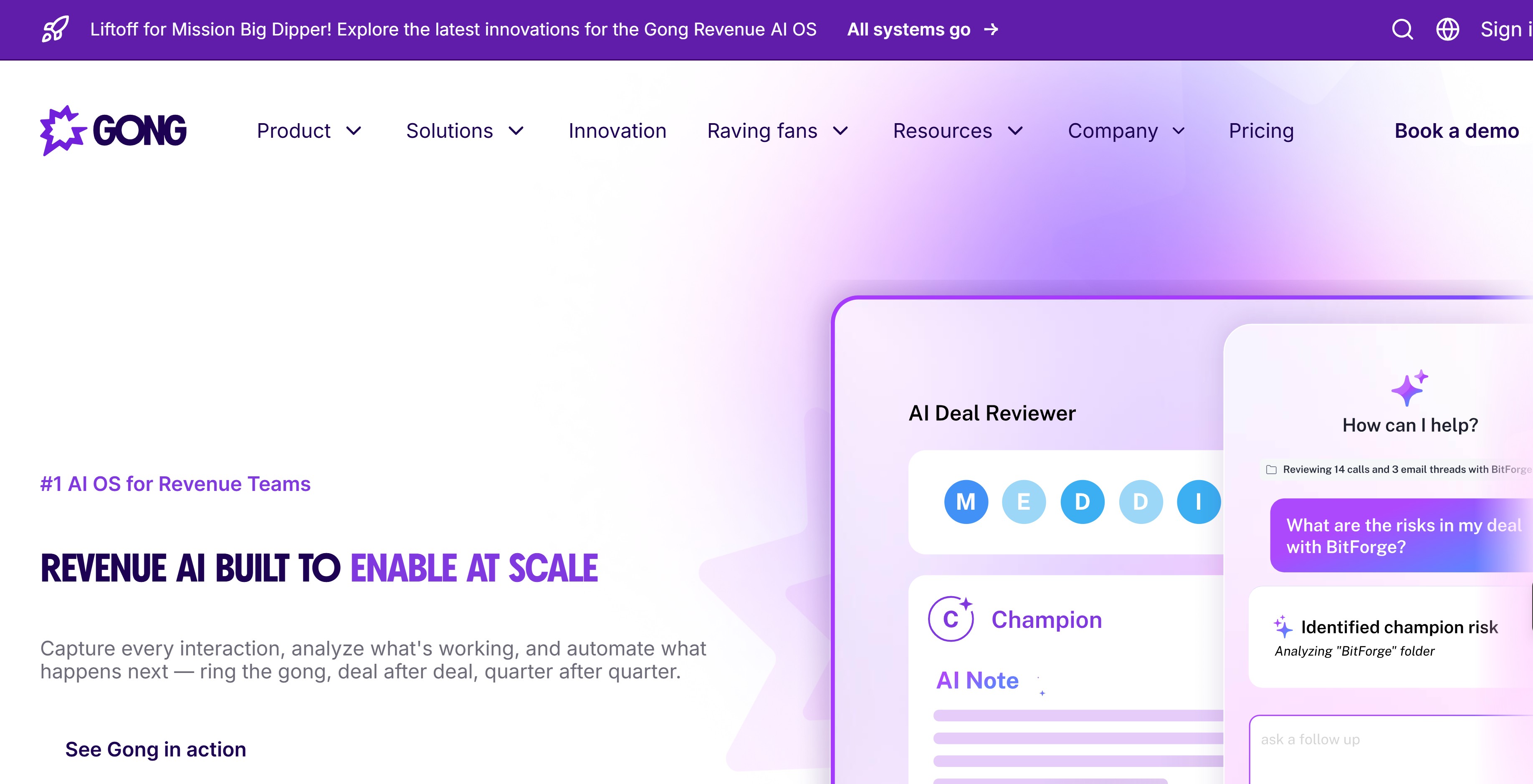
For sales managers, incomplete CRM data has always been frustrating, aside from subpar features that an ordinary sales rep software would come with.
Gong solves those problems by capturing nearly every customer interaction automatically, organizing stuff where it’s easily retrievable by sales reps, helping with cold calls and improve the sales pipeline health.
On top of that we’ve got managers who can quickly identify stalled deals, understand why opportunities are slowing down, uncover coaching opportunities across the team, and produce more accurate revenue forecasts.
One of Gong's biggest strengths is its Revenue Graph.
Rather than displaying disconnected customer activities, it creates a living relationship map between accounts, conversations, stakeholders, emails, meetings, and opportunities. This helps revenue leaders understand which deals continue building momentum and which ones are quietly fading away long before quarterly forecasts become a problem.
Another impressive capability comes from Gong AI Agents.
These intelligent assistants reduce administrative work throughout the sales cycle.
After a customer conversation, the platform can generate follow up emails, summarize meetings, recommend next actions, update CRM records automatically, identify missing stakeholders, and even highlight opportunities where forecast confidence no longer matches actual buyer behavior.
For enterprise organizations managing hundreds of representatives, Gong remains one of the strongest revenue intelligence platforms available.
Pros
Before looking at the highlights, it's worth understanding that Gong focuses heavily on visibility and coaching rather than simple call recording. Every feature contributes toward helping leadership understand pipeline quality while helping representatives improve performance.
- Revenue Graph connects every customer interaction into one complete opportunity timeline.
- AI Agents automate meeting summaries, CRM updates, follow up recommendations, and opportunity monitoring.
- More than 300 integrations connect Gong with leading CRM, communication, and productivity platforms.
- Outstanding conversation intelligence for coaching, forecasting, and deal inspection.
Cons
Large organizations receive tremendous value from Gong, although smaller companies should evaluate pricing carefully before committing.
- Pricing requires speaking with the sales team.
- Annual contracts provide limited flexibility.
- Forecasting and engagement modules increase overall subscription costs.
Pricing: Contact Gong for custom enterprise pricing.
2. Trellus: AIO Solution For Multi-sized Sales First Businesses
Most sales reps don't struggle because they aren't working hard enough.
They struggle because their day is full of tiny interruptions that slowly eat away at selling time.
One minute they're researching a prospect on LinkedIn. The next they're copying notes into the CRM. Then they're checking if an email was opened, listening to a previous call, leaving a voicemail, updating a task, switching tabs, looking for company information, and repeating the whole process fifty more times before lunch.
At the end of the day, they may have spent eight hours "working" but only a fraction of that time was spent talking to potential customers.
That's exactly the problem Trellus was built to solve… and more!
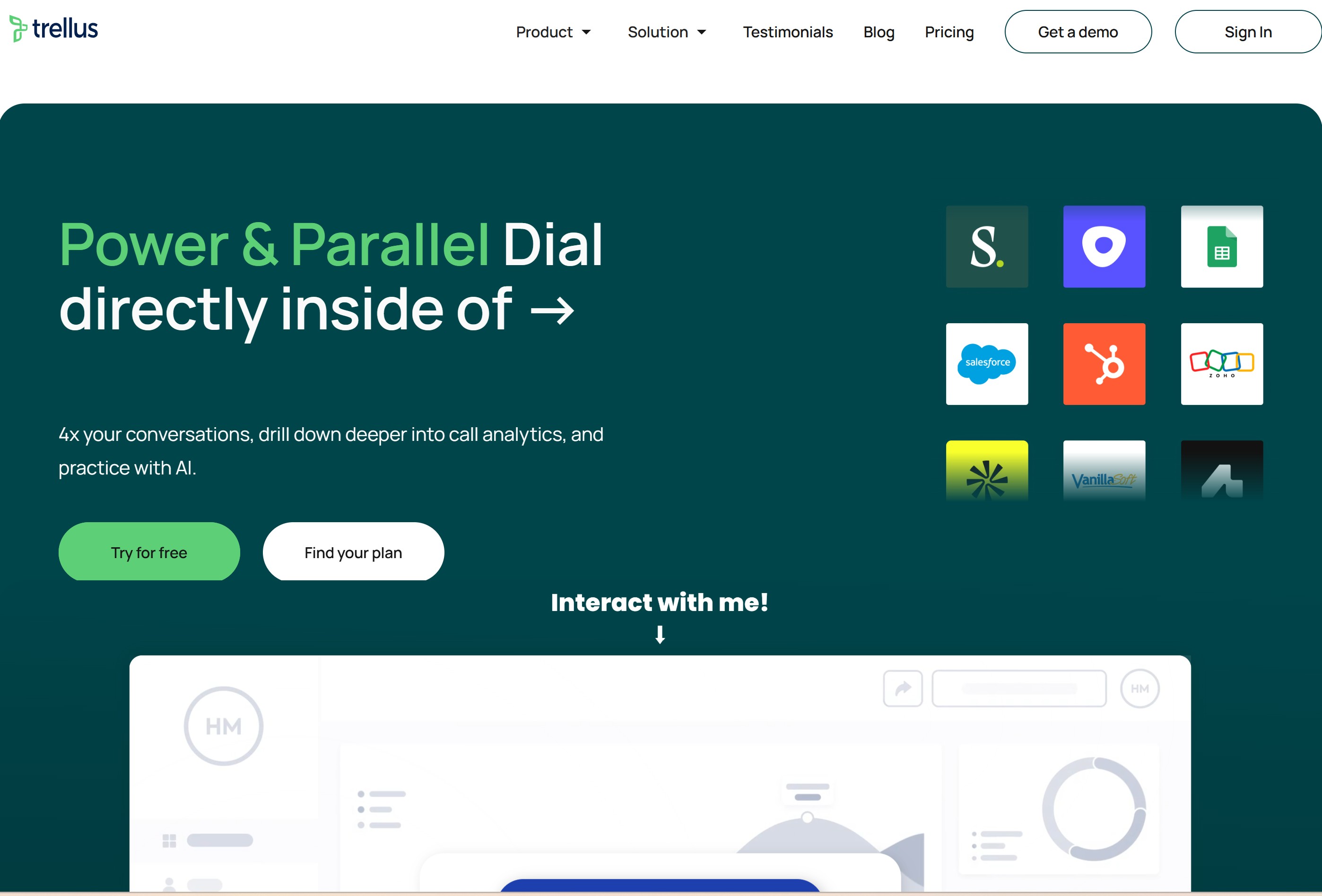
Unlike traditional sales rep software, which often revolves around record keeping, this platform was designed around one objective: helping sales teams book more meetings while reducing the busywork that slows everyone down.
For outbound teams running hundreds of calls every day, that difference becomes obvious almost immediately.
Why Sales Teams Like Working Inside Trellus
A typical outbound workflow involves bouncing between LinkedIn, Salesforce, HubSpot, email, dialers, calendars, note taking apps, call recording software, coaching tools, and spreadsheets.
After a while, it feels like you're managing software rather than building pipeline.
This platform brings those activities together into a single outbound workspace.
Representatives can research prospects, place calls, receive live coaching, leave voicemail drops, review conversations, and analyze performance without constantly jumping between browser tabs.
That smoother workflow doesn't simply save time; it helps sales reps stay mentally focused on conversations, which often translates into more meetings booked throughout the week.
AI Parallel Dialer That Maximizes Selling Time
One feature that immediately stands out is the AI Parallel Dialer.
Traditional power dialers call one number at a time.
Representatives spend a surprising amount of their day listening to ringing phones, busy signals, disconnected numbers, and voicemail greetings.
Those small delays add up quickly.
The AI Parallel Dialer approaches outbound prospecting differently.
It intelligently places multiple calls while ensuring representatives only connect when a live person answers. For teams measured on conversations booked rather than dials completed, this can make a substantial difference in daily productivity.
It also gives managers greater confidence that representatives are spending their time speaking with prospects instead of waiting for unanswered calls.
If your organization evaluates different sales productivity tools, this capability alone deserves serious attention.
Real Time AI Sales Coaching
Every sales manager wants coaching to be on spot!
But the reality is that very few managers have enough hours available to coach every representative after every conversation. That leaves many SDRs repeating the same mistakes for weeks before someone notices.
The AI coaching engine works alongside representatives while calls are happening.
During live conversations, it can surface relevant talking points, objection handling suggestions, competitive information, qualification reminders, and helpful prompts based on the discussion. New representatives benefit because they gain confidence during difficult conversations.
Experienced sellers benefit because they stay focused without worrying about remembering every playbook or product detail.
Managers also gain a valuable coaching resource.
After calls finish, conversations are analyzed automatically, making it much easier to identify trends across the team and provide targeted coaching where it creates the biggest impact.
AI Practice Calls Before Talking To Real Prospects
Ramp time has always been one of the biggest expenses inside sales organizations.
New hires often spend weeks reading documentation before making meaningful contributions. Role playing helps, although scheduling managers for repeated practice sessions becomes difficult as teams grow.
The AI Practice Calls feature offers a practical solution.
Representatives can rehearse conversations against realistic AI buyers that simulate common objections, pricing discussions, competitor comparisons, gatekeepers, and discovery conversations.
Each practice session generates feedback on areas that need improvement.
LinkedIn Superhuman
Prospecting rarely begins with a phone call anymore.
LinkedIn has become one of the most valuable research environments available to outbound teams.
The platform's LinkedIn Superhuman capability enhances that experience considerably.
While viewing prospects, representatives gain quick access to relevant information that supports better conversations without opening multiple research tools.
Important account information becomes easier to surface, allowing SDRs to personalize outreach with far less manual effort.
For account based selling, that context often becomes the difference between sounding like another cold caller and sounding like someone who genuinely understands the prospect's business.
Voicemail Drop (*VM Drops)
Leaving the same voicemail hundreds of times becomes exhausting remarkably quickly.
The voicemail drop feature removes that repetitive task.
Representatives can record professional voicemail messages once and deliver them automatically whenever a call reaches voicemail.
That keeps messaging consistent while saving valuable minutes throughout the day.
Across hundreds of calls every week, those saved minutes become meaningful selling time.
Call Analytics That Managers Can Use
Data only matters when it leads to better decisions.
The analytics dashboard tracks far more than simple activity metrics.
Managers can evaluate conversation quality, meeting conversion rates, objection frequency, coaching trends, representative performance, talk ratios, dialing efficiency, and pipeline generation across the team.
Rather than relying solely on call volume, leadership gains a clearer understanding of what top performers consistently do differently.
That knowledge becomes invaluable for coaching the rest of the organization.
CRM Integrations That Keep Everything Synced
No modern CRM for sales representatives should exist in isolation.
The platform integrates smoothly with leading CRM systems, allowing conversations, activities, notes, and customer interactions to synchronize automatically.
Representatives spend less time updating records manually while managers maintain accurate reporting across the organization.
That seamless connection keeps the CRM current without forcing salespeople to perform repetitive administrative work after every call. For organizations comparing sales rep software vs CRM: what's the difference?, this is a useful example.
A CRM primarily stores customer records and opportunity information.
This platform focuses on helping representatives generate those opportunities more efficiently through smarter prospecting, AI coaching, faster dialing, and workflow optimization. The two systems complement one another rather than competing.
It's also an excellent answer for teams asking How does sales rep software improve team performance?
When representatives spend less time researching, dialing manually, updating records, and writing notes, they naturally spend more time speaking with qualified prospects. Managers receive stronger visibility, coaching becomes data driven, onboarding accelerates, and pipeline creation becomes much more predictable.
Pros
This platform stands out because every capability revolves around improving outbound execution rather than adding unnecessary complexity. Representatives become productive quickly while managers gain meaningful visibility into performance.
- AI Parallel Dialer dramatically increases live conversations.
- Real time AI coaching helps representatives handle objections more confidently.
- AI Practice Calls accelerate onboarding and continuous skill development.
- LinkedIn Superhuman keeps prospect research inside the outbound workflow.
- AI Research Agent prepares representatives with meaningful account intelligence.
- Voicemail drop saves time across high volume outbound campaigns.
- Powerful analytics uncover coaching opportunities and performance trends.
- Number Health helps maintain stronger outbound connection rates.
- Excellent CRM integrations reduce administrative work.
Cons
Like many specialized outbound platforms, the strongest value comes from organizations that rely heavily on prospecting and phone based outreach.
- Organizations focused almost entirely on inbound sales may not use every feature.
- Teams unfamiliar with AI assisted selling may need a short adjustment period.
- Pricing requires contacting the sales team.
3. Pipedrive
If you've ever opened a CRM and immediately felt overwhelmed by dozens of menus, reports, dashboards, and settings you'll probably never touch, you're not alone.
Many CRM platforms try to become the center of your entire business. Before long, they're handling marketing, customer support, accounting, inventory, forecasting, project management, and just about everything except making your morning coffee.
That works for some organizations.
For many sales teams, though, it's unnecessary. Pipedrive takes a much simpler approach.
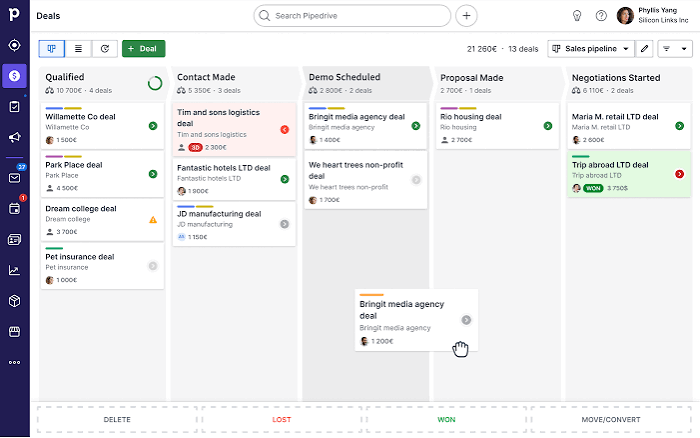
Its primary purpose is helping salespeople move deals from one stage to the next with as little friction as possible. Rather than burying opportunities inside complicated reports, everything revolves around a highly visual pipeline that lets representatives and managers understand deal health within seconds.
If your sales organization values simplicity over endless customization, Pipedrive remains one of the strongest choices available.
It is particularly appealing for startups, growing businesses, and smaller sales teams looking for dependable sales rep software without committing months to implementation and employee training.
A Pipeline That Makes Sense At First Glance
One of the reasons sales teams enjoy working inside Pipedrive is that it doesn't hide your opportunities behind multiple screens.
The pipeline uses a Kanban style layout where every deal appears as a movable card.
Each stage represents part of your sales process, making it incredibly easy to see where opportunities are progressing and where they have stalled.
Managers can identify bottlenecks almost immediately.
If several deals have remained in the proposal stage for weeks, it becomes obvious something needs attention.
If discovery calls are converting well but demos are falling apart, those trends become visible without digging through complicated reports.
Representatives appreciate this layout because updating deals feels effortless.
Dragging an opportunity into the next stage often triggers automated actions, keeping everyone aligned without adding extra administrative work.
Automation That Removes Repetitive Work
Sales representatives rarely enjoy updating software.
Their priority is talking to customers.
Pipedrive includes workflow automation tools that quietly handle many repetitive tasks happening behind the scenes.
For example, moving a deal into a new stage can automatically schedule a follow up activity, notify another team member, assign a task, update customer records, or send an internal notification.
These automations reduce the number of small tasks that usually pile up throughout the day.
Over weeks and months, those saved minutes create more opportunities for meaningful customer conversations.
For businesses searching for dependable sales automation software, Pipedrive offers an excellent balance between simplicity and functionality.
Built For Growing Businesses
One area where Pipedrive consistently performs well is scalability.
A small business can begin with a simple pipeline containing only a handful of stages.
As the organization grows, additional pipelines, automation rules, reporting dashboards, custom fields, permissions, and integrations can be added without rebuilding the entire system.
That flexibility allows companies to grow naturally without feeling forced into enterprise level complexity from day one. For startups hiring their first SDRs or account executives, this makes onboarding considerably easier.
Representatives spend their time learning the sales process rather than learning software.
Mobile Access Keeps Reps Productive
Not every salesperson works behind a desk.
Many account executives spend their day traveling between customer meetings.
Outside sales representatives often update opportunities from parking lots, airports, or coffee shops.
Pipedrive's mobile sales app makes those updates straightforward.
Representatives can review pipelines, log activities, add meeting notes, update opportunities, schedule appointments, and contact prospects directly from their phones.
For organizations searching for field sales management software, Pipedrive covers many everyday requirements without overwhelming users with unnecessary complexity.
Although businesses requiring advanced route optimization may need dedicated territory management software, mobile accessibility remains one of Pipedrive's strongest qualities.
Integrations That Fit Into Existing Workflows
Replacing an entire technology stack rarely makes financial sense.
Pipedrive understands that.
The platform connects with more than 500 applications covering email, calendars, accounting, communication, document management, marketing automation, lead generation, video conferencing, and reporting.
These integrations allow organizations to keep existing workflows while adding a capable CRM that brings customer information together.
Representatives spend less time copying information between systems and more time nurturing opportunities.
Is Pipedrive The Best Sales Rep Software For Small Businesses?
This question appears frequently, and for good reason.
What is the best sales rep software for small businesses?
There isn't one universal answer because every company sells differently.
That said, Pipedrive consistently ranks near the top for growing businesses because it balances affordability, ease of use, and practical functionality.
Smaller organizations rarely have dedicated CRM administrators. They need software that representatives can begin using quickly without extensive technical support.
Pipedrive delivers that experience remarkably well.
It provides enough automation to increase productivity while remaining approachable for teams transitioning away from spreadsheets or entry level CRM platforms.
Pros
Pipedrive succeeds because it stays focused on helping salespeople manage opportunities efficiently. Every feature supports pipeline visibility, daily productivity, and smoother sales execution.
- Visual Kanban pipeline makes opportunity management extremely intuitive.
- AI assistant highlights stalled deals and recommends practical next steps.
- Workflow automation reduces repetitive administrative work.
- Excellent mobile sales app for representatives working remotely or traveling.
- More than 500 integrations support modern sales workflows.
- Easy to learn for growing sales organizations.
Cons
Pipedrive offers impressive functionality, although larger enterprise organizations with highly customized workflows may eventually require broader platform capabilities.
- Advanced workflow automation begins with higher pricing tiers.
- Marketing features remain relatively lightweight compared to dedicated marketing platforms.
- Enterprise level customization is more limited than larger CRM ecosystems.
Pricing: Plans begin at $14 per user per month.
4. Clay
Ask almost any SDR what part of outbound sales they enjoy the least, and you'll probably hear the same answer.
Prospecting.
Not because finding new opportunities isn't important. It absolutely is.
The frustrating part is everything that happens before the first email or phone call.
- Finding the right company.
- Identifying the right decision maker.
- Verifying an email address.
- Looking for a direct phone number.
- Checking LinkedIn.
- Reading recent company news.
- Searching for funding announcements.
- Looking at hiring trends.
- Trying to figure out if the company even fits your ideal customer profile.
Repeat that process a few hundred times every month and it becomes clear why so many sales teams struggle to maintain consistent pipeline generation.
Clay was built to eliminate much of that manual research.
Rather than serving as another traditional CRM for sales representatives, it focuses on helping outbound teams build richer prospect lists, uncover buying signals, personalize outreach, and prepare representatives before they ever reach out to a prospect.
For SDR teams that live and breathe outbound prospecting, it's one of the most powerful research platforms available today.
Waterfall Enrichment Solves a Common Prospecting Problem
Most data providers have one obvious weakness. No matter how large their database claims to be, gaps always exist.
One platform may have excellent email coverage but weak direct phone numbers.
Another might excel at company data but struggle with international contacts.
Many sales teams subscribe to multiple databases simply because no single provider consistently delivers complete information.
Clay approaches this problem in a much smarter way.
Rather than forcing users to search one provider at a time, it automatically checks multiple databases in sequence.
If the first provider cannot locate verified contact information, the system immediately moves to the next one.
Then the next.
And then another if necessary.
Claygent AI Works Like a Digital Research Assistant
Research has traditionally been one of the biggest time investments for outbound teams.
Claygent changes that dynamic considerably.
- Need to know if a company recently raised funding?
- Looking for executive leadership changes?
- Trying to identify expansion into new markets?
- Interested in recent hiring patterns that signal growth?
Claygent can gather that information automatically and organize it into structured fields that representatives can immediately use during outreach.
This saves an incredible amount of preparation time while producing richer prospect profiles.
Sales representatives no longer need to piece together information from dozens of unrelated sources before making a call.
Personalization That Goes Beyond First Name Tokens
Most buyers have become immune to fake personalization. Adding someone's first name to an email no longer feels personal.
Mentioning a company's industry rarely grabs attention either. Clay helps outbound teams build outreach around meaningful business context.
Representatives can reference recent product launches, executive appointments, hiring trends, technology adoption, funding announcements, expansion into new markets, or other relevant company developments.
Those details create emails that feel researched rather than mass produced.
For organizations running account based sales strategies, this level of personalization often improves reply rates considerably.
Spreadsheet Simplicity With Powerful Automation
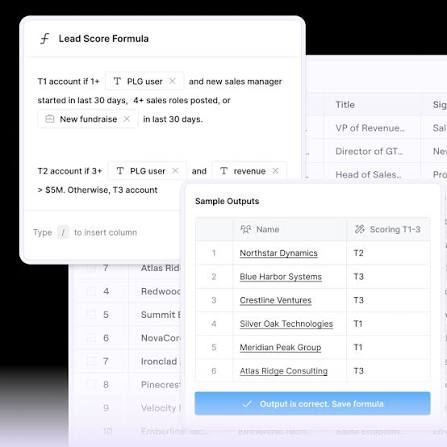
While the layout feels familiar to anyone comfortable with spreadsheets, it becomes surprisingly powerful once automation enters the picture.
Entire prospect lists can be enriched, scored, categorized, and prepared for outreach with very little manual effort.
Sales operations teams particularly appreciate this flexibility because they can build highly customized prospecting workflows without requiring engineering support.
Native Sequencing Adds More Flexibility
Clay recently expanded its capabilities by including native outbound sequencing.
Representatives can now launch email campaigns directly inside the platform without depending entirely on separate outreach software.
That creates a smoother workflow for smaller teams looking to consolidate parts of their outbound process.
Larger organizations may still prefer dedicated sales engagement platforms, but having sequencing available within the same environment offers welcome flexibility.
Is Clay Suitable for Every Sales Team?
Not necessarily.
This is important to understand before making a purchasing decision. Clay excels at prospect research, enrichment, and outbound preparation.
It is not a complete sales rep software platform handling forecasting, opportunity management, coaching, and pipeline reporting. Think of it as an intelligence layer that strengthens everything happening before first contact.
Companies running high volume outbound prospecting will gain enormous value.
Organizations generating most of their business through referrals or inbound marketing may not see the same return.
Pros
Clay stands apart because it transforms prospect research from a manual process into an automated workflow. Teams gain richer data, stronger personalization, and better preparation before every conversation.
- Waterfall enrichment dramatically improves contact coverage across multiple providers.
- Claygent AI performs detailed prospect research automatically.
- Excellent personalization capabilities for outbound campaigns.
- Flexible spreadsheet interface supports highly customized workflows.
- Native sequencing simplifies email outreach.
- Usage based pricing works well for organizations with changing team sizes.
Cons
Although incredibly powerful, Clay comes with a learning curve that may feel intimidating for representatives expecting a traditional CRM interface.
- Spreadsheet style workflows require some initial learning.
- Credit based pricing makes monthly costs less predictable.
- Many advanced integrations are reserved for higher plans.
- Better suited for outbound prospecting than complete sales management.
Pricing: Free plan available. Paid plans begin at $167 per month with annual billing and include 30,000 data credits.
5. Manychat
Not every sale begins with a cold call anymore.
In fact, for many businesses, the very first conversation happens inside Instagram, Facebook Messenger, WhatsApp, or TikTok.
- Someone comments on a product video.
- A potential customer replies to an Instagram Story.
- Another person sends a direct message asking about pricing.
Hundreds of these conversations happen every day, and most businesses simply don't have enough people to answer every message quickly.
That's where Manychat shines.
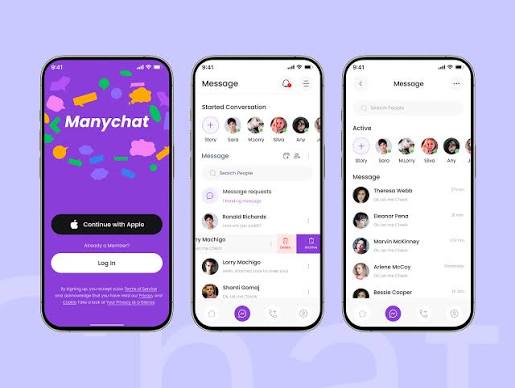
Unlike traditional sales rep software, which revolves around pipelines and opportunity management, Manychat focuses on starting conversations where customers are already spending their time.
For ecommerce brands, creators, coaches, local businesses, and companies generating leads through social media, it can become one of the most valuable sales productivity tools in the entire technology stack.
It helps businesses capture interest immediately, answer common questions automatically, qualify leads, and guide prospects toward the next step without requiring a sales representative to reply to every message manually.
Turn Social Media Conversations Into Qualified Leads
Social media has changed the buying journey.
People rarely visit a website first anymore.
More often than not, they discover a business through short form videos, reels, influencer content, or community posts. When curiosity strikes, they usually send a quick message. If nobody responds, the opportunity often disappears.
Manychat keeps those conversations alive.
For example, imagine someone comments "Price?" underneath your latest Instagram Reel.
Within seconds, Manychat can automatically send a personalized direct message containing product details, answers to common questions, a discount code, or a booking link.
That immediate response keeps potential buyers engaged while reducing the workload for your sales team.
Multiply that process across hundreds or even thousands of conversations every month, and the impact becomes significant.
AI Powered Conversations That Feel Natural
Automation has earned a mixed reputation over the years.
Many early chatbots felt robotic.
They answered simple questions well enough but completely fell apart once customers asked something unexpected.
Modern AI has improved that experience dramatically.
Manychat allows businesses to train conversations around their products, services, pricing, FAQs, and brand voice.
As customers ask questions, the AI responds with relevant information while keeping the conversation moving naturally.
If someone asks about product availability, shipping times, return policies, booking appointments, or pricing packages, the system can respond immediately.
When conversations become more complex, qualified leads can be transferred to a human representative without losing context.
Flexible Pricing That Grows With Your Business
One area where Manychat stands apart is its pricing model.
Many software platforms charge based on total contacts stored inside the system.
Manychat charges according to active contacts.
That may sound like a small detail, but it can create meaningful savings.
Businesses with large social audiences often have thousands of inactive followers who never start conversations.
Paying only for active users keeps subscription costs far more predictable.
As engagement grows, the platform scales naturally alongside your business.
Pros
Manychat performs exceptionally well when businesses rely on social media conversations as their primary source of leads. It automates repetitive messaging while creating a faster customer experience.
- Supports Instagram, Facebook Messenger, WhatsApp, SMS, and email.
- AI powered conversations answer customer questions around the clock.
- Excellent automation for ecommerce and creator businesses.
- Active contact pricing helps control subscription costs.
- Booking links, product recommendations, and promotional campaigns fit naturally into automated conversations.
Cons
Businesses requiring advanced pipeline management will still need dedicated sales rep software alongside Manychat.
- Limited CRM functionality.
- Sales reporting remains fairly lightweight.
- Advanced API capabilities require higher subscription plans.
Pricing: Free plan available. Paid plans begin at $14 per month for 250 active contacts.
6. Salesforce Sales Cloud
Few names carry as much weight in the CRM world as Salesforce.
Mention customer relationship management in almost any boardroom, and Salesforce usually enters the conversation within minutes.
There's a good reason for that.
Over the years, the platform has grown from a traditional CRM into one of the largest business ecosystems available today.
- Sales.
- Marketing.
- Customer service.
- Commerce.
- Analytics.
- Artificial intelligence.
- Industry specific solutions.
Almost every business function can be managed somewhere inside the Salesforce ecosystem.
For large organizations handling thousands of customers across multiple departments, that breadth is incredibly valuable.
For smaller businesses, though, the platform can sometimes feel like driving a Formula One car to the grocery store.
Built for Complex Sales Organizations
Salesforce shines when companies require complete control over their sales process.
Almost every field, workflow, report, permission, object, automation, and dashboard can be customized.
In other words, this sense of overwhelming flexibility allows businesses to build workflows matching their exact sales methodology rather than forcing their teams into predefined templates.
Enterprise organizations often have unique approval processes, territory structures, commission models, forecasting requirements, and reporting standards.
Salesforce handles those scenarios remarkably well.
AI Continues Expanding Across The Platform
Artificial intelligence has become a major investment area for Salesforce.
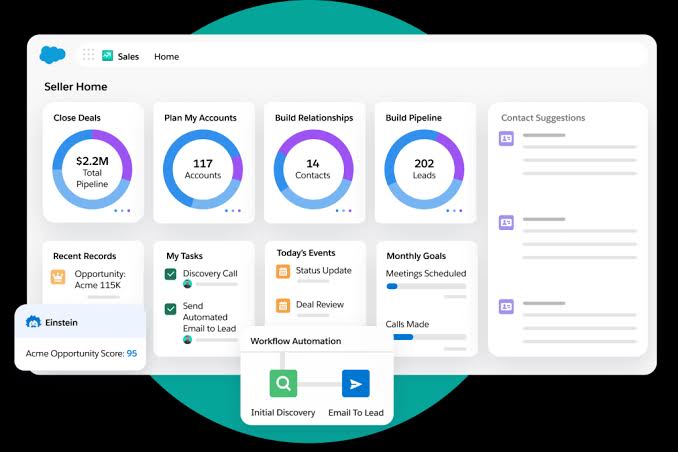
Sales representatives receive recommendations for next actions, opportunity scoring, conversation summaries, forecasting insights, and automated administrative support. Managers benefit from predictive reporting that highlights pipeline risks before quarterly reviews arrive.
For organizations managing large revenue teams, these capabilities become increasingly valuable as pipeline complexity grows.
A Boatload of Integrations…
Modern businesses rarely depend on one software platform.
Salesforce connects with thousands of third party applications covering communication, marketing, finance, customer support, document management, analytics, and productivity. These integrations help organizations create connected workflows across nearly every department.
That ecosystem remains one of Salesforce's biggest competitive strengths.
Pros
Salesforce remains one of the most complete CRM platforms available for businesses requiring enterprise grade customization and reporting.
- Extremely customizable CRM.
- Excellent forecasting and reporting.
- Powerful AI capabilities.
- Thousands of third party integrations.
- Scales comfortably across global sales organizations.
Cons
Its flexibility comes with increased complexity and implementation effort.
- Steeper learning curve.
- Customization often requires specialist knowledge.
- Costs rise as additional products and users are added.
Pricing: Plans begin at $25 per user per month.
7. Zendesk Sell
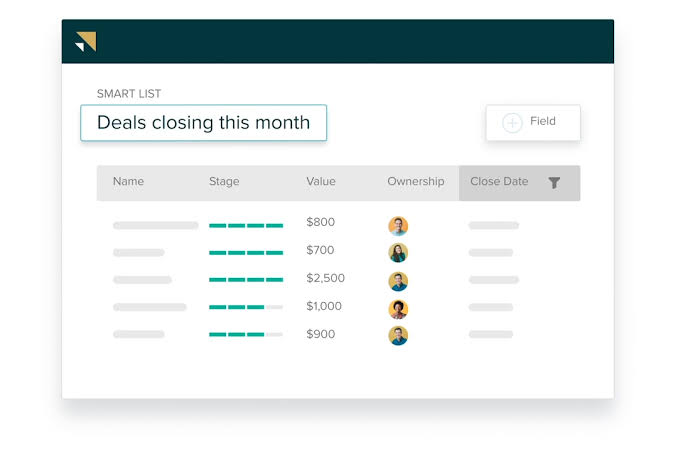
Not every business needs a CRM packed with hundreds of customization options.
Sometimes, all a sales team wants is a platform that's easy to learn, keeps customer information organized, and helps representatives stay on top of follow ups without creating extra work.
That's exactly where Zendesk Sell performs well.
Originally built with smaller and growing businesses in mind, Zendesk Sell offers a clean interface, sensible automation, and enough reporting to help managers understand what's happening across the pipeline without overwhelming the people who use it every day.
If your organization already uses Zendesk for customer support, bringing sales into the same ecosystem feels like a natural progression. Customer conversations remain connected, sales and support teams work from the same customer history, and handoffs become much smoother.
For companies searching for practical sales rep software that doesn't require weeks of onboarding, Zendesk Sell deserves a close look.
A CRM That Sales Reps Will Use
One of the biggest complaints about enterprise CRM platforms is that sales representatives spend too much time feeding the system.
Zendesk Sell takes a different approach.
The interface feels straightforward from the moment you log in.
Contacts, deals, activities, emails, and tasks are easy to locate without digging through endless menus. When entering notes or scheduling follow ups takes only a few clicks, adoption naturally improves across the team.
Managers benefit from cleaner data, while representatives spend more time selling.
Automation Removes Repetitive Tasks
Like many modern sales automation software platforms, Zendesk Sell reduces much of the administrative work that slows sales teams down.
Leads can be assigned automatically.
Tasks can be created when opportunities reach specific stages.
Follow up reminders appear without managers manually assigning them.
Customer records update as activities happen.
None of these automations feel flashy.
They're simply practical improvements that help sales representatives stay organized during busy weeks.
Mobile Access for Sales Teams on the Move
Not every representative spends the day sitting behind a desk.
Many account executives travel between customer meetings, trade shows, networking events, and client offices.
Zendesk Sell includes a capable mobile sales app that allows representatives to manage contacts, update opportunities, schedule follow ups, log meeting notes, and communicate with prospects from virtually anywhere.
For organizations with field representatives, this flexibility helps keep customer records current throughout the day.
Although businesses requiring advanced field sales management software with territory optimization and route planning may eventually require more specialized platforms, Zendesk Sell provides everything many mobile sales teams need for everyday relationship management.
Pros
Zendesk Sell offers an excellent balance between usability and functionality. It gives sales teams the tools they need without introducing unnecessary complexity.
- Clean, intuitive interface that's easy to learn.
- Strong communication tracking across multiple channels.
- Practical workflow automation.
- Useful reporting dashboards for managers.
- Reliable mobile sales app for remote representatives.
- Excellent fit for businesses already using Zendesk products.
Cons
Organizations with highly customized enterprise sales processes may eventually outgrow some of the platform's capabilities.
- Advanced forecasting is less comprehensive than larger enterprise CRMs.
- AI capabilities continue expanding but remain lighter than some competitors.
- Complex enterprise workflow customization is more limited.
Pricing: Plans begin at $19 per user per month.
8. HubSpot Sales Hub
Ask ten sales representatives which CRM they started with, and there's a good chance several will mention HubSpot.
The platform has earned a reputation for being approachable, easy to implement, and surprisingly capable without overwhelming new users.
What began primarily as a marketing platform has evolved into a complete revenue ecosystem supporting sales, marketing, customer service, operations, and content management.
For many growing businesses, it serves as the first serious CRM for sales representatives after graduating from spreadsheets.
Easy to Learn, Easy to Adopt
One of HubSpot's greatest strengths is usability.
Representatives can begin tracking contacts, managing deals, scheduling meetings, sending emails, and logging activities almost immediately.
Managers appreciate this because onboarding takes considerably less time than many enterprise CRM platforms.
The interface remains clean and organized while still offering enough customization for growing teams.
Sales Workspace That Keeps Reps Organized
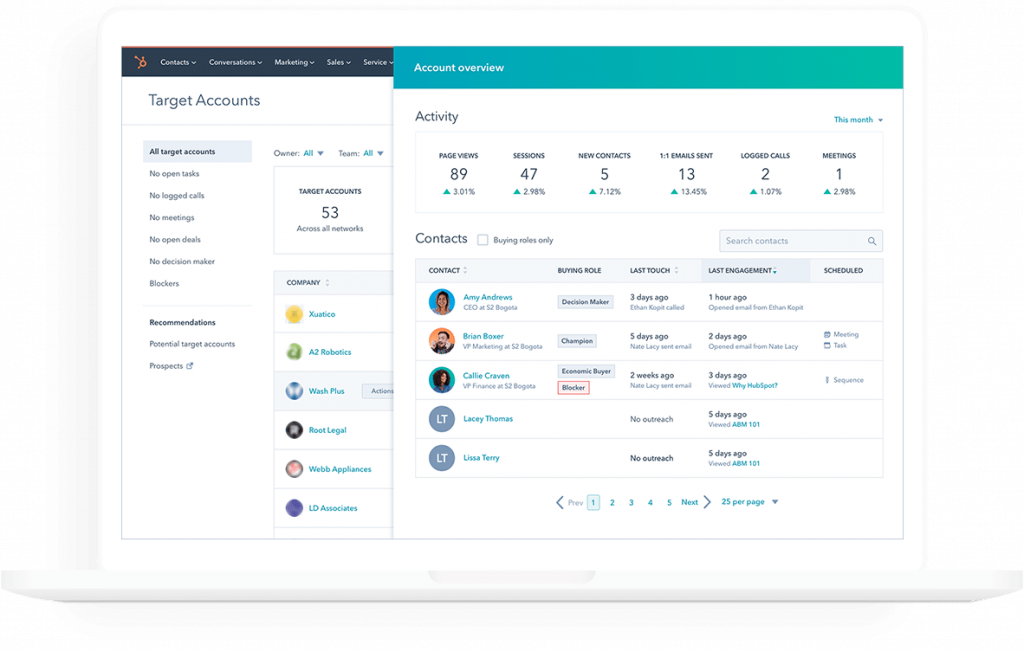
HubSpot centralizes customer information into a single workspace.
Representatives can review previous emails, meeting history, website activity, documents viewed, tasks, notes, and deal progression from one screen.
Having this context available before every conversation helps salespeople prepare more effectively.
It also reduces the awkward moments where customers have to repeat information they've already shared with someone else.
Automation That Grows Alongside Your Business
HubSpot includes automation features that expand as organizations grow.
- Lead assignment.
- Task creation.
- Email sequences.
- Meeting scheduling.
- Internal notifications.
- Pipeline updates.
All of these processes can be automated, allowing representatives to focus on relationship building rather than administrative work.
For businesses investing in sales productivity tools, HubSpot provides an excellent foundation.
Pros
HubSpot remains one of the easiest CRM platforms for growing businesses to adopt.
- Excellent user experience.
- Strong free plan.
- Sales, marketing, and customer service work together seamlessly.
- Useful automation features.
- Growing collection of AI powered productivity tools.
Cons
As businesses expand, subscription costs can increase noticeably when additional hubs and advanced features are required.
- Advanced reporting requires higher tier plans.
- Larger teams may eventually need deeper customization.
- Premium features become expensive as organizations grow.
Pricing: Free CRM available. Paid Sales Hub plans begin around $20 per user per month, depending on plan and billing cycle.
9. Freshsales
Freshsales often flies under the radar, which is surprising considering how much functionality it offers for growing sales organizations.
Built as part of the Freshworks ecosystem, the platform combines CRM capabilities, communication tools, AI assistance, automation, and customer management into one relatively affordable package.
For businesses looking for modern sales rep software without enterprise level pricing, Freshsales presents an attractive option.
AI Helps Prioritize Selling
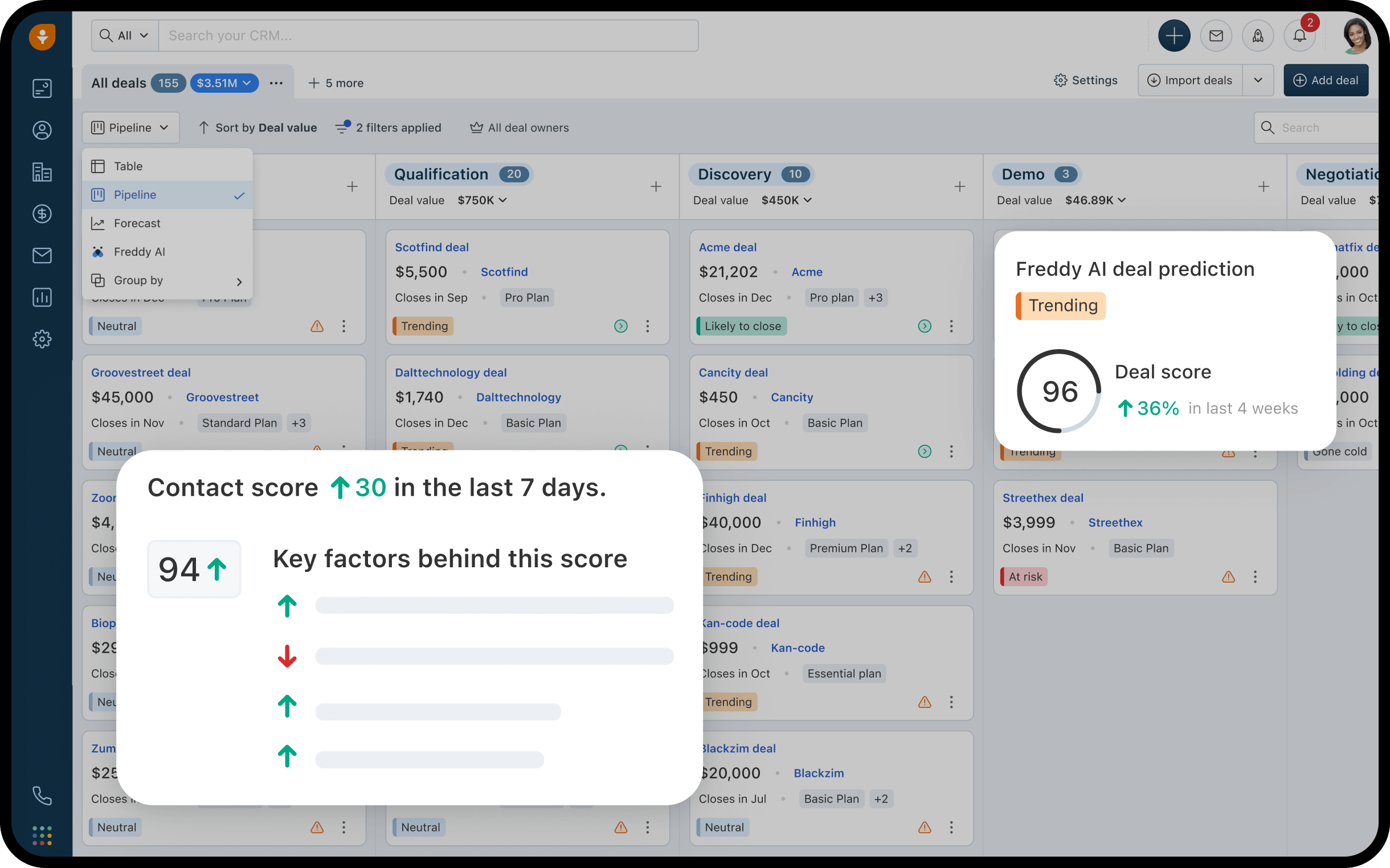
Freshsales includes Freddy AI, which assists representatives throughout the sales cycle.
It can score leads, recommend next actions, summarize customer interactions, and identify deals requiring immediate attention.
These insights help representatives prioritize their workload without manually reviewing every opportunity.
Managers also receive stronger visibility into pipeline health and team performance.
Communication Lives Inside The CRM
Phone calls, emails, chat conversations, and customer activities remain connected inside one timeline.
Representatives no longer need to search multiple applications before contacting a customer.
Everything appears together, making conversations more informed and reducing time spent preparing for meetings.
Suitable for Field Sales Teams
Businesses searching for field sales management software often need strong mobile capabilities.
Freshsales includes an excellent mobile sales app that allows representatives to update opportunities, access customer information, schedule appointments, capture meeting notes, and communicate with prospects while traveling.
For companies evaluating sales rep software with route planning and GPS tracking, Freshsales covers many mobile CRM requirements, though organizations needing highly advanced territory optimization or complex route planning may still benefit from dedicated field sales platforms.
Pros
Freshsales offers an impressive combination of CRM functionality, AI, automation, and affordability.
- Strong AI assistant.
- Excellent mobile sales app.
- Built in communication tools.
- Practical automation features.
- Competitive pricing for growing businesses.
Cons
Businesses requiring extensive third party marketplace integrations may find fewer options compared to Salesforce or HubSpot.
- Smaller integration marketplace.
- Advanced customization remains more limited than enterprise CRMs.
- Reporting can become restrictive on lower plans.
Pricing: Free plan available. Paid plans begin at approximately $11 per user per month.
How We Selected These Sales Rep Software Solutions
Selecting the right sales rep software is a bigger decision than most people expect.
Once your sales team builds its daily workflow around a platform, switching later can be expensive. Data has to be migrated, integrations need rebuilding, sales reps require retraining, and productivity usually takes a temporary hit while everyone adjusts.
That's why this list wasn't built around vendor marketing pages or feature checklists alone.
The experts at Trellus.ai looked at how these platforms perform in real sales environments and evaluated the capabilities that have the biggest impact on everyday selling.
Here's the evaluation process that was set in place and eventually followed accordingly…
Ease of Adoption
The best software in the world has very little value if your sales team refuses to use it.
Sales representatives already juggle prospecting, meetings, follow ups, demos, proposals, and customer conversations throughout the day.
Nobody wants software that requires twenty clicks to update one opportunity.
I prioritized platforms that feel intuitive from the beginning.
The strongest products allow representatives to become productive within days rather than weeks while giving managers the visibility they need without creating unnecessary administrative work.
Workflow Automation
- Administrative work quietly steals selling time.
- Creating follow up reminders.
- Updating CRM records.
- Assigning leads.
- Moving deals through pipeline stages.
- Logging customer interactions.
These activities are important, although they shouldn't consume hours every week.
Every platform included here offers meaningful automation that removes repetitive work from the sales process.
The stronger the automation capabilities, the more time representatives can devote to customer conversations.
Artificial Intelligence That Supports Revenue
AI has become impossible to ignore.
The products on this list provide practical AI features such as conversation coaching, lead scoring, pipeline analysis, prospect research, opportunity prioritization, forecasting, meeting summaries, email assistance, and workflow recommendations.
Those capabilities save time while helping sales teams make better decisions throughout the sales cycle.
CRM and Integration Capabilities
Sales organizations rarely operate inside one application.
A modern sales stack often includes CRM software, dialers, calendars, video conferencing platforms, email tools, proposal software, marketing automation, customer support systems, and analytics platforms.
Every solution here integrates well with commonly used business software.
Strong integrations reduce duplicate data entry while keeping information synchronized across departments.
That connected workflow creates a much better experience for both sales representatives and customers.
Reporting and Analytics
Good reporting goes far beyond showing how many calls were made this week.
Managers need visibility into conversion rates, pipeline health, forecast accuracy, activity trends, coaching opportunities, revenue generation, and individual performance.
Platforms that offered deeper reporting capabilities scored higher because they help sales leaders make informed decisions rather than relying on assumptions.
Mobile Experience
Modern sales rarely happens from behind one desk.
- Account executives travel constantly.
- Field representatives spend much of their week visiting customers.
- Remote sellers work from home offices.
That makes a reliable mobile sales app far more important than it was a few years ago.
Applications that allow representatives to manage opportunities, update customer records, access notes, schedule meetings, and communicate with prospects while away from their desks received stronger consideration.
This becomes even more valuable for companies searching for dependable field sales management software.
Over To You!
Needless to say, “to each their own.” These solutions aren’t perfect. None of them could be interpreted as THE ultimate solution because the programs were developed around different businesses’ requirements.
Therefore, the best course of action would be to sign up for a free trial, or the low price one and evalute the program against whatever your business needs are. If everything seems in order, feel free to onboard the entire sales team and transition to a high tier paid plan as per your ongoing budget.
Good luck!
.jpeg)

Power and parallel dialing in your CRM.