Our Top Picks


Short answer: Apollo already includes a dialer for paid accounts, and its Advanced Dialer add-on adds power dialing, parallel dialing, local presence, and international calling. Apollo's own dialer is the straightforward choice when you want Apollo to own the phone setup, call controls, coaching, and reporting. Trellus is an alternative for teams that want to keep Apollo Tasks as the worklist while adding Trellus power or parallel calling and live coaching.
If your team wants to keep Apollo as the system of record and add Trellus power or parallel calling around Apollo Call Tasks and selected Contact or Task records, see how Trellus works with Apollo.
How Trellus works with an Apollo task list
A Trellus calling session can begin from Apollo Tasks → Call tasks, a Contact page, a Task page, or the Contact side panel. On a task list, Trellus keeps the current owner, filters, order, and relevant Task and Contact context with the queue. On an individual record, the call stays tied to the selected person instead of asking the rep to rebuild the work somewhere else.
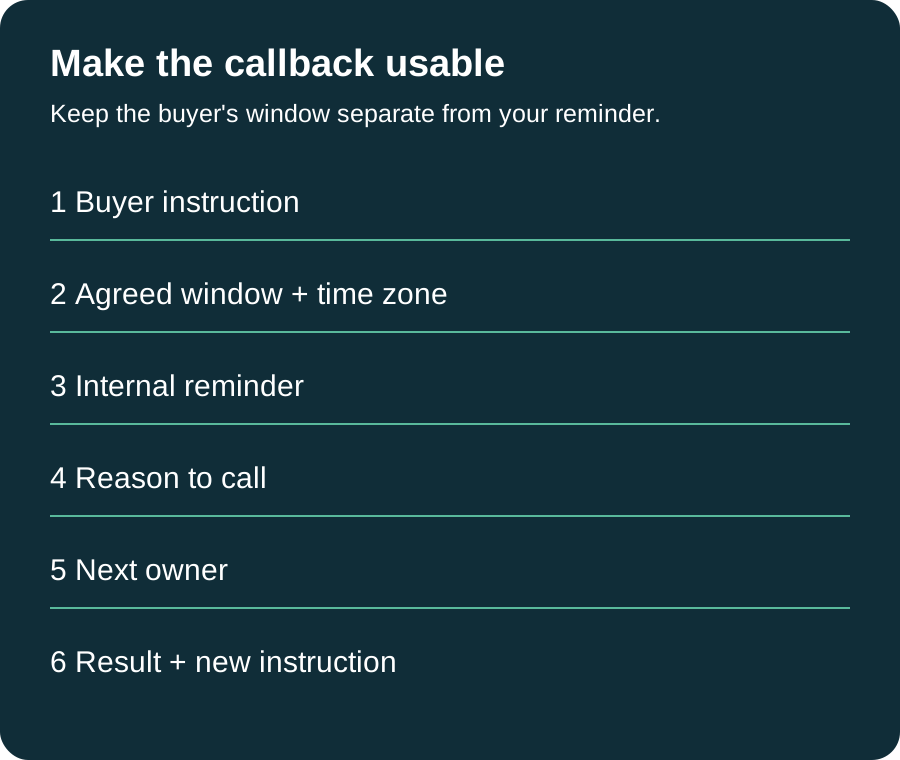
Before a call, reps can use the phone labels and number status that Apollo provides. During the call, Trellus can show live suggestions, talk-time signals, and pace cues. Afterward, the rep can save the current Apollo disposition, the purpose when one is configured and resolved, a note or call summary, and an available Trellus recording link. Calls started from a Task can also complete that source Task, and a rep can create a record-linked Apollo callback Task with an owner and due date.
Review the Trellus Apollo dialer workflow to see where reps start, what stays attached to the call, and what returns to Apollo.
What Apollo's own dialer includes
Apollo's dialer is not just click-to-call. Apollo says all paid accounts can access its dialer, while power dialing, parallel dialing, local presence, and international calling are available through the Advanced Dialer add-on. Its current Dialer Overview also covers Apollo phone numbers, browser and phone calling, recording, transcription, voicemail, team calls, coaching, and call reporting.
That matters because the useful comparison is not “Apollo has no dialer versus Trellus has one.” Both products can support a serious outbound calling motion. The decision is which calling experience your team wants around the Apollo work it already has.
Apollo power dialer vs. parallel dialer
Apollo's power and parallel dialing guide draws a clear distinction between the two modes. It also says these modes work with saved contacts rather than net-new prospects.
| Mode | How Apollo describes it | When the pace makes sense |
|---|---|---|
| Power dialing | Calls one contact at a time and advances after each call ends. | Use it when reps want a controlled pace and time to review context, leave a manual voicemail, or finish notes between calls. |
| Parallel dialing | Calls multiple contacts at once and connects the rep to the first person who answers. | Use it when the team is ready for a faster queue while keeping each rep focused on one live conversation at a time. |
For either mode, Apollo lists People → Saved, Tasks → Call tasks, and Calls → Upcoming calls as starting points. Reps select the saved contacts they want to call, choose their dialing preferences, and work through the resulting queue.
Choose Apollo's dialer when you want one Apollo-owned calling workspace
Apollo's own dialer is the sensible choice when your team wants its phone numbers, calling controls, voicemail drops, recordings, transcripts, coaching, analytics, and plan administration in Apollo. It also keeps the dialing experience closest to Apollo's product support and documentation.
This is especially practical for a team that already uses Apollo for prospect data, sequences, Tasks, calling, and reporting and does not need a separate live-coaching experience. If that setup gives reps the pace and context they need, adding another dialer may create more change than value.
Plan details can change. Check Apollo's current dialer and Advanced Dialer availability before making a purchasing decision rather than relying on an old comparison or a cached price.
Choose Trellus when Apollo Tasks should stay central
Trellus is designed for teams that want Trellus power or parallel calling and live coaching while reps continue to work from Apollo. The Apollo list or record is still where the rep begins; Trellus adds the calling session around that context.
- Start with due work: open the current Apollo Call Tasks view and keep its owner, filters, order, and Task identities with the queue.
- Start with one person: place a one-off call from a Contact page, Task page, or Contact side panel while keeping the selected record attached.
- Use Apollo phone context: review available phone labels and number status before selecting the number to call.
- Coach in the moment: give the rep live suggestions plus talk-time and pace cues during the conversation.
- Finish the work in Apollo: return the selected outcome and useful call context to the Contact or Task that produced the call.
What Trellus can return after an Apollo call
The post-call step is where vague integration language usually breaks down. For an Apollo call made through Trellus, the workflow can keep these items together:
- the current Apollo disposition;
- the Apollo call purpose when it is configured and resolved;
- the rep's note or call summary;
- an available Trellus recording link;
- the Contact and associated account context when Apollo provides it;
- completion of the source Apollo Call Task; and
- a new Apollo callback Task with the current owner, due date, and available summary when follow-up is needed.
Apollo itself treats purposes and dispositions as the fields that describe why a call happened and how it ended. Its purposes and dispositions guide explains that reps can use those fields with notes and later filter call activity for reporting. Trellus uses the options available in the team's current Apollo setup instead of inventing a separate outcome vocabulary.
How Apollo Call Tasks shape the workflow
Apollo Tasks can come from sequences, deals, individual contacts, or accounts. Apollo's Tasks Overview says each task can carry details such as priority, due date, and assignee, and that call tasks can be completed directly in Apollo.
That structure is why the starting view matters. A useful Apollo dialer workflow should preserve more than a list of phone numbers: the rep needs to know whose work is due, which record produced it, and what should happen when the call ends. Trellus keeps the current Call Tasks context with the calling session so the rep can move through the list without recreating the queue.
A practical Apollo dialer evaluation
Use one small, representative Apollo worklist to compare the two experiences. Avoid a polished demo list that hides the normal details your reps handle every day.
- Create or select a Call Tasks view with a real owner, sort order, and filters.
- Include contacts with more than one phone label and a mix of current number statuses.
- Run the list in the dialing mode your team expects to use most often.
- During a connected call, check how quickly the rep can see context and act on coaching.
- After the call, inspect the Apollo Contact, call activity, disposition, purpose, note, Task status, and callback.
- Repeat the process with a one-off call from a Contact or Task record.
The winner is the workflow your reps can understand and repeat while leaving Apollo with the call history and follow-up work your managers actually use. A larger feature list does not compensate for a queue that feels disconnected from the day-to-day process.
Apollo dialer questions
Does Apollo have its own power dialer?
Yes. Apollo offers power dialing through the Advanced Dialer add-on. Its power dialer calls one saved contact at a time and moves to the next after the current call ends.
Does Apollo have a parallel dialer?
Yes. Apollo offers parallel dialing through the Advanced Dialer add-on. Apollo's current guide says it can call multiple saved contacts at once and connect the rep to the first person who answers.
Can Trellus start from Apollo Call Tasks?
Yes. Trellus can work from Apollo Tasks → Call tasks and keep the current owner, filters, order, Task identity, Contact context, and available phone information with the calling session.
Can Trellus make a one-off call from Apollo?
Yes. A rep can start from an Apollo Contact page, Task page, or Contact side panel when one selected record provides the calling context.
What happens in Apollo after a Trellus call?
The rep can save the current Apollo disposition, the purpose when configured and resolved, a note or summary, and an available Trellus recording link. A Task-origin call can also complete its source Task, and the rep can create an Apollo callback Task for later follow-up.
Make the decision from one real call block
Use Apollo's dialer when you want Apollo to own the complete calling workspace. Use Trellus when you want Trellus power or parallel calling and live coaching around the Apollo Tasks and records your reps already use. The fastest way to decide is to run the same small Call Tasks view through both workflows and inspect what the rep sees before, during, and after each call.
.jpeg)

Power and parallel dialing in your CRM.