The 9 best cold calling dialers for sales teams in 2026
Compare 9 cold calling dialers by workflow, dialing mode, CRM fit, and pricing approach—plus a practical test to choose the right one in 2026.
.jpeg)
On this page
The best cold calling dialer depends on where your list lives and how your reps want to work it.
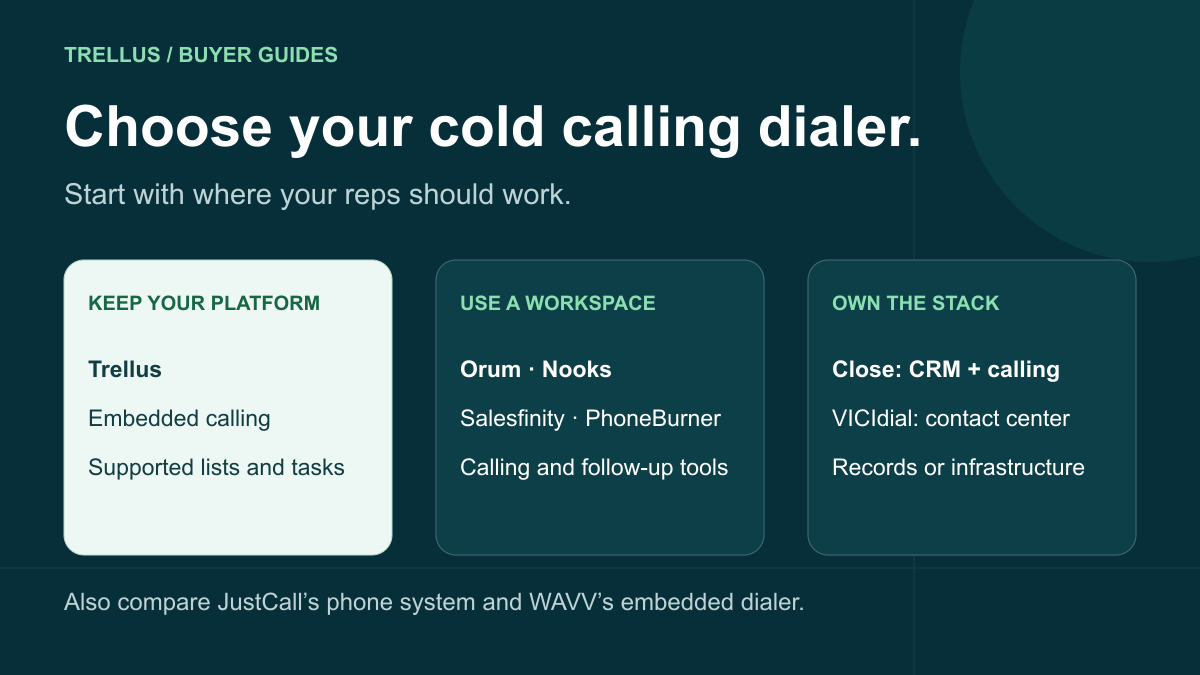
Trellus keeps power or parallel dialing inside supported CRMs and sales platforms. Nooks, Orum, and Salesfinity move calling into a separate outbound workspace with broader data and manager tools. PhoneBurner concentrates on one-at-a-time power dialing. Close puts calling inside its own CRM. WAVV offers embedded dialing for HighLevel and HubSpot. VICIdial gives technical teams a self-hosted contact-center stack.
Use this nine-product shortlist to choose where calls start, how many attempts run at once, and where the outcome and next step are saved.
Trellus publishes this guide. Competitor details come from current public product, help, integration, and pricing pages, not equivalent paid-account testing.
See Trellus in your current platform Browse Trellus integrations
Watch the recorded HubSpot dialer guide to see Trellus calling controls and post-call logging.
Cold calling dialers at a glance
| Dialer | Calling workflow | Buying model |
|---|---|---|
| Trellus | Power and parallel dialing in supported CRMs and sales platforms; eligible parallel plans support up to five lines. | Public individual plans; custom Business plan. |
| Orum | Dedicated calling workspace; its dialer page lists power and parallel dialing up to five lines. | Custom quote; pricing lists a nine-seat minimum. Confirm the package's line limit. |
| Nooks | Dedicated workspace: Power-1, two-to-five-line Parallel, plus conditional Adaptive and Turbo modes. | Custom quote for the dialer and wider data and coaching workspace. |
| Salesfinity | Dedicated workspace with parallel dialing up to five lines. | Gold monthly or annual; Enterprise annual. Online purchase for one to five users, volume quotes for larger teams. |
| PhoneBurner | Attended one-to-one power dialing; the rep's disposition advances the session. | Confirm the current plan, calling coverage and required CRM connection. |
| JustCall | Campaign-based Power, Dynamic and Predictive modes. | Advanced SalesPro dialing requires a quote and at least two licenses. |
| Close | Calling in Close CRM: Growth includes Power Dialer; Scale adds Predictive Dialer and live coaching. | Public per-user CRM plans. |
| WAVV | Embedded HighLevel and HubSpot offerings; the HighLevel product page lists up to three lines. | Confirm the tier, seats, numbers, calling countries and minute allowances. |
| VICIdial | Self-hosted contact-center system with manual and predictive calling. | Open-source software; hosting, telephony and administration are separate costs. |
Choose the operating model before the brand
A dialer demo can look great while hiding the biggest workflow change. Decide where the rep starts the call block before comparing feature lists.
Keep the current CRM or sales platform
Choose this route when lists, tasks, filters, dispositions, and follow-up already live in tools such as HubSpot, Salesforce, Salesloft, Outreach, Apollo, GoHighLevel, Attio, or Google Sheets. The dialer should work from that context and return the supported result without turning every call block into an export-and-import project.
Trellus is built for this operating model.
Move calling into a dedicated outbound workspace
Choose this route when the team wants calling, enrichment, research, manager visibility, coaching, and a virtual salesfloor in one separate system. Nooks, Orum, and Salesfinity are the clearest examples in this guide.
This can be a good trade when the broader workspace replaces enough other work to justify the change.
Make the CRM the phone system
Close combines CRM records, pipeline, calling, email, SMS, tasks, and automation. It is worth evaluating when the team is open to changing its system of record rather than adding a dialer to the CRM it already has.
Run a contact-center stack
VICIdial fits a different buyer. It is an open-source inbound and outbound contact-center suite designed to run with Asterisk, telephony trunks, databases, servers, and hands-on administration. The software license may be free, but the operating model is not lightweight.
Match the dialing mode to the list
The mode matters more than the word “AI” in the product name.
- Single-line power dialing calls one number at a time. Check what advances the queue and how long the rep has to review notes. This can fit requested callbacks and contacts that need individual preparation.
- Parallel dialing places several calls for one rep and connects a live answer. It fits larger cold lists where low answer rates create too much dead time.
- Predictive dialing paces multiple calls around agent availability. It is usually a contact-center or high-volume team decision, not just a faster version of a power dialer.
- Preview or click-to-call gives the rep time to inspect the record before placing each call. It is slower, but it can be the right choice for high-value accounts.
Vendors use mode names differently: WAVV calls its multi-line product a Power Dialer. Ask how many attempts run for one rep and what happens when two people answer. Read the Trellus guides to power dialing and parallel dialing for the call-block workflow.
1. Trellus: dial inside the tools reps already use
Trellus adds power and parallel dialing to supported CRM, sales-engagement, prospecting, and spreadsheet workflows. A rep opens the list, task view, report, sequence, or table the team already uses and starts the call block from there.
That is the central difference. The rep does not have to make a separate dialer workspace the new source of truth.
On supported workflows, Trellus keeps the right contact and account context close to the call, then saves the supported outcome and follow-up where the rep already works. For example:
- GoHighLevel can start from a Contacts Smart List or an Opportunity pipeline or stage view confirmed during setup. Save the selected outcome in a contact note, apply a selected tag when completing the result, and create a contact-linked callback task.
- Attio can start from supported People lists or Tasks and return outcomes and follow-up context to the Person.
- HubSpot is a concrete example: open the Contacts view or task list your team wants to call, choose power or parallel dialing, and keep contact and company context beside the conversation. Afterward, choose the call outcome, add notes, and schedule a follow-up when needed. The saved activity stays linked to the relevant HubSpot records. Watch the HubSpot call block and logging workflow.
- See the Salesforce, Salesloft, Outreach, and Apollo guides for where calls start and how results are saved.
- Google Sheets can turn mapped rows in the current spreadsheet tab into a calling session and write configured results back to the source row.
Before calling, Hot Numbers can sort eligible contacts by estimated pickup likelihood. Smart caller ID selects from the available calling numbers; number health tools separately show spam signals and number performance. On supported parallel calls, a saved voicemail plays after the tone, while a separate recorded screener introduction leaves the line available for a person to answer.
During the conversation, live AI coaching supplies a transcript and suggested responses. Managers can join the virtual Salesfloor to see who is dialing or connected and listen to calls. Practice bots let reps rehearse before a calling session. The public MCP guide explains how to analyze permitted call data in an AI assistant.
Individual plans are public, teams can request a Business plan, and eligible parallel plans support up to five simultaneous lines. Compare your platform's available mode, caller IDs, logging and team features in the plan you intend to buy.
Choose Trellus when: the team likes its current sales stack and wants more live conversations without rebuilding the rep workflow around another system.
Look elsewhere when: the company wants a new all-in-one outbound workspace, a replacement CRM, or a self-hosted contact-center system.
See the complete Trellus integrations directory to find the platform your reps already use.
Compare the Trellus power and parallel dialer and current pricing. For a closer workspace comparison, read Trellus vs. Nooks or Trellus vs. Orum.
2. Orum: dedicated high-volume calling and manager workspace
Orum has moved beyond a single dialer feature. Its current product combines an AI dialer, a virtual Salesfloor, analytics, call history, coaching, roleplay, scorecards, and data products.
Orum's current dialer page lists power dialing and parallel dialing up to five lines. Its pricing page requests a quote and lists a nine-seat minimum, plus click-to-call and one-off calling. Confirm the line limit and coaching package on that quote.
That makes Orum a serious fit for an established outbound organization that wants calling and manager workflows to become their own operating system. The tradeoff is the same: the team is buying a broader workspace and commercial relationship, not a lightweight dialer added to whatever every rep already has open.
Choose Orum when: a larger outbound team wants high-volume dialing, Salesfloor, analytics, and structured coaching in one dedicated system.
Look elsewhere when: the team needs a self-serve individual plan or wants the current CRM screen to remain the rep’s home base.
3. Nooks: dialer, data, and virtual salesfloor in one workspace
Nooks combines its dialer with phone-data enrichment, account research, live Battlecards, coaching, analytics, and a virtual Salesfloor.
Its dialing modes are unusually explicit. Power-1 calls one prospect at a time. Standard Parallel calls two to five. Adaptive adjusts around a chosen base, while Turbo can move above that base under the documented eligibility conditions. Nooks requires a custom quote.
Nooks is compelling when a company wants more than a dialer and is comfortable moving daily call work into the Nooks environment. The wider product can reduce tool switching if the team actually adopts the research, data, coaching, and manager layers. If those layers are not part of the purchase, compare the cost and workflow against a narrower dialer.
Choose Nooks when: the team wants a dedicated outbound workspace with dialing, data, research, and live team collaboration.
Look elsewhere when: the rep must keep working directly from a CRM or sales-platform view that Nooks does not support as the daily calling surface.
4. Salesfinity: self-serve parallel dialing with enrichment
Salesfinity's current plans include parallel dialing up to five lines, number scoring, a virtual salesfloor, call scoring and practice calls. Gold focuses on calling; Enterprise adds its Sequencer, list building, mobile data, Ari assistant and Live Assist.
The buying choice is specific: Gold offers monthly or annual terms; Enterprise is annual. Teams of one to five can buy online, while larger teams request volume pricing. Compare the data allowances and AI features your team would use alongside the dialing workflow.
Choose Salesfinity when: a dedicated calling workspace and its data or sequencing bundle fit the team's purchase.
Look elsewhere when: the main requirement is an embedded dialer inside a platform-specific list or task workflow.
5. PhoneBurner: focused one-to-one power dialing
PhoneBurner's dial-session guide describes an attended workflow: select contacts, choose the script, voicemail and disposition sets, then start calling. The rep's disposition records the result and advances the session.
Its disposition controls can save notes, apply tags, send a configured email and choose the next number or contact. This gives a team a concrete after-call process to evaluate.
Check the current plan, calling coverage and exact CRM connection before comparing cost. A connector logo does not establish which of your lists, fields and follow-up actions will work.
Choose PhoneBurner when: one-to-one power dialing and a disciplined follow-up sequence matter more than maximum line volume.
Look elsewhere when: parallel dialing is a hard requirement. If staying in your CRM matters most, compare PhoneBurner’s CRM and extension workflows with the exact lists and after-call steps your team needs.
6. JustCall: outbound dialer plus cloud phone and messaging
JustCall is broader than a sales dialer. It combines business phone service, inbound routing, SMS, call recording, analytics, AI assistance, coaching, and CRM integrations.
JustCall offers Power, Dynamic and Predictive modes. Its Predictive campaign settings allow one to ten attempts per agent. The current SalesPro package lists multi-line predictive dialing, Power and Dynamic modes, a two-license minimum and request-a-quote pricing. Check this package rather than assume a base business-phone subscription includes the advanced dialer.
JustCall deserves a look when sales is only one part of the phone requirement. A company that also needs inbound routing, messaging, mobile access, and contact-center operations may get more value from a single communications platform.
Choose JustCall when: outbound dialing, cloud telephony, messaging, and routing should live together.
Look elsewhere when: the team already has its phone system and only needs a focused calling workflow inside its sales tools.
7. Close: make the CRM the calling hub
Close is a sales CRM with calling, email, SMS, tasks, workflows, pipeline, and reporting in the same product.
Its Power Dialer works through a list one lead at a time. The Predictive Dialer places multiple calls and connects a rep to an answer. Current Close pricing places Power Dialer in Growth and Predictive Dialer plus live call coaching in Scale. Compare calling usage and AI allowances with the required CRM plan.
The real decision is not whether Close has a dialer. It is whether the business wants Close to become the CRM. If the answer is yes, combining records and communication can remove several integrations. If the business is committed to another CRM, migration cost belongs in the comparison.
Choose Close when: a small or growing sales team wants CRM and communications in one system.
Look elsewhere when: replacing the current CRM is off the table.
8. WAVV: multi-line dialing inside HighLevel
WAVV has built a specific commercial workflow around HighLevel. Agencies install it from the HighLevel App Marketplace, choose sub-accounts, and launch WAVV from the sub-account sidebar.
The HighLevel product page lists up to three simultaneous lines. Its calling guide describes single-line and multi-line sessions from Contacts or Opportunities and campaigns that can resume where the rep stopped.
WAVV's disposition guide explains configured outcome tags and automatic no-answer, voicemail and bad-number results. It also documents the configurable wavv-none tag when a HighLevel rep closes the menu without selecting an outcome.
WAVV is a focused fit for agencies that live in HighLevel and want a marketplace-installed dialer. It also markets an embedded HubSpot dialer, so compare its current platform offering before ruling it out. This section focuses on the HighLevel workflow.
Trellus also supports HighLevel, but the right comparison is the actual workflow—not a generic feature checklist. See how Trellus works with GoHighLevel, then run the same smart list, opportunity stage, dispositions, tags, notes, and callbacks through both products.
Choose WAVV when: HighLevel is the center of the agency and a three-line marketplace-installed dialer fits the team.
Choose Trellus when: the team wants HighLevel calling plus Trellus dialing across other supported CRMs, sales platforms, data tools, or spreadsheets. Check each platform's supported starting views and saved results.
9. VICIdial: self-hosted contact-center control
VICIdial is an open-source inbound, outbound, and blended contact-center suite built around Asterisk. It supports web-based agent and admin interfaces, manual and agent-controlled calling, broadcast and predictive campaigns, recordings, callbacks, custom dispositions, DNC lists, reporting, remote agents, and multi-server deployments.
For the self-hosted option compared here, there is no software licensing cost under the current open-source license. A buyer still needs servers or hosting, telephony trunks, numbers, configuration, monitoring, upgrades, security, backups, and people who understand the stack. VICIdial’s creators and maintainers also offer a hosted service through VICIhost for teams that want the contact-center software without maintaining their own servers.
VICIdial makes sense when the organization wants deep contact-center control and has technical ownership. It is usually too much system for a rep who simply wants a faster call block from a CRM list.
Choose VICIdial when: self-hosting, predictive campaigns, detailed administration, and contact-center control are deliberate requirements.
Look elsewhere when: the team wants a lightweight embedded CRM dialer rather than a contact-center system.
What is the cheapest dialer for cold calling?
Compare the cost for the callers you actually have, in the dialing mode they will use. A lower advertised seat price can still mean a larger bill if it requires more seats, an annual commitment, or paid calling and data extras.
For every finalist, fill in the same quote worksheet:
| Write down | Use this basis for every vendor |
|---|---|
| License cost | The seats you will be billed for, including any minimum, multiplied by the price of the plan that includes your chosen dialing mode. |
| Calling and numbers | Your expected countries, call usage, caller IDs, number registration and monitoring. Separate included allowances from paid extras. |
| Data and AI | The enrichment credits, recordings, transcripts, summaries, coaching and manager features your team needs. Include only the extras you intend to use. |
| Setup cost | Vendor onboarding charges plus the internal work needed to set up lists, call outcomes, follow-up and reporting. |
| Commitment | The amount due before the team can start, the total minimum contract spend, and the renewal or cancellation terms. |
First-month cash outlay: add the actual license payment due, paid usage and extras, and one-time setup charges. If an annual license is collected up front, use that payment here—not its monthly equivalent. Also keep a separate expected ongoing monthly cost so the first invoice does not distort the comparison.
For a small call block, first ask whether your existing phone or CRM calling plan is enough. For a self-hosted product, include hosting, telephony and administration even if there is no software license charge. A broader paid workspace can still be the better purchase if your team will use the data, coaching or collaboration it includes.
Start with Trellus pricing when you want to keep the current CRM workflow, but apply the same worksheet to every finalist. Keep the quote beside a completed call-block test: the cheapest plan that cannot run your list or save the follow-up is not a usable substitute.
Test the whole call block, not just the dial counter
Use the same scorecard for every finalist, but separate workflow checks from calls to prospects.
- Check the workflow with numbers your team controls. Create test contacts in your actual CRM or worklist. Include a contact number and a company number, a missing phone field, an existing task, and a planned callback. Walk through a live answer and voicemail, then inspect the resulting records.
- Run comparable approved call blocks. Use the same rep, target segment, dialing mode, time allowance and success definitions. Use equivalent audiences instead of repeatedly calling the same prospects just to benchmark tools. Record differences in list quality, timing and prior attempts; these affect the result.
- Measure from preparation through follow-up. Note setup minutes, attempted calls, live conversations, correct saved outcomes, follow-ups created and manual fixes. At an answer, check that the rep has the right person and company context. After the call, inspect the note, disposition, recording when available, completed task and callback.
- Have a manager check the work. Can they find the calls that need coaching and understand what happened without asking the rep to reconstruct the block? Test the manager features included in the plan, not a separate demonstration package.
Bring the same CRM view to a Trellus demo. The recorded HubSpot walkthrough shows calling controls and post-call logging; the Attio call-block guide includes a worksheet for carrying the next step back to the team. Check the starting view and saved result for your platform.
Decision rule: shortlist the products that keep the correct records, conversations and follow-ups together, then compare the total cost of those workable options. A small trial is a workflow check, not proof of a permanent conversion-rate advantage.
Frequently asked questions
What is the best dialer for cold calling?
There is no single best dialer for every cold-calling team. Trellus keeps power or parallel dialing inside supported CRMs, sales platforms, data tools, and spreadsheets. Nooks, Orum, and Salesfinity use a separate outbound workspace. PhoneBurner focuses on one-to-one power dialing. Close combines the dialer and CRM. WAVV offers embedded dialing for HighLevel and HubSpot. VICIdial is for teams that want to operate a self-hosted contact center.
Is a power dialer or parallel dialer better for cold calling?
Use a power dialer when one-to-one pacing, context, and control matter most. Use a parallel dialer when the list is large, answer rates are low, and dead ring time is the bottleneck. Compare both modes using team-controlled numbers for workflow checks and comparable prospect audiences for call blocks.
Can a cold calling dialer work inside a CRM?
Yes. Trellus works from supported views and tasks in platforms including HubSpot, Salesforce, GoHighLevel, Attio, Salesloft, Outreach, and Apollo. Other vendors may sync or import CRM data into a separate dialer workspace. The important question is where the rep starts and what gets written back after the call.
Is an auto dialer the same as a power dialer?
“Auto dialer” is a broad term for software that automates outbound dialing. Single-line power dialing works one number at a time; parallel and predictive modes arrange multiple attempts differently. Vendor labels vary, so confirm the behavior rather than relying on the mode name.
Which cold calling dialer is best for a small sales team?
A small team should favor a short setup, public pricing, and a workflow that does not require extra administration. Trellus works when the team keeps its current sales platform. Close is relevant when the CRM and phone system should be combined. PhoneBurner focuses on one-to-one power dialing. JustCall also covers business telephony.
Does Trellus work with GoHighLevel?
Yes. Trellus can work from a Contacts Smart List or an Opportunity pipeline or stage view confirmed during setup. It can save the selected outcome and available call details in a contact note, apply a selected tag when the result is completed, and create a contact-linked callback task. The GoHighLevel integration page shows the workflow.
Does Trellus work with Attio?
Yes. Trellus can use supported Attio People lists or Tasks for power or parallel calling and return supported outcomes and follow-up context to the Person. See Trellus for Attio.
See Trellus in your current platform Browse Trellus integrations
Sources
Product workflows and plan references were reviewed on October 21, 2026 against the linked vendor documentation. Check the calling mode, countries, usage and follow-up tools in the plan you intend to buy.
Trellus
- Trellus integrations
- Trellus pricing
- Trellus power and parallel dialer
- Recorded HubSpot dialer guide
- Trellus MCP reporting guide
Orum
Nooks
Salesfinity
PhoneBurner
- PhoneBurner dial-session guide
- PhoneBurner disposition controls
- PhoneBurner pricing
- PhoneBurner integrations
JustCall
Close
WAVV
- WAVV for HighLevel
- WAVV subscription management
- WAVV outcome tags
- WAVV calling workflow
- WAVV pricing