Nooks HubSpot Integration vs Trellus HubSpot Integration
Our detailed guide on Nooks Hubspot integration highlights its pros and cons and why you could potentially use Trellus.ai, among other options, to scale your workflow, outreach and overall activities.
.jpeg)
Our Top Picks


Regardless of any cold calling or a sales oriented platform that you’re using, the idea of plugging in integrations is to make things simple. Complex workflows become automated, calls go on an auto dial mode, outreach scales; so on and so forth.
Integrations are here to make your life as an SDR easier, more productive, and more output-oriented. And yes, it’s less of a waste of time when some kind of tools are paired with your primary CRM environment to get things done.
Speaking of integrations, Trellus supports tons of them. And we are constantly on a role to add support for more integrations as we continue to expand.
Out of the ones that are most popular are Hubspot, Apollo, Salesloft, and a bunch of big platform names. Nooks does the same thing too, and so do plenty of other dialers, which puts potential users into a contemplative state, i.e., should they be going for a Trellus integration, or a Nooks integration with HubSpot?
Both these integrations support outbound sales teams that rely on HubSpot, but they approach the problem from different angles. One positions itself as a broader AI sales engagement platform with multiple sales workflow capabilities, while the other concentrates heavily on embedded dialing productivity, parallel calling, coaching, call analytics, and sales floor collaboration.
For SDR leaders, sales managers, and revenue operations teams, understanding these differences can have a meaningful impact on rep productivity, connect rates, coaching effectiveness, and CRM data quality.
TL;DR: What Should HubSpot Users Know Before Comparing Nooks and Trellus?
• The Nooks HubSpot integration is part of a larger AI sales engagement platform that includes dialing, sequencing, coaching, enrichment, signals, and workflow automation.
• Trellus focuses heavily on embedded calling productivity through power dialing, parallel dialing, AI coaching, call analytics, and sales floor collaboration.
• Both platforms support HubSpot related workflows, but their priorities and feature emphasis differ.
What Is a HubSpot Sales Dialer Integration?

If it’s your first time add integrations to HubSpot, and you haven’t had any previous experience of trying a sales dialer integration before, it’s important to know what you’re about to get into.
On that note, a HubSpot sales dialer integration connects outbound calling software with HubSpot so sales teams can manage prospecting activity from a centralized workflow. Rather than manually updating records after every conversation, reps can complete calls, log outcomes, schedule follow ups, and maintain CRM accuracy with far less effort.
For outbound teams, this matters because administrative work tends to grow alongside prospecting volume. When SDRs spend too much time switching between tools, updating records, or manually entering notes, selling time decreases. A strong HubSpot sales dialer integration helps eliminate those friction points.
HubSpot itself positions Sales Hub as a platform that combines CRM functionality, prospecting tools, sales automation, pipeline management, activity tracking, and communication workflows. Dialer integrations expand these capabilities by introducing advanced calling features that many outbound teams need as they scale.
That being said, before comparing platforms, it helps to understand several common terms that frequently appear in conversations around outbound sales technology.
CRM Sync
CRM sync refers to the movement of information between a sales platform and HubSpot. This can include contact records, call outcomes, tasks, notes, activity history, and other prospect data. Strong synchronization helps maintain consistent records across systems.
Call Disposition
A call disposition is the outcome assigned to a completed call. Common examples include connected, voicemail, no answer, follow up required, meeting booked, or not interested. Dispositions help managers measure performance and create future workflows.
Activity Logging
Activity logging refers to automatically recording sales actions inside HubSpot. Calls, emails, notes, meetings, tasks, recordings, and prospect interactions may all be captured as part of the sales record.
Power Dialer
A power dialer automatically moves representatives from one prospect to the next after each call ends. This helps increase calling efficiency while maintaining a one call at a time workflow.
Parallel Dialer
A parallel dialer places multiple outbound calls simultaneously and connects the representative only when a live person answers. This approach is commonly used by teams focused on maximizing connect rates and increasing conversation volume.
Real Time Coaching
Real time coaching provides guidance while a conversation is taking place. Coaching prompts may help reps respond to objections, improve questioning techniques, or stay aligned with approved messaging.
How Does the Nooks HubSpot Integration Work for SDR Teams?
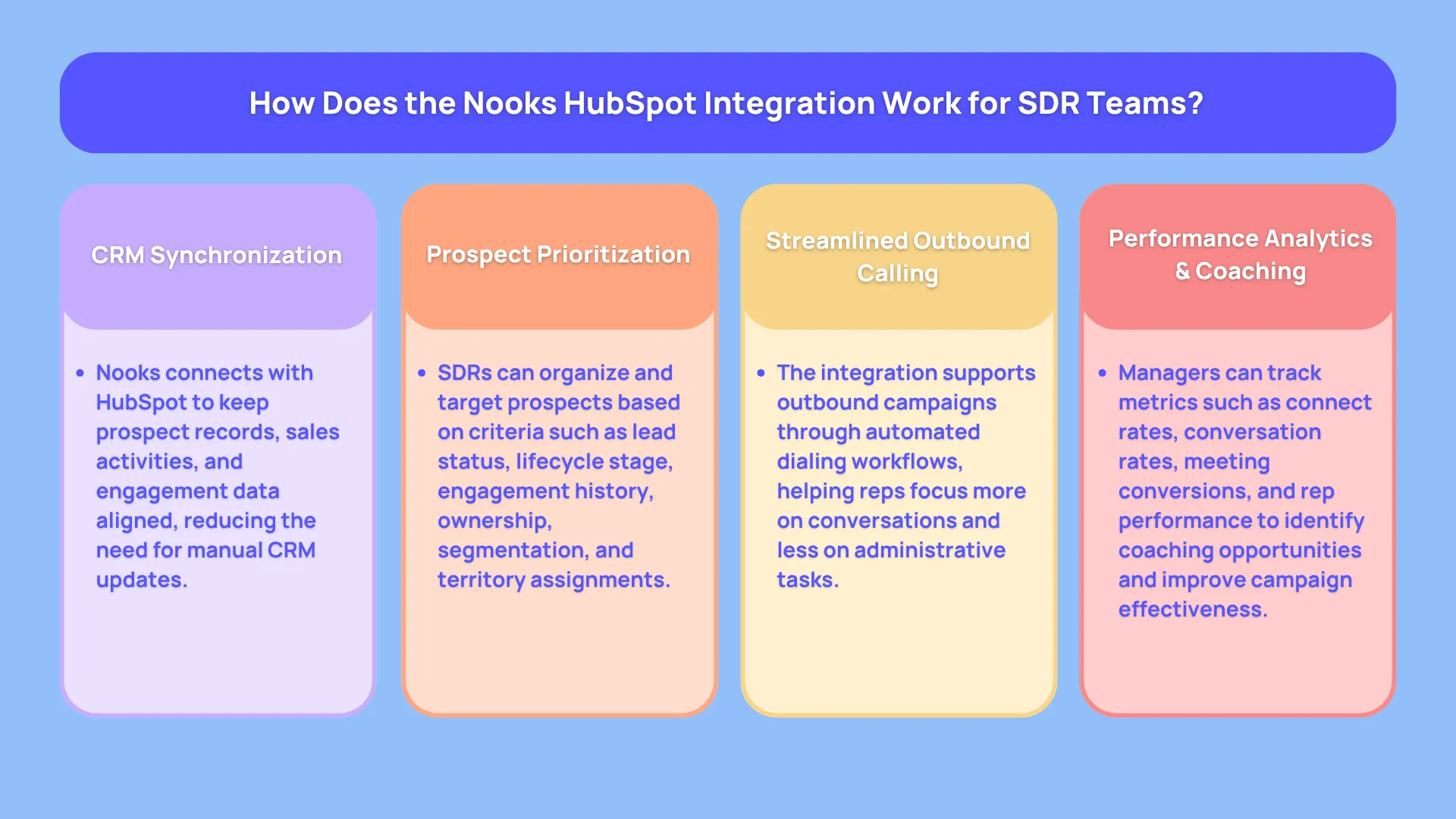
One of the most common questions revenue leaders ask during evaluation is: How does the Nooks HubSpot integration work for SDR teams?
At a high level, the platform connects outbound prospecting activities with HubSpot so representatives can manage calling workflows while keeping CRM records aligned with ongoing sales activity. The goal is to reduce manual administration while helping teams move through prospect lists more efficiently.
The Nooks CRM integration is typically positioned around the idea of creating a connected outbound environment where dialing, prospect engagement, coaching, reporting, and workflow automation work alongside existing CRM processes. Rather than treating HubSpot as a separate system that requires constant updating, the integration attempts to keep sales activity synchronized throughout the prospecting process.
For SDR teams handling hundreds of outbound touches every week, this can create operational advantages. Managers gain better visibility into activity levels, representatives spend less time on repetitive data entry, and revenue operations teams can maintain cleaner reporting structures.
According to Nooks' public product positioning, its AI Dialer includes features such as bi directional CRM synchronization, live transcription, automated voicemail drops, smart call scripts, dashboards, reporting capabilities, and workflow automation. These features are designed to support outbound teams throughout the prospecting lifecycle.
A Typical Nooks HubSpot Workflow
Although every organization configures its sales process differently, the typical workflow generally follows a similar pattern.
1. Connect HubSpot to Nooks
The first step involves establishing the connection between the two systems.
Once connected, the platform can access relevant prospect records, sales activities, contact information, and workflow data necessary for outbound operations.
This connection forms the foundation of the Nooks sales engagement integration because it allows information to move between systems rather than remaining isolated in separate platforms.
2. Import or Prioritize Prospects
After setup is complete, sales teams can identify the contacts they want representatives to engage.
Depending on team configuration, prospect prioritization may be influenced by factors such as:
• Lead qualification status
• Lifecycle stage
• Recent engagement activity
• Assigned ownership
• Account segmentation
• Territory assignments
This step helps SDRs focus attention on prospects that align with current campaign objectives.
3. Launch Outbound Calling Campaigns
Representatives then begin calling activities through the dialing environment.
The Nooks AI dialer HubSpot integration is designed to help teams increase outreach efficiency while maintaining visibility into prospect interactions.
Rather than manually tracking every step, reps can focus more attention on conversations and less on administrative work.
4. Review Analytics and Coaching Insights
Outbound improvement rarely comes from activity volume alone.
Managers typically review:
• Connect rates
• Conversation rates
• Meeting conversion rates
• Rep performance metrics
• Coaching opportunities
• Campaign effectiveness
These insights help teams identify areas where messaging, timing, targeting, or coaching can improve future performance.
Why SDR Teams Consider Nooks for HubSpot
Many organizations evaluating the Nooks HubSpot integration are looking for more than a standalone dialer.
The platform's broader positioning centers around creating a connected sales engagement ecosystem that combines outreach, coaching, workflow automation, prospect intelligence, and CRM synchronization.
For teams attempting to consolidate multiple sales functions into a single environment, that broader platform strategy may be attractive.
Particularly for growing outbound organizations, having dialing, sequencing, coaching, and reporting capabilities connected under one vendor can simplify technology management and reduce the number of separate tools required to support SDR productivity.
Can Nooks Sync Calls, Tasks, and Notes With HubSpot CRM?
Another frequently asked question is:
Can Nooks sync calls, tasks, and notes with HubSpot CRM?
This is an important consideration because CRM adoption often succeeds or fails based on data quality. Even the most sophisticated outbound technology loses value when sales records become incomplete, outdated, or inconsistent.
Nooks publicly states that its AI Dialer includes bi directional CRM synchronization and workflow automation. While this indicates significant CRM connectivity, buyers should avoid assuming the exact behavior of every field, object, activity type, or workflow without validating it directly during a product demonstration.
Why Sync Quality Matters
Many organizations focus heavily on dialing capabilities during vendor evaluations.
The challenge is that calling efficiency only solves part of the problem.
Leadership teams still need:
• Accurate reporting
• Reliable forecasting
• Clean contact records
• Consistent activity histories
• Clear attribution data
• Effective follow up workflows
Without dependable synchronization, those outcomes become much harder to achieve.
A platform may offer excellent dialing functionality, but if information does not appear correctly inside HubSpot, managers may struggle to trust reporting and performance metrics.
What Buyers Should Verify During a Demo
Rather than relying on assumptions, teams should request demonstrations using realistic sales scenarios.
The following checklist can help guide evaluation conversations.
Call Activity Sync
Confirm how completed calls appear inside HubSpot records.
Questions to ask include:
• Are calls logged automatically?
• Are timestamps preserved?
• Can managers view call history easily?
• How quickly does information appear in HubSpot?
Task Synchronization
Many outbound teams rely heavily on task management.
Buyers should verify:
• Task creation behavior
• Task completion updates
• Follow up scheduling
• Ownership assignment
• Workflow compatibility
Notes Synchronization
Notes often contain valuable context that influences future conversations.
Teams should confirm:
• How notes are captured
• Where notes appear inside HubSpot
• Rep editing permissions
• Visibility across teams
Call Recordings
Organizations that prioritize coaching often rely on recordings.
Important questions include:
• Are recordings accessible from HubSpot?
• How are recordings linked to contacts?
• Are permissions configurable?
• How long are recordings retained?
Call Transcripts
Transcripts can support coaching, onboarding, and quality assurance initiatives.
Buyers should evaluate:
• Transcript availability
• Search functionality
• Keyword tracking
• Storage locations
Follow Up Fields and Dispositions
Disposition data often drives future workflows.
Verification should include:
• Custom field support
• Disposition mapping
• Workflow triggers
• Reporting compatibility
Test Before Full Deployment
One of the smartest approaches any sales operations team can take is running a controlled pilot before organization wide rollout.
Create a small group of HubSpot contacts and test every major workflow.
Place calls.
Log notes.
Create tasks.
Assign dispositions.
Review recordings.
Inspect contact records.
Then compare the results against expected CRM behavior.
This process often reveals configuration issues early, before hundreds of representatives begin generating large volumes of activity.
For organizations evaluating a Nooks CRM integration, this verification step can provide confidence that data quality standards will remain intact after implementation.
The next consideration is understanding how Trellus approaches HubSpot connected outbound sales workflows and where its workflow philosophy differs from a broader sales engagement platform.
How Does Trellus Work With HubSpot for Outbound Sales?
After understanding how the Nooks HubSpot integration supports CRM connected prospecting, the next question becomes how Trellus fits into a HubSpot centered outbound workflow.
The platform approaches the problem from a different direction. Rather than positioning itself primarily as a broad sales engagement ecosystem, it focuses heavily on helping representatives make more live connections, spend less time navigating multiple interfaces, and receive support while conversations are happening.
For many SDR teams, one of the biggest productivity drains comes from workflow fragmentation. A representative may need to jump between CRM records, call software, coaching platforms, analytics dashboards, note taking tools, and activity tracking systems throughout the day.
That constant context switching creates friction.
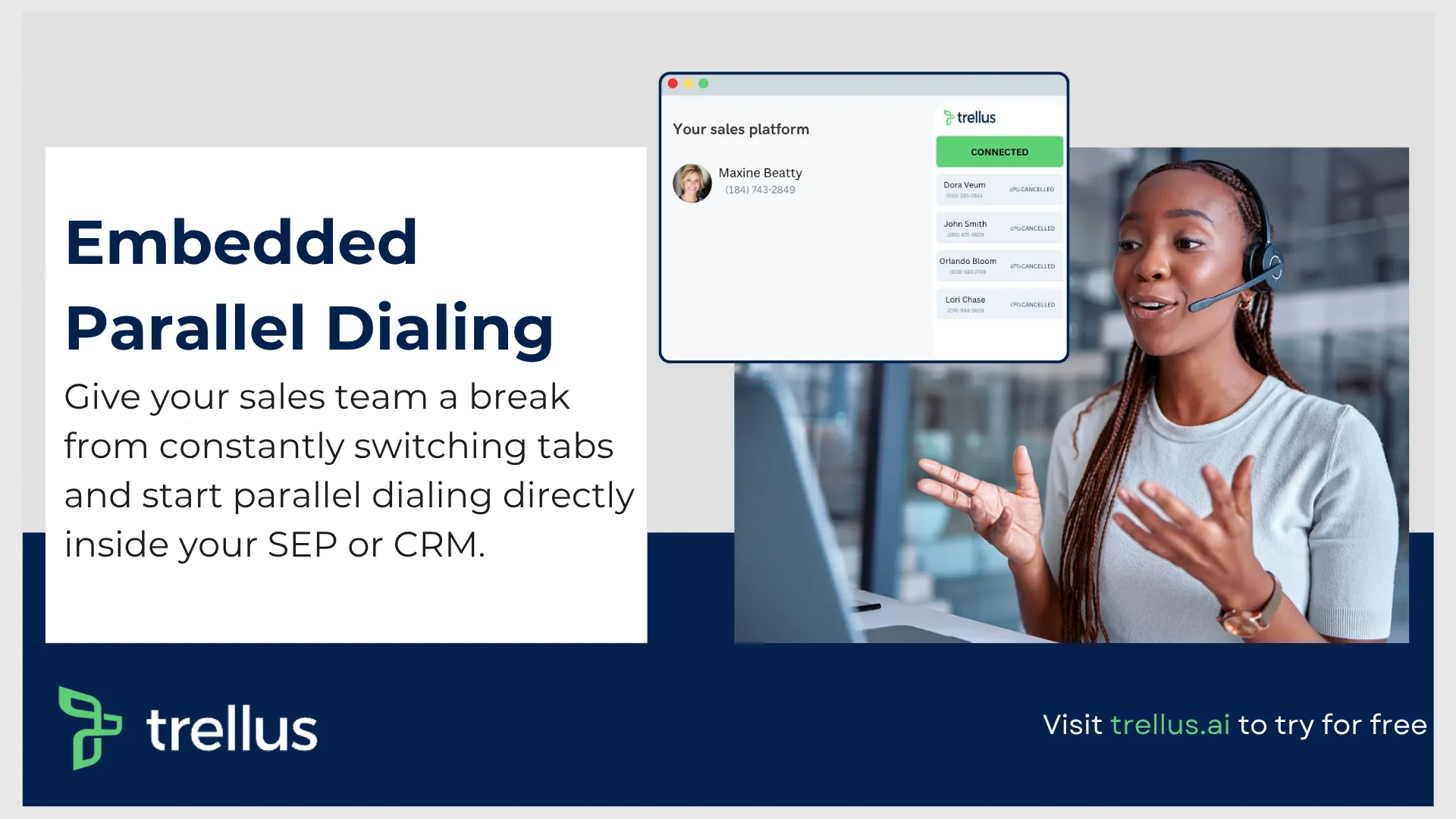
Trellus attempts to reduce that friction by functioning as an embedded dialing and coaching layer that works alongside existing sales workflows. The emphasis is placed on helping representatives stay close to the systems they already use while adding capabilities such as power dialing, parallel dialing, live coaching prompts, voicemail automation, call analytics, and sales floor collaboration.
This approach can be particularly attractive for organizations that already have established CRM processes and simply want stronger outbound execution.
A Typical Trellus Workflow Inside a HubSpot Environment
Although every sales organization structures prospecting differently, the day to day workflow often follows a predictable pattern.
Open HubSpot and Existing Sales Workflows
Representatives begin where they already spend much of their day.
Rather than building an entirely new process around a separate environment, the goal is to keep prospecting activities connected to existing workflows and contact records.
This creates less disruption for teams that have already invested significant time building HubSpot based processes.
Launch Calling Activities
Once call tasks are identified, representatives can begin outreach activities through power dialing or parallel dialing modes.
The primary objective here is straightforward: create more opportunities for live conversations without increasing administrative burden.
Outbound sales performance is often limited by connect rates rather than effort. Reps can spend hours dialing and still speak with relatively few prospects.
Calling acceleration tools are designed to address that challenge.
Receive Real Time Guidance During Conversations
One of the more interesting elements of the platform is its focus on live coaching.
Traditional coaching frequently happens after calls are completed. Managers review recordings, identify missed opportunities, and provide feedback later.
The challenge is that feedback arrives after the moment has already passed.
Live coaching attempts to move guidance closer to the actual conversation.
During active calls, representatives may receive prompts, recommendations, or conversation insights designed to help them navigate objections, maintain messaging consistency, and improve call quality.
Sales Floor Visibility
Another area that receives significant attention is sales floor collaboration.
Remote and distributed sales teams often lose some of the visibility that naturally exists inside a physical office environment.
Sales floor functionality attempts to recreate aspects of that collaborative experience by providing managers and team members with greater awareness of activity levels, coaching opportunities, and ongoing prospecting efforts.
Why HubSpot Users Evaluate Trellus
Many organizations considering alternatives to a traditional Nooks sales engagement integration are not necessarily searching for a larger platform.
Often, they are looking for improvements in execution.
Common objectives include:
• More live conversations
• Less manual work
• Better coaching visibility
• Higher connect rates
• Stronger rep productivity
• Reduced workflow friction
For teams already comfortable with their existing sales stack, adding a specialized outbound execution layer can feel more manageable than restructuring broader engagement processes.
What Are the Benefits of Using Trellus Instead of Nooks With HubSpot?
This question ultimately comes down to priorities.
Neither platform serves exactly the same purpose, even though there is overlap in several areas.
Organizations evaluating the Nooks HubSpot integration often appreciate the broader engagement capabilities available across the platform. On the other hand, teams that place a stronger emphasis on dialing productivity, live coaching, and conversation volume may find the Trellus approach aligns more closely with their goals.
The strongest argument for Trellus generally centers on helping representatives stay within familiar workflows while improving outbound execution.
For sales leaders, this can translate into fewer process changes, faster onboarding, and more focus on conversation quality and activity volume.
Greater Focus on Calling Productivity
Many sales technologies attempt to improve every part of the revenue process.
There is value in that approach, particularly for organizations seeking consolidation.
However, some teams prefer specialized tools that concentrate heavily on one critical challenge.
For outbound organizations, that challenge is often maximizing meaningful conversations.
The platform's emphasis on dialing acceleration, workflow efficiency, and conversation support is designed around helping representatives spend more time talking to prospects.
Coaching Happens Closer to the Conversation
Traditional coaching often suffers from timing issues.
A manager reviews a call hours or days later. Feedback is provided. The representative attempts to remember the interaction. The learning opportunity becomes less immediate.
Live coaching brings guidance closer to the moment where it can influence outcomes.
For newer representatives, this can shorten learning curves. For experienced representatives, it can reinforce best practices and improve consistency across teams.
Better Visibility for Managers
Coaching becomes more difficult as teams grow.
Managers cannot sit beside every representative.
Remote work environments add another layer of complexity.
Sales floor features, analytics, and coaching visibility tools help managers maintain awareness of performance patterns without relying exclusively on retrospective reporting.
This can support faster intervention when representatives need assistance and faster recognition when best practices emerge.
A Strong Fit for Teams That Already Like Their HubSpot Workflow
Perhaps the most compelling use case involves organizations that are already satisfied with HubSpot as the foundation of their sales process.
These teams are not necessarily looking to replace large portions of their workflow.
They simply want stronger outbound execution.
For those organizations, embedded dialing, coaching, analytics, voicemail automation, and collaboration features may provide a more direct path toward improving prospecting performance.
That does not automatically make it the right solution for every team.
Organizations seeking broader sales engagement functionality may still prefer to spend considerable time evaluating the Nooks AI dialer HubSpot integration and the wider set of capabilities available across that ecosystem.
What Are the Benefits of Using Nooks With HubSpot for Outbound Sales?
When buyers begin researching the Nooks HubSpot integration, they are often looking beyond dialing alone.
That is an important point because Nooks positions itself as a broader sales engagement platform rather than a tool focused exclusively on outbound calling productivity. While dialing remains a major component of the platform, its product ecosystem extends into areas such as sequencing, prospect intelligence, coaching, workflow automation, enrichment, and CRM connectivity.
For organizations that want multiple sales functions operating under a single vendor relationship, this broader approach can be appealing.
The question many buyers ask is:
What are the benefits of using Nooks with HubSpot for outbound sales?
The answer depends largely on how much functionality a team wants from its sales engagement platform.
Access to a Broader AI Sales Engagement Ecosystem
One of the primary reasons teams evaluate Nooks CRM integration capabilities is the breadth of tools available within the platform.
Publicly available product information highlights several major categories, including:
• AI Dialer
• AI Sequencing
• Signals and Intelligence
• AI Coaching
• Contact Enrichment
• Workflow Automation
• CRM Synchronization
For organizations trying to reduce the number of disconnected sales applications they manage, this wider platform strategy may offer operational advantages.
Rather than evaluating separate vendors for prospecting, sequencing, enrichment, coaching, and analytics, buyers can assess multiple capabilities through a single platform review process.
Stronger Multi Channel Prospecting Workflows
Modern outbound sales rarely relies on phone calls alone.
Prospects interact through:
• Calls
• Emails
• LinkedIn outreach
• Follow up sequences
• Meeting invitations
• Automated workflows
Many revenue teams want visibility across all of these touchpoints.
This is one area where a broader sales engagement platform often attracts attention. Teams can evaluate how different prospecting channels work together rather than managing each motion independently.
Consolidated Reporting and Visibility
As organizations scale, reporting becomes increasingly complex.
Sales leaders often need answers to questions such as:
• Which outreach channels generate meetings?
• Which sequences perform best?
• Which reps convert opportunities most effectively?
• Which accounts show buying intent?
• Which campaigns drive pipeline growth?
Consolidating activity data into a centralized engagement environment can make these questions easier to answer.
This is particularly relevant for teams that want leadership visibility across multiple outbound channels rather than dialing metrics alone.
AI Coaching and Rep Development
Coaching remains a major focus for growing sales organizations.
New representatives need support.
Experienced representatives need optimization.
Managers need visibility into both.
The Nooks sales engagement integration includes coaching related capabilities designed to help sales teams improve performance over time.
For organizations building structured coaching programs, these features may become an important part of the evaluation process.
Workflow Automation Opportunities
Another reason buyers investigate the Nooks AI dialer HubSpot integration is workflow automation.
As prospecting volume increases, repetitive administrative work tends to grow as well.
Automation can help reduce:
• Manual updates
• Task creation
• Prospect routing
• Follow up management
• Activity tracking
• Data entry
This allows sales teams to spend more time engaging prospects and less time maintaining systems.
When Nooks May Be the Better Fit?
Trellus isn’t the ultimate go-to solution for every single sales team out there. How so?
Based on our experience, we’d say that none of the tools, you see out there, are perfect. There’s always room for improvement. And most of the time, each software has its own blend of unique features that may suit one sales business better than the other one.
That being said, there are situations where Nooks may align more naturally with a company's objectives.
Examples include:
• Organizations seeking a broader sales engagement platform
• Teams evaluating outreach beyond calling alone
• Companies interested in consolidating multiple sales tools
• Revenue teams that prioritize sequencing and automation alongside dialing
• Buyers looking for a larger ecosystem of engagement capabilities
For these organizations, the Nooks HubSpot integration represents more than a CRM connection. It becomes part of a wider strategy focused on managing prospect engagement across multiple channels and workflows.
How Do You Connect Nooks or Trellus to HubSpot CRM?
Another frequently searched question is:
How do you connect Nooks to HubSpot CRM?
The same question often applies when evaluating Trellus or any other HubSpot connected sales platform.
The safest answer is simple.
Follow the official onboarding process provided by the vendor, complete implementation inside a controlled testing environment, and validate data synchronization thoroughly before rolling the solution out across the entire sales organization.
Many implementation challenges occur because teams rush directly into production deployment without first verifying workflows, permissions, field mappings, and reporting behavior.
The following checklist works well for both the Nooks CRM integration and Trellus implementation processes.
1. Confirm HubSpot Administrative Permissions
Before connecting any platform, verify that the appropriate team members have sufficient access rights.
Review:
• User permissions
• Integration permissions
• CRM administration rights
2. Review Integration Requirements
Every vendor has its own requirements and supported workflows.
Before activation, review:
• Supported HubSpot plans
• Technical requirements
• Integration limitations
3. Connect the Integration in a Test Workspace
Avoid immediate company wide deployment.
Start with:
• A test environment
• A pilot group
• Sample contacts
4. Map Required Fields
Field mapping is one of the most important implementation steps.
Teams should confirm how the platform handles:
• Calls
• Notes
• Dispositions
• Tasks
5. Run Test Calls
Before launch, simulate real world activity.
Create sample records and perform:
• Outbound calls
• Voicemail drops
• Follow up tasks
• Note creation
6. Audit Activity Synchronization
After testing, carefully review the resulting HubSpot records.
Confirm:
• Call logs appear correctly
• Notes are attached properly
• Tasks sync accurately
This step is critical for maintaining long term CRM integrity.
7. Train Representatives and Managers
Technology adoption often depends more on training than software quality.
Before organization wide rollout, provide guidance on:
• Daily workflows
• Call handling procedures
• Activity management
Teams that invest in training generally see faster adoption and stronger outcomes.
What Are the Best AI Dialer Integrations for HubSpot Users?
One of the most common questions sales leaders ask during software evaluations is:
What are the best AI dialer integrations for HubSpot users?
The answer is rarely as simple as choosing the platform with the longest feature list.
An AI dialer can have impressive functionality on paper and still fail to improve sales outcomes if it does not fit the team's workflow, prospecting style, coaching culture, or CRM requirements.
For HubSpot users, the most valuable solution is usually the one that helps representatives spend more time having productive conversations while maintaining accurate CRM records and supporting management visibility.
That is why comparisons between the Nooks HubSpot integration and Trellus tend to focus on workflow alignment rather than feature count alone.
Both platforms serve outbound sales organizations, but they approach the challenge from different directions.
What Makes a Great HubSpot Sales Dialer Integration?
Before comparing vendors, it helps to establish the criteria that matter most.
A strong HubSpot sales dialer integration should help teams:
• Increase live conversations
• Reduce manual data entry
• Improve CRM accuracy
• Support coaching initiatives
Where Trellus Fits
Organizations often gravitate toward Trellus when they want stronger outbound execution inside their existing workflow.
The platform's strengths are generally associated with:
• Power dialing
• Parallel dialing
• Real time coaching
• Call analytics
• Sales floor collaboration
• Voicemail automation
• Embedded productivity
For teams that already like their HubSpot process and simply want more conversations, greater coaching visibility, and less workflow friction, this approach can be compelling.
Rather than replacing large portions of the sales process, the focus is on improving how representatives execute daily prospecting activities.
Where Nooks Fits
Organizations evaluating the Nooks AI dialer HubSpot integration often have a broader set of objectives.
The platform presents itself as a larger sales engagement environment that extends beyond dialing.
Its product categories include:
• AI Dialer
• AI Sequencing
• Signals and Intelligence
• AI Coaching
• Contact Enrichment
• Workflow Automation
• CRM Synchronization
For companies looking to consolidate several sales technologies under one platform, these broader capabilities may deserve closer evaluation.
This can be particularly attractive for revenue teams seeking a unified engagement ecosystem rather than a specialized dialing solution.
Other AI Dialer Categories in the HubSpot Ecosystem
The broader HubSpot marketplace contains numerous categories of calling solutions.
These generally include:
• Power dialers
• Parallel dialers
• Sales engagement platforms
• Revenue intelligence platforms
• Contact center systems
• Conversation intelligence tools
• Coaching platforms
• Outreach automation solutions
While buyers should absolutely evaluate the wider market, searchers looking specifically at the Nooks CRM integration, Nooks sales engagement integration, and Trellus are usually trying to determine which of these two approaches better supports their outbound motion.
That is why workflow fit often matters more than feature volume.
A platform that aligns with how representatives prospect every day tends to deliver stronger adoption and better long term results.
What Evidence Should Buyers Look for Before Choosing Between Nooks and Trellus?
One of the biggest mistakes companies make during software evaluations is relying too heavily on marketing claims.
- Vendor demonstrations can be useful.
- Product videos can be informative.
- Case studies can provide context.
Yet none of those sources can fully predict how a platform will perform inside your sales organization.
The strongest buying decisions are based on measurable evidence gathered during a structured pilot program.
Before selecting either the Nooks HubSpot integration or Trellus, buyers should look for proof that the platform improves four key areas:
1. More Live Conversations
Outbound success starts with conversations.
If representatives are not reaching prospects, pipeline generation becomes much more difficult.
During a pilot, measure:
• Daily connect rates
• Live conversations per day
• Conversations per rep
• Call completion rates
• Meeting creation rates
A platform should produce measurable improvements in activity quality, not just activity volume.
2. Less CRM Administrative Work
One of the primary goals of any HubSpot connected platform is reducing repetitive work.
Representatives should spend less time:
• Updating records
• Creating tasks
• Logging notes
• Managing follow ups
• Entering dispositions
• Maintaining activity history
Reducing administrative effort gives representatives more time to sell.
3. Better Coaching Visibility
Sales managers need insight into what is happening during prospect conversations.
Evaluate:
• Coaching effectiveness
• Manager visibility
• Rep adoption
• Conversation review workflows
• Call analysis quality
• Learning opportunities
A platform that improves coaching visibility can have a long term impact on team performance.
4. Cleaner CRM Data
CRM quality influences forecasting, reporting, attribution, and decision making.
Verify that the system improves:
• Activity completeness
• Contact accuracy
• Task consistency
Even small improvements in CRM quality can create substantial operational benefits over time.
HubSpot Pilot Scorecard: Comparing Results Before and After Implementation
One of the most effective ways to evaluate both platforms is through a 30 day pilot.
The following scorecard provides a framework sales leaders can use during testing.
Over To You:
Ultimately, should you choose to go for a Nooks, or Trellus integration, depends on your business requirements. If they’re not being fulfilled by the former two, feel free to switch to an alternative that gets the job done.
Period!