Quote follow-up
Start with the request: what the person asked about, who owns the conversation and whether any information is missing.
Useful next stepAgree on the information or appointment needed to continue.
For insurance teams
Work through quote requests, requested callbacks and renewal conversations with Trellus inside a supported CRM.
Your team supplies the contacts and conversation expertise. Start by confirming your CRM.
Start with the question they asked.
Understand what needs a follow-up.
Save the outcome and callback plan.
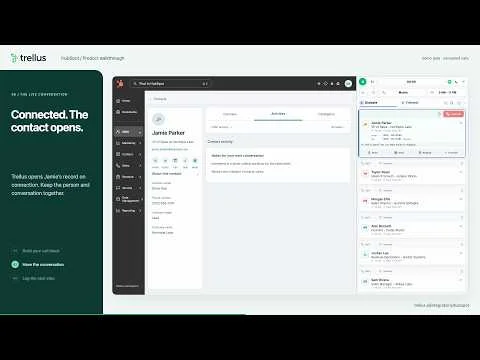 See the HubSpot call flowProduct walkthrough · 2:32
A concrete starting point / HubSpot
In the HubSpot walkthrough, the rep opens Trellus from Contacts and chooses a dialing mode. When a call connects, the contact opens alongside the conversation. The rep then reviews the notes and disposition, logs the call and checks the saved activity.
Use that sequence to evaluate your own quote-follow-up process: what needs to be visible before the call, what the agent must confirm, and what the next person should find afterward.
Explore the HubSpot integrationThe video is a general product demonstration with fictional contacts, not an insurance customer example.
Three distinct reasons to call
A quote request and a renewal conversation need different context. Separate the work before opening the dialer.
Start with the request: what the person asked about, who owns the conversation and whether any information is missing.
Keep the agreed time and reason visible. A callback should pick up the conversation, without asking the person to start again.
Prepare the account context and the questions your qualified team needs to ask. Keep policy work in the systems that manage it.
Make the first pilot useful
Choose one clearly defined contact group and an agent who knows the process. After the call block, review a few saved records together.
Trellus supports the calling workflow. It does not replace policy administration, a carrier quoting portal or your team’s coverage expertise. Platform compatibility and contact permissions come first.
Your pilot checklist
Tick off what your team has decided. This stays on this page and is never submitted.
Keep exploring
A few practical questions
Bring the details of your platform and calling process to the conversation.
Check your exact platform before planning a rollout. The HubSpot example on this page demonstrates a supported CRM workflow; it does not establish support for every agency management system, carrier portal or custom setup.
Browse supported platformsTrellus offers power and parallel dialing on supported platforms, subject to the account’s plan and setup. Use a focused one-at-a-time workflow for a conversation that needs preparation, and evaluate parallel dialing separately for suitable calling lists.
Explore dialing modesThis workflow helps a team place calls and review call notes. Quoting, policy administration and coverage recommendations stay with your existing systems and appropriately qualified team.
See what the dialer doesNo. Your team remains responsible for deciding whom it can call, when it can call, and whether recording is appropriate. Set up your contact permissions, suppression process and approved conversation guidance before starting a campaign.
Review Trellus security informationStart with one workflow
Bring your CRM, the type of contacts you work with and the handoff your agents need.