Skip to content

For real estate teams

Keep the context.
Make the call.
Follow through.

Build a calling routine around new inquiries, agreed callbacks and the people whose plans are still taking shape.

For teams using a supported CRM. Confirm your platform before planning a rollout.

A contact plan with context
  1. Respond

    New inquiry

    Property interest · preferred timing

  2. Understand

    Active conversation

    Questions · next appointment

  3. Follow through

    Future plans

    Time frame · agreed next contact

Illustrative workflow · organize these stages in your CRM
Organized contact listsPower or parallel dialingConversation contextClear follow-up ownership

A concrete starting point / GoHighLevel

Your Smart List.
Your next conversation.

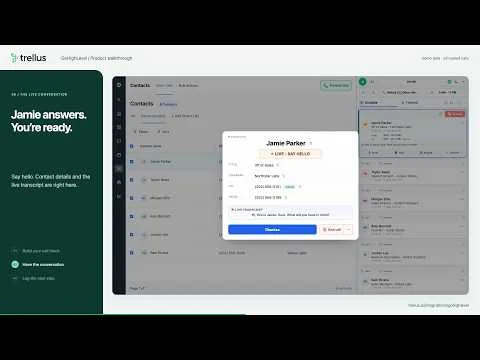
The GoHighLevel walkthrough starts in a Smart List. The rep opens Trellus beside the contacts, chooses power or parallel dialing, and moves into a connected call with a live transcript and call controls.

Afterward, the rep reviews the summary, tags and notes in the call logger before resuming. Evaluate that process with the lists and handoff your agents actually need.

Explore the GoHighLevel integration

The video uses fictional contacts and simulated calls. It illustrates the product workflow, not a real estate customer result. White-label setups need an exact workspace check.

GoHighLevel Smart List in the Trellus calling walkthroughSee the GoHighLevel call flowProduct walkthrough · 2:44

Organize around intent

Different time frames.
Different follow-up.

Keep the contact’s stated plans at the center of the call. Use your CRM to decide which list they belong in and when a next call makes sense.

New inquiry

Start with what
they asked about.

Review the inquiry and property context before the call. Find out whether the person wants details, a conversation about their plans or a specific appointment.

Conversation prompt

“What would be useful for you to know next?”

Active conversation

Make the next
action specific.

Keep questions and agreed timing visible. Confirm the next step, then make the owner and follow-up plan easy to find in the record.

Conversation prompt

“What should we have ready for our next conversation?”

Future plans

Remember their
time frame.

Separate longer-term contacts from immediate inquiries. Record the timing they give you and agree on whether and when to reconnect.

Conversation prompt

“When would you like us to check back in?”

Your pilot checklist

Plan one focused call block.

Tick off what your team has decided. This stays on this page and is never submitted.

Prepare your real estate calling workflow

A practical first session

Choose a list.
Define a useful outcome.

Start with one contact group, rather than combining every lead stage. Decide which context the agent needs and what they should save after the call.

An illustrative follow-up record
Reason for contact
Requested more information
What changed
Timing and questions clarified
Agreed next step
Send the requested details, then reconnect at the agreed time
Owner
The assigned agent

This is a planning example, not an automatic CRM-field mapping. Confirm the saved notes and activities in your exact integration.

Check the fit

Keep your property
and brokerage systems.

Trellus supports calling inside supported platforms. It is not an MLS feed, a property valuation system or a source of homeowner data. If your team needs those capabilities, choose the appropriate system first and assess the calling integration separately.

Check your CRM

Plan the conversation

A little preparation
goes with the product.

Buying guide

Choose a real estate dialer workflow

Conversation guide

Prepare for real estate calls

A few practical questions

Know what fits
before you start.

Bring the details of your platform and calling process to the conversation.

Does Trellus work with our real estate CRM?

Trellus supports specific CRMs and sales platforms. This page shows GoHighLevel; other platforms have their own integration pages. Confirm your exact CRM and workspace before assuming that a real estate CRM, brokerage system or white-label setup is supported.

Find your CRM
Can we call a list from GoHighLevel?

The GoHighLevel walkthrough shows a Smart List, opening Trellus beside the contacts, choosing power or parallel dialing, and reviewing the call logger. Confirm your contact permissions, workspace access and plan before using the same process with your own list.

Watch the complete workflow
Is this a source of property or homeowner data?

No. The example starts with inquiries and contacts your team already manages. Trellus is not presented here as an MLS feed, property database, listing valuation tool or source of contact permission.

Explore the dialer
Can the dialer guarantee more appointments?

No. Results depend on the contact list, timing and conversation. Evaluate the workflow using your own completed conversations, agreed next steps and saved follow-up records instead of treating dial count as an appointment forecast.

Read the calling guide

Start with your agents’ day

Let’s walk through
one real call block.

Bring your CRM, your contact stages and the follow-up process your team wants to use.