Skip to content

For staffing client-development teams

Find the hiring context.
Earn the next conversation.

Use Trellus to work client contact lists in a supported CRM. Keep the account context close while you ask about hiring needs, timing and the next useful discussion.

Build your client business development around account context and hiring decision-makers.

Start with the client’s hiring context
  1. Prepare

    The client account

    Relationship · owner · reason to call

  2. Clarify

    The hiring conversation

    Need · decision-maker · timing

  3. Follow through

    The next discussion

    Confirmed facts · questions · owner

Illustrative workflow · organize these stages in your CRM
Client account contextA clear reason to callConfirmed hiring needsFollow-up ownership

HubSpot calling in practice

Keep the client record
beside the conversation.

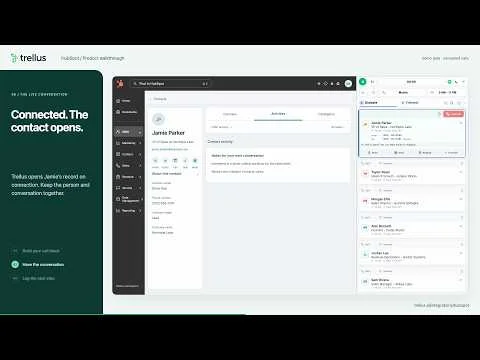
The HubSpot walkthrough shows a rep opening Trellus from Contacts, choosing a dialing mode and moving into a connected call. The rep reviews the notes and disposition, logs the call and checks the saved contact activity.

Evaluate that sequence with a client-development list: can the rep see the relationship, capture what the hiring contact actually confirmed and leave a useful next step for the account team?

Explore the HubSpot integration
HubSpot contact record in the Trellus connected-call walkthrough From a HubSpot contact to reviewed activityProduct walkthrough · 2:32

Prepare for the client’s situation

A hiring conversation
needs a starting point.

A new account, an active hiring need and an existing relationship deserve different questions. The examples below are prompts to adapt, not a prescribed script.

01

A new client relationship

Find out how the company approaches hiring and who owns the relevant decisions.

“When you need to add this kind of role, how does the team usually handle it?”

Record: the current approach, the person involved and whether another discussion is useful.

02

An active hiring need

Clarify what has changed, what the client needs to understand next and the timing they can confirm.

“What makes this hire important now, and what still needs to be decided?”

Record: the stated need, the timing and the questions to resolve in a fuller brief.

03

An agreed account follow-up

Return to the last conversation and let the client explain what has changed.

“When we last spoke, the plan was to revisit this after the team review. Where did that land?”

Record: what changed, what remains open and when the client wants to speak again.

Keep the brief honest

Separate confirmed facts
from the next questions.

A first conversation may uncover a potential need without establishing a complete assignment. Review notes with that distinction in mind before handing the account to someone else.

  • Did the client confirm a role, or is the team still planning?
  • Who can clarify scope, timing and the decision process?
  • What next discussion did the client actually agree to?
Confirm the client-contact system before rollout.

Start with a supported CRM such as HubSpot. Review any ATS connection separately; candidate, job and placement records stay in the systems that manage them.

Your pilot checklist

Prepare a client-development pilot.

Tick off what your team has decided. This stays on this page and is never submitted.

Prepare your recruiting & staffing calling workflow

Before you hand off the account

Leave the next person
a useful brief.

Use your normal CRM process to save the facts, open questions and owner. Check the saved activity so the account team has the details it needs.

  1. The contextWhy the client took the call and the need they described.
  2. The unknownsRole details, timing or stakeholders that still need confirmation.
  3. The next actionThe discussion or information agreed, who owns it and when to follow up.

Check the calling setup

See the tools
behind the workflow.

Dialing modes

Explore parallel and power dialing

Platform fit

Check the exact CRM your team uses

A few practical questions

Know what fits
before you start.

Bring the details of your platform and calling process to the conversation.

Is this workflow for client development or candidate outreach?

This workflow is for client business development: talking with hiring decision-makers about staffing needs, timing and the next discussion. Build the list around client accounts and leave the account team a clear brief.

See the calling workflow
Does Trellus integrate with our applicant tracking system?

Start with the supported-platform directory and check your exact system. The workflow here uses HubSpot client contacts. Review any ATS connection, including candidate, job or placement records, separately before planning a rollout.

Check supported platforms
What should a rep capture after a staffing client call?

Capture what the client confirmed about the hiring need, the person involved, the timing and the agreed next conversation. Mark unanswered questions clearly. Keep candidate and placement work in the systems your team uses for those records.

Watch the call review and logging flow
Where do the client contacts for a call block come from?

Use a client contact list your team already manages. Choose a focused group of accounts and give the rep a reason to call, the relationship context and a useful question about hiring needs. Trellus supports the calling and conversation-review workflow.

Try the illustrative product tour

Start with the client conversation

Bring your CRM
and your account process.

See how a rep can work a client list, review the call and leave context for the next owner.