
Combine Sales Call Rates Without Changing the Question
Choose the right total for unequal rep counts. Work through pooled rates, equal-weighted averages, zero denominators and missing outcomes before sharing a team percentage.
On this page
By Trellus Team ·
One rep's report says 10%. Another says 50%. The equally weighted average of those two rep rates is 30%. To find the share of all attempts that produced an answer, you need the underlying counts. The two calculations can give different answers without either calculator being broken.
Start by writing the question above the total. Then retain each row's numerator, denominator and inclusion rules. This guide uses fictional call counts to show when to pool those counts, when an average of rep percentages is useful, and when the rows cannot yet support a combined number. It is a manual reporting method, not a description of how any Trellus dashboard calculates a metric.
Keep the counts behind each percentage
For this example, an “answer” means the stated answer outcome recorded for an included call attempt. Assume every included attempt has a known outcome and the rows use the same rule. We are counting attempts, not distinct people or accounts. Repeated attempts to the same person remain separate attempts.
| Rep | Answers | Attempts | Answer share |
|---|---|---|---|
| A | 1 | 10 | 10% |
| B | 45 | 90 | 50% |
| C | 0 | 0 | Not applicable: no attempts |
A's rate is 1 ÷ 10. B's is 45 ÷ 90. C has no measured rate: 0 ÷ 0 is undefined. A row with no attempts is different from a row with attempts and no answers. For example, 0 answers from 10 attempts would be a defined 0%.
Don't assume that a column named “connects” always uses this answer rule. It might include a different outcome or population. Establish that definition before combining rows; the cold call connect-rate guide explains why the label alone is not enough.
Pool counts to answer a question about attempts
To ask “What share of the team's included attempts had an answer?”, add the answers and add the attempts, then divide:
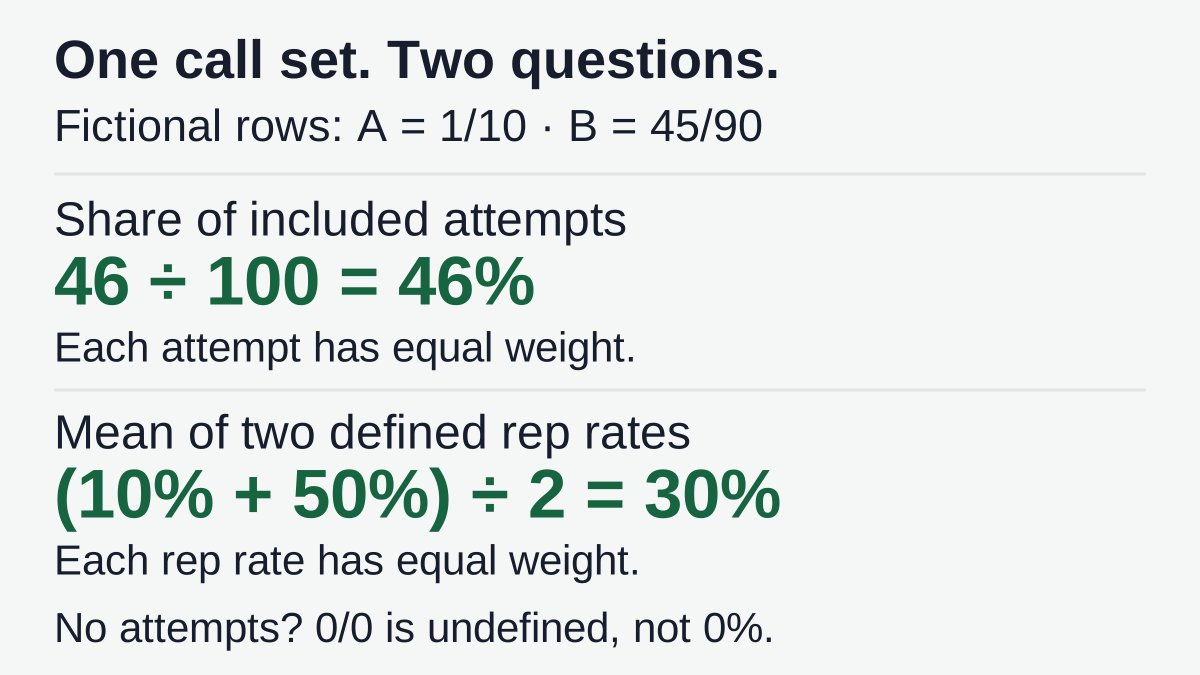
Pooled answer share = (1 + 45) ÷ (10 + 90) = 46 ÷ 100 = 46%.
Each of the 100 attempts gets the same weight. B contributes 90 of them, so B's rate has more influence on the result. This is not an adjustment that favors B; it follows from choosing attempts as the unit being counted.
You can express the same calculation as a weighted average of the unrounded rep rates. A supplies 10% of the attempts and B supplies 90%: 0.1 × 10% + 0.9 × 50% = 46%. The weights come from each row's share of the included denominator, not its share of answers or its rep's seniority.
C's empty row adds nothing to either count. Keep it visible if it helps explain coverage, but don't turn its undefined rate into a measured zero. Also check that each attempt appears in only one included row. Summing a rep export and a campaign export of the same calls would count those calls twice. The dialer and CRM count-reconciliation guide is the next step when the source totals do not agree.
Give reps equal weight only when that is the question
Now ask a different question: “What is the arithmetic mean of the two reps' defined answer rates, giving each rep equal weight?” The answer is:
Equal-weighted mean of defined rep rates = (10% + 50%) ÷ 2 = 30%.
This calculation describes two rep-level rates. It does not describe the answer share of all 100 attempts. A's 10 attempts receive the same group-level weight as B's 90 because the chosen unit is a rep rate, not an attempt.
There can be a reason to report both numbers. Label them separately, say which reps have a defined rate, and retain the attempt counts beside them. “Mean of two active reps' answer rates: 30%” is clearer than “team connect rate: 30%.” Neither result, by itself, proves which rep did better under comparable conditions.
If you insert 0% for C, the mean becomes (10% + 50% + 0%) ÷ 3 = 20%. That adds a number where no rate was observed. For the stated mean of defined rates, exclude C from the calculation and disclose “two defined rates; one rep with no attempts.” If your business needs a measure of participation, report that separately instead of hiding it inside an answer percentage.
Return to original counts before rounding
Displayed percentages may already have lost information. Suppose two more fictional rows have 1 answer from 3 attempts and 1 from 6. Their rates are approximately 33.33% and 16.67%; a whole-percent display shows 33% and 17%.
The pooled result is 2 ÷ 9, or approximately 22.22%. Weighting the rounded display values instead gives (3 × 33% + 6 × 17%) ÷ 9, or approximately 22.33%. The mismatch comes from rounding the inputs first. Adding the original counts avoids that loss for this calculation.
The simple mean of the two exact rep rates is 25%, which again answers the equal-rep question rather than the pooled-attempt question. Don't choose a formula because it happens to reproduce a dashboard's rounded headline. Establish what the headline is meant to measure, calculate from source counts or unrounded rates with valid weights, and round the final display consistently.
If all you have is “33%” and “17%,” ask for the original counts. Those displays cannot uniquely reconstruct how many attempts occurred. Mark the combined attempt rate unavailable until the needed inputs are available; extra decimal places won't recover missing data.
Resolve missing outcomes and incompatible rows first
Pooling requires compatible definitions, not just numeric cells. Keep the same intended reporting window and time-zone convention, counting unit, outcome rule and inclusion policy across the rows. A rate per conversation cannot be added to one per attempt as though they described the same population. The productive-call-rate worksheet covers that separate denominator choice.
Consider a fictional row with 20 attempts: 8 confirmed answers, 5 known non-answers and 7 unknown outcomes. You can report 8 ÷ 20 = 40% as the confirmed-answer share of all attempts, with 7 unknowns disclosed. You can also report 8 ÷ 13 ≈ 61.54% among attempts with known outcomes, again disclosing the 7 excluded unknowns. Those are different questions. Neither establishes the answer share that would be observed if all 20 outcomes were known.
Do not silently classify the 7 unknowns as non-answers or pool an all-attempts denominator with a known-outcomes-only denominator. Choose and label the policy, retain the missing count, and apply the same policy to each included row. If you cannot establish compatible inputs, leave the combined rate unreported and list what needs reconciliation.
Be equally careful with distinct people or accounts. A person present in two rep lists should not become two distinct people in a team total. The disjoint-attempt example above does not validate adding overlapping unique-entity counts. And even a correct pooled attempt rate can hide audience differences; use the existing call-list comparison guide before drawing conclusions about list quality or rep performance.
Use this decision table before sharing the total
| Question | Calculation | Required check |
|---|---|---|
| What share of included attempts had the outcome? | Sum compatible outcome counts ÷ sum compatible attempt counts. | No duplicate attempts; consistent definitions and missing-outcome policy. |
| What is the mean of defined rep rates, each rep weighted equally? | Sum those unrounded rep rates ÷ number of defined rep rates. | State which reps qualify; disclose no-attempt rows separately. |
| Rows use incompatible or unknown definitions. | No combined rate yet. | Reconcile the missing inputs instead of guessing weights. |
For the first fictional table, the first question produces 46%, the second produces 30%, and the no-attempt row is disclosed rather than scored. Keep those labels with the values when exporting, copying into a slide or comparing another period.
Save a calculation note someone else can reproduce
Copy this card beside your report. It records the aggregation decision, not customer details or a second contact database.
Question this total answers: ____
Window and time-zone convention: ____
Counting unit and outcome definition: ____
Included groups and inclusion rule: ____
Original numerator and denominator counts for each group: ____
Unknown outcomes and their treatment: ____
Duplicate or overlapping rows checked against: ____
Chosen calculation and weights: ____
No-denominator rows disclosed: ____
Unrounded result and final display rounding: ____
Unresolved exception and person responsible: ____
A completed note for the first example would say: “Share of included attempts with the stated answer outcome; same window and rule; A 1/10, B 45/90, C 0/0; no unknown outcomes or duplicate attempts. Sum counts: 46/100 = 46%. C has no defined rate. Separately, the equal-weighted mean of A and B's rates is 30%.” Another reader can now check both the arithmetic and the question it answers.
When evaluating calling software, bring that question and a small approved set of report rows to the dialer setup discussion. Confirm the actual fields, outcome definitions and supported reporting workflow for your platform; this worksheet does not establish a product's calculation or export behavior.
Before sharing a team percentage, ask one final question: could somebody reproduce it from the saved counts and rules? If not, save the missing inputs or label the total unavailable. A precise-looking percentage is not a substitute for an answerable question.