Our Top Picks


Your dialer says eight calls. The CRM says nine activities. Neither number tells you whether a call is missing.
Before changing the integration or asking reps to log everything again, check what each report counts. Then compare the underlying records for the same people and time window. The useful result isn't two matching totals. It's an explanation for each difference, with any genuinely unresolved call left visible.
This guide gives sales operations leads a manual reconciliation worksheet and a fictional worked example. It doesn't require changing CRM fields, deleting activities or placing more calls. You do need permission to view the relevant records; if your report only shows totals, ask an administrator for the permitted detail.
First, agree on what counts as a call
Write one sentence at the top of the comparison: “We're comparing outbound call attempts by these reps during this interval.” That gives you something firmer than two dashboard labels.
A dial attempt, a call activity, a completed task and a unique contact are different units. Calling the same person twice can produce two legitimate attempts. A task to call someone tomorrow is not evidence that either attempt happened. And an attempt isn't necessarily a conversation, let alone a qualified opportunity.
HubSpot provides a useful example of why the labels matter. Its sales reporting documentation describes separate call-outcome and completed-activity reports. Completed activities can include more than calls, and tasks in that report use their due date for date filtering. The report's description and filters are worth reading before comparing its total with a dialer.
Check your own platform's report definitions. Don't assume a report called “activity” is call-only, or that a status called “completed” means the rep reached the intended person. If your team also needs a consistent way to record what happened, the call disposition template handles that separate job.
Copy the report settings before touching them
Keep the original views intact. Record the settings below for both reports, then work in a permitted copy or temporary analysis. Otherwise, a filter change can make the discrepancy disappear without explaining it.
- Report: saved-view name or link, plus the time you read or exported it.
- Unit: call attempts, call activities, tasks, unique contacts or something else.
- Interval: exact start and end, including the time zone and whether the end is included.
- Date field: when the call occurred, when the activity was created, or another date.
- People: reps or owners included, and which ownership field the report uses.
- Scope: inbound versus outbound, statuses, outcomes and any hidden or inherited filters.
- Detail available: record links or IDs, timestamps and any permissions that limit what you can inspect.
For example, two reports labeled “Monday” can select different records if they use different time zones. A call at 11:55 p.m. in one zone may fall on Tuesday in another. Convert the timestamps to one agreed zone; don't move the call's actual timestamp to make it fit.
The date field matters independently of the time zone. HubSpot's activity-property definitions distinguish when an activity happened from when its record was created and last modified. They also separate call direction, status and outcome. Those are HubSpot definitions, not proof of how your particular dialer fills those fields.
After recording the originals, narrow both sides to the same interval, people and type of call where the reports allow it. If one side cannot represent that scope, write down the limitation instead of calling the totals comparable.
Match individual attempts, not just phone numbers
Start with a short completed call block that you can inspect in full. If you sample a larger period, label it as a sample; finding an explanation for ten rows does not reconcile the whole day.
Make one worksheet row per dialer attempt, and keep a second section for CRM activities that have no match. A stable call identifier exposed on both sides is the strongest starting point. If there isn't one, compare the record reference, rep, time and direction together. Mark the match as uncertain when those details don't establish it.
Do not use the contact or phone number alone as a unique key. Two calls to one person may be intentional. Conversely, two activity records might describe one call. An activity duplicate is a reporting question; two reps calling the same prospect is a different coordination problem.
Use these headings for the reconciliation sheet:
- Dialer reference / CRM reference: use exposed identifiers or links, not invented IDs presented as system values.
- Record, rep, time and direction: enough context to compare the attempt without copying unnecessary personal details.
- Status and outcome: retain each system's original label before applying an agreed grouping.
- Match basis: shared ID, manually checked details, or uncertain.
- Classification: matched; outside scope; confirmed duplicate activity; or unresolved.
- Evidence and next check: what supports the classification, who will investigate, and when.
Keep the sheet in an approved workspace. Record links are usually more useful than a copied transcript or a column of personal phone numbers. Only share the details the reviewer is authorized to see.
A worked example: eight attempts, nine activities
Everything in this example is fictional. The D and C references are teaching labels, not Trellus or HubSpot identifiers. Assume the reviewer has checked the underlying records described below.
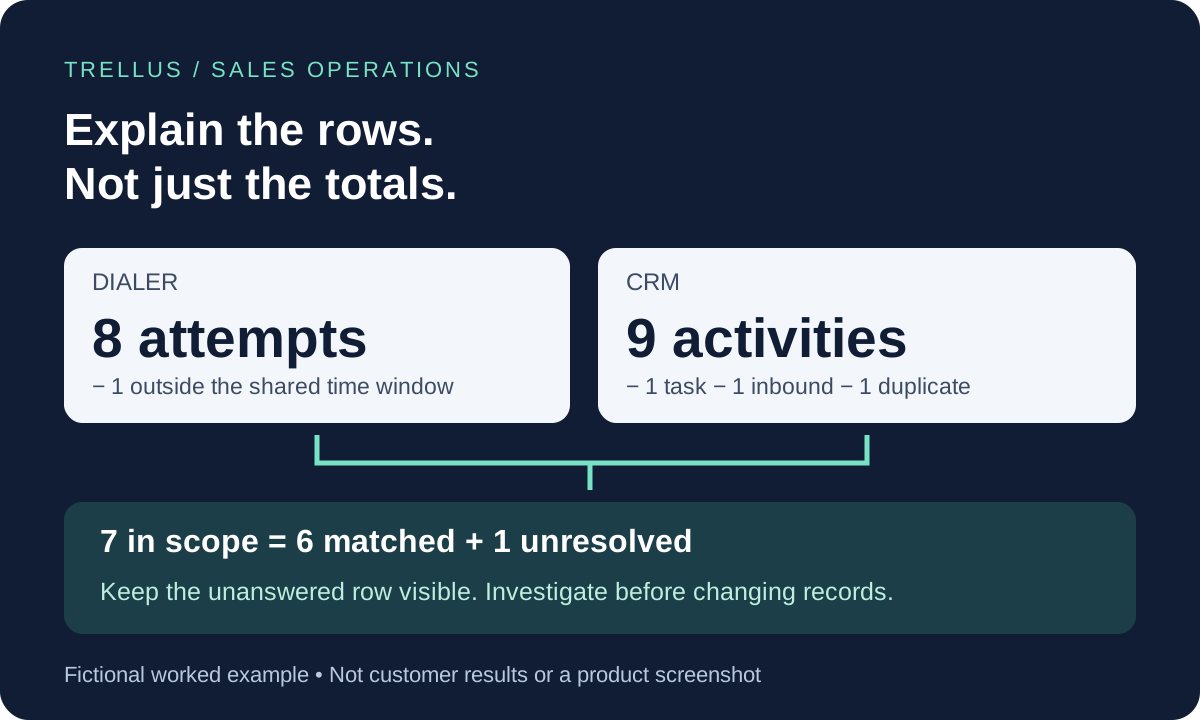
The agreed comparison is outbound attempts during one rep's Monday call block, from 9:00 a.m. inclusive to 10:00 a.m. exclusive in the same time zone. The original dialer view contains eight attempts. The original CRM view contains nine activities.
Six ordinary matches
D01 through D06 each match one distinct CRM call activity, C01 through C06. The reviewer confirms the rep, record, timestamp and direction for each pair. There are six matched attempts. Their outcomes can differ; a no-answer attempt doesn't become invalid just because another call reached someone.
Three CRM rows explain the extra activity
C07 is a confirmed duplicate entry for D02. In this fictional case, the reviewer checks the two activity records and confirms that a manual entry describes the same call already logged in C02. Count that call once in this analysis. Don't delete either record as part of reconciling the report; any correction belongs in the administrator's normal process.
C08 is inbound. It is a real call, but outside this comparison's outbound-only scope. Excluding it here doesn't mean it should disappear from the team's inbound reporting.
T01 is a follow-up task. It belongs in the rep's workload but is not a call activity. Remove it from this call-count comparison, not from the CRM.
Two dialer rows need different treatment
D07 falls outside the common interval. Once its time zone is normalized, the attempt is at 8:55 a.m. The original dialer filter included it; the agreed 9–10 a.m. block does not. That is an explained boundary difference, not a missing CRM call.
D08 remains unresolved. It is outbound, belongs to the selected rep and falls inside the common interval, but no corresponding CRM activity has been located. Leave it unresolved. The report alone can't tell you whether the activity is hidden by a filter, saved against another record, still being processed, or absent because something failed.
The arithmetic is now clear:
- CRM: 9 activities − 1 task − 1 inbound call − 1 confirmed duplicate entry = 6 distinct in-scope calls.
- Dialer: 8 attempts − 1 time-boundary exclusion = 7 in-scope attempts.
- 7 in-scope attempts − 6 matched calls = 1 unresolved attempt.
The raw totals differed by one, but the explanation involved several rows on both sides. A subtraction by itself would have hidden that. Even equal totals could conceal one missing call and one duplicate activity.
Escalate the unresolved row with a specific question
For D08, the question is: “Where was this attempt saved, and should this report include it?” Send the administrator the permitted call reference, CRM record link, rep, timestamp with zone, original report settings and the checks already performed. Include when each view was refreshed. Redact unnecessary customer details from screenshots.
Check the underlying record before deciding the integration is broken. If the activity exists but the report omits it, investigate the report's filters, associations or access. If the record isn't found, ask the administrator to check the documented logging behavior and available error history. If a documented processing delay applies, agree on one recheck time and preserve the unresolved row until then. Don't invent a universal waiting period.
A reconciliation sheet should not trigger a second call to the prospect. Nor should a rep add a placeholder activity simply to make a dashboard total match. Both actions can make the original question harder to answer.
When the administrator resolves the row, record what changed and verify it in the relevant view. Keep “explained reporting difference” separate from “missing activity repaired.” A count match doesn't prove that notes, outcomes or callback commitments are correct; inspect those fields separately when they matter.
Make this one check part of your dialer evaluation
If you're changing tools, include a small, permissioned test set in your dialer pilot. Agree in advance which attempts should appear in the CRM, where they should be associated, which fields should be saved and which report should count them. Include more than one outcome and a repeated attempt to the same test record. Do not place real prospect calls just to fill the worksheet.
For a Trellus evaluation, find your platform in the integration directory and ask to see the exact call-to-activity flow for that setup. Bring this worksheet to the demo. It is a manual checking method, not a claim that Trellus automatically reconciles reports or supplies the same identifiers and logging behavior on every platform.
Finish with a short statement you can defend: which records were compared, which differences were explained, and which attempt still needs an answer. That's more useful than forcing two totals to agree.
Method: original worksheet and fictional example from Trellus. HubSpot's public reporting and activity-property documentation was checked on October 5, 2026. No customer dataset or account-level integration test is presented.

Power and parallel dialing in your CRM.