
Time Zone vs UTC Offset: Record a Callback Correctly
Keep the buyer's agreed clock time intact when a date change crosses a clock change. Use worked conversions and a reusable time-check card.
On this page
By Trellus Team ·
A callback at 10 a.m. needs a date and a time zone before another rep can schedule it reliably. A numeric UTC offset, such as −04:00, identifies the local clock's relationship to UTC at that moment. It isn't a promise that the same place will use that offset on the callback date.
Keep the buyer's agreed local date and time, confirm the intended time zone, and check the offset for that future date. If your team also records UTC, verify that the UTC value converts back to the agreed local time. Don't reuse the offset from the original call just because the contact hasn't moved.
This guide explains that time check. It doesn't establish permission to call, permissible calling hours, or how a particular CRM schedules tasks. Those are separate questions. The callback note guide covers the buyer's instruction, the agreed window and the team's separate internal reminder.
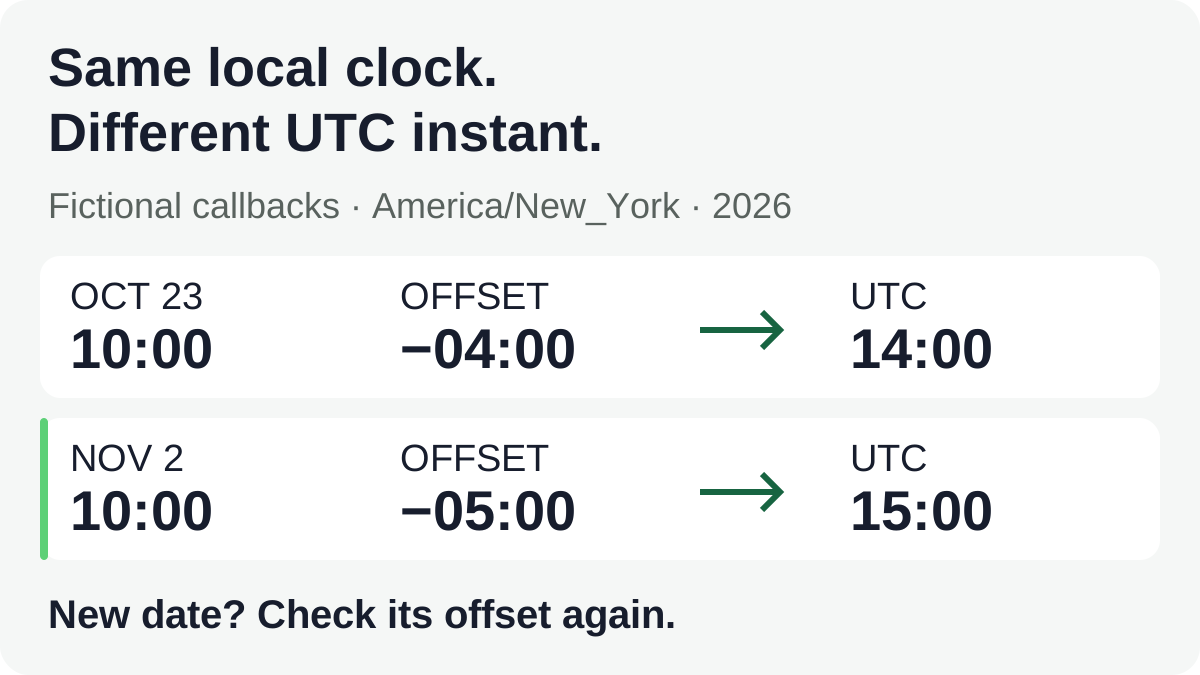
A time zone and an offset answer different questions
Think of the local date and time as what a person expects to see on their clock: November 2, 2026 at 10:00 a.m. A named time zone, such as America/New_York, supplies the rules needed to interpret that clock reading. The offset is the resulting difference from UTC for the chosen date and time.
UTC is a common reference for describing an instant. Two people can display that same instant differently. A New York clock reading 10:00 and a London clock reading 15:00 may describe one event, not two appointments. The difference between the displays depends on the date.
The IETF's time-zone definitions distinguish a zone's rules from an offset attached to one timestamp. That distinction matters when you move a task to another date. An offset alone doesn't tell you whether a daylight-saving change falls between the original call and the callback.
You don't need to put technical zone identifiers in a buyer-facing message. Confirm the place or zone in ordinary language, then use the supported named-zone choice in your work system where available. If the system only accepts an offset, determine the offset for the agreed date and retain the confirmed zone in the note. Don't assume a field called “time zone” accepts every timestamp format described by a technical standard.
The New York–London difference changes for one week
Consider a fictional rep in London arranging a callback for a buyer who confirms 10:00 a.m. New York time. The following examples describe the clocks, not recommended calling hours or actual meetings.
In 2026, the UK's clocks go back on October 25. The US daylight-saving period ends November 1 where that change is observed. These dates were checked October 24, 2026. They aren't worldwide rules; check the actual location and date when using the method elsewhere.
| Agreed date | New York local time and offset | Same instant in UTC | London display |
|---|---|---|---|
| October 23, 2026 | 10:00, UTC−04:00 | 14:00 UTC | 15:00, UTC+01:00 |
| October 26, 2026 | 10:00, UTC−04:00 | 14:00 UTC | 14:00, UTC+00:00 |
| November 2, 2026 | 10:00, UTC−05:00 | 15:00 UTC | 15:00, UTC+00:00 |
The buyer's requested clock time stays at 10:00 in all three rows. The London rep cannot safely turn that into “always five hours later.” For the middle row, London is four hours ahead of New York. After the US change, the five-hour difference returns.
Read each row as one instant with several labels. On November 2, 10:00 with offset −05:00 is 15:00 UTC: add five hours to the local reading to reach UTC. London is then at offset +00:00, so its clock also reads 15:00. The calculation doesn't create a new commitment; it helps the rep honor the one already agreed.
When the buyer changes the date, recalculate the time
Suppose the fictional buyer originally agreed to October 23 at 10:00 New York time, then asks for November 2 at the same local time. The original UTC value was 14:00. Keeping 14:00 UTC on the new date would produce 09:00 in New York, an hour before the newly agreed 10:00.
The correct replacement is November 2 at 10:00 in America/New_York, which corresponds to 15:00 UTC for that date. Copying the original −04:00 offset into the new callback would be a different way of making the same mistake.
Before changing a task, decide what the buyer meant by “the same time.” Usually the conversation will make the intended local clock clear; when it doesn't, ask. Don't silently choose between preserving the buyer's clock time and preserving the old UTC time. Those choices can produce different appointments.
Keep the earlier instruction as history and make the replacement obvious to the next rep. A useful note is: “Moved from October 23 to November 2; buyer confirmed 10:00 a.m. New York time. New reminder checked as 15:00 UTC.” Avoid leaving two tasks that both appear to be the current commitment.
If the buyer only requested an afternoon window, preserve the window. Your system's exact due time may be an internal reminder rather than a buyer-agreed appointment. Correct timezone arithmetic doesn't justify turning an approximate request into a precise promise.
Some clock readings need clarification
“10 a.m. tomorrow” is incomplete if the note doesn't say whose clock or which date “tomorrow” refers to. Save an explicit calendar date and the confirmed zone. Don't infer the buyer's current zone from a phone area code, company headquarters or a previous conversation. Those may be clues for a question, not confirmation.
Clock changes can also make a local time ambiguous. In New York on November 1, 2026, 01:30 occurs twice: once at UTC−04:00 and once at UTC−05:00. Those readings correspond to 05:30 UTC and 06:30 UTC respectively—an hour apart. This is a timestamp example, not a suggestion to place sales calls at that hour.
Other local clock readings can be skipped during a forward change. A system may reject or adjust a nonexistent time, and different products may handle an ambiguous one differently. Don't interpret a successfully saved task as proof that the system selected the instant the person intended.
If a date/time combination is ambiguous or inconsistent, clarify it before treating it as a confirmed reminder. A message can state the full date, local time and place, then ask the person to confirm the intended occurrence. You don't need to make them debug a timestamp, and you shouldn't resolve the uncertainty by guessing.
Use a time-check card, not another copy of the contact record
Keep the following beside the approved callback record. It captures the time interpretation; it doesn't replace the existing owner, permission or conversation notes.
Buyer's original timing instruction: ____
Explicit callback date and local time or window: ____
Confirmed place or named time zone: ____
UTC offset for that callback date/time: ____
Corresponding UTC instant, if your team uses it: ____
Rep's displayed date/time and zone: ____
Read back to buyer's local clock: ____
Unconfirmed or ambiguous detail and who will clarify it: ____
For the November 2 example, the confirmed zone is America/New_York, the local time is 10:00, the offset is −05:00, and the UTC instant is 15:00. The London rep's display should show 15:00 on November 2. Converting that instant back to New York should return the original 10:00.
A mismatch is a reason to inspect the date, selected zone and stored offset. It isn't a reason to overwrite the buyer's instruction to agree with the software. Keep the unknown visible until somebody resolves it.
The sales call log worksheet has separate local-time and offset fields for the call and the follow-up. Its columns don't calculate every future zone change for you. Use the check above when filling them, and keep customer details in the team's approved system rather than expanding a teaching worksheet into a second customer database.
Check the saved display before relying on the reminder
Use the actual supported calendar or task preview to inspect the agreed date in both the buyer's zone and the rep's zone. Reopen the saved task when that can be done without sending invitations or creating a meeting. Check which date and time will surface for the responsible rep, not just what an administrator sees.
Don't paste a technical timestamp into an import field unless that product documents the format. An offset field, a named-zone selector and a free-text note aren't interchangeable. If a tool cannot retain the necessary context, keep the confirmed local instruction visible and arrange an approved manual check instead of assuming an automatic conversion occurred.
Repeat the check after a date change, a change of responsible rep, or a move between systems. If a recurring reminder is involved, confirm whether it follows a local clock or a fixed elapsed interval; this guide doesn't establish any provider's recurrence behavior.
The finish line is simple: the buyer's agreed local time, the stored instant and the next rep's display describe the same intended callback. When they don't, fix the interpretation before relying on the reminder.