How to Export Trellus Calls Without Mistaking the Row Cap for the Total
Collect smaller intervals, replace retries and check coverage before calling a file complete.
On this page
If a call-data request returns exactly 1,000 rows, don't put “all calls” on the file. Trellus returns the newest matching sessions up to the requested limit; it doesn't provide a cursor for the next page. You may have the whole interval, or only its newest part.
The practical way forward is to split the interval, keep a record of each request and combine only the successful pieces that didn't fill their limit. This guide walks through that process, including a fictional 1,070-session example and a worksheet you can copy into an approved working document.
Use this with an existing, authorized server-side Call Data API connection. It is a collection procedure, not a new export feature or a tested customer dataset. If you only need a total, use the API's aggregate endpoint instead of collecting every row. The Call Data API reference owns the endpoint, field and rate-limit definitions.
Write down the scope before the first request
“Yesterday's calls” isn't enough to reproduce an export. Name the reporting time zone, write an explicit start and end with their UTC offsets, and resolve both to UTC. A local calendar day is not always 24 hours when daylight saving time changes. Don't calculate every local day by adding 24 hours to midnight.
Trellus's top-level start is inclusive and end is exclusive. Write the interval as [start, end): include the start, exclude the end. Set both values explicitly. Leaving the end at its default of “now” changes the target while you work.
Keep the permitted team, readable reps, call filters and selected columns beside those bounds. This guide's example selects call sessions with conversation_type = 1. It does not define those rows as outbound attempts, answered calls, unique prospects or qualified conversations. Add only the documented filters that your actual question needs, and keep them unchanged across child requests.
Verify readable users through /visible in your existing connection. A team_id selects a permitted team; it doesn't grant access. An API key inherits its user's permissions and is not a separately restricted read-only credential. Keep it server-side and out of worksheets, screenshots, prompts and logs. The authentication reference explains the headers and scope.
Start with a small set of columns
For a collection check, session_id, started_at and resource_id are enough to identify rows, inspect their times and associate them with readable reps. Don't collect phone numbers, names or transcripts just to count rows. Add necessary fields only within your organization's approved access and retention rules.
The request below describes October 1, 2026 in UTC. It contains no credential and sends nothing from this page. Use the documented POST endpoint, https://rpt-2.trellus.ai/session-list-v6, through your existing server-side client.
{
  "start": 1790812800000000,
  "end": 1790899200000000,
  "cnf": [
    [{ "column_name": "conversation_type", "operator": "EQ", "value_safe": 1 }]
  ],
  "limit": 1000,
  "select": ["session_id", "started_at", "resource_id"]
}
Watch the units. Top-level request bounds use Unix microseconds. Returned started_at values, and values in a started_at filter, use seconds. In JavaScript, the reference uses Date.parse(ISO_WITH_TIMEZONE) * 1000 for request bounds. Don't apply that multiplication again to an already converted value.
The response is an array of positional rows, not objects named after your columns. With the select above, cell 0 is the session ID, cell 1 is the start time in seconds, and cell 2 is the rep/resource ID. Save that column order with the result. Changing the header order without changing the request would mislabel the data.
Split a full interval; don't append another copy
For each successful response, compare its row count with the limit you actually requested. Fewer rows means that request did not fill its cap. Exactly the limit means coverage is still uncertain—even when the interval happens to contain exactly that many sessions.
- Record the parent. Save the exact bounds, scope, limit, request time, status and returned row count. If it filled the cap, label it split; excluded from final rows.
- Choose a midpoint. Replace
[A, B)with[A, M)and[M, B). Use the same exact value for the first child's end and the second child's start. Don't subtract a second or add a “safety” overlap. - Check both children. Keep a successful child that returns fewer than its limit. Split a child that fills its limit again. A failed request stays pending; it isn't an empty interval.
- Combine only the final pieces. These are the successful, uncapped intervals with no children of their own—the leaves of your split. Keep parent responses for the audit trail, not in the final dataset.
Don't move the next request's end to the oldest timestamp in a capped response and assume that creates a safe next page. Several sessions can share that timestamp. Without a documented tie-breaking cursor, a timestamp-only shortcut can omit or repeat rows.
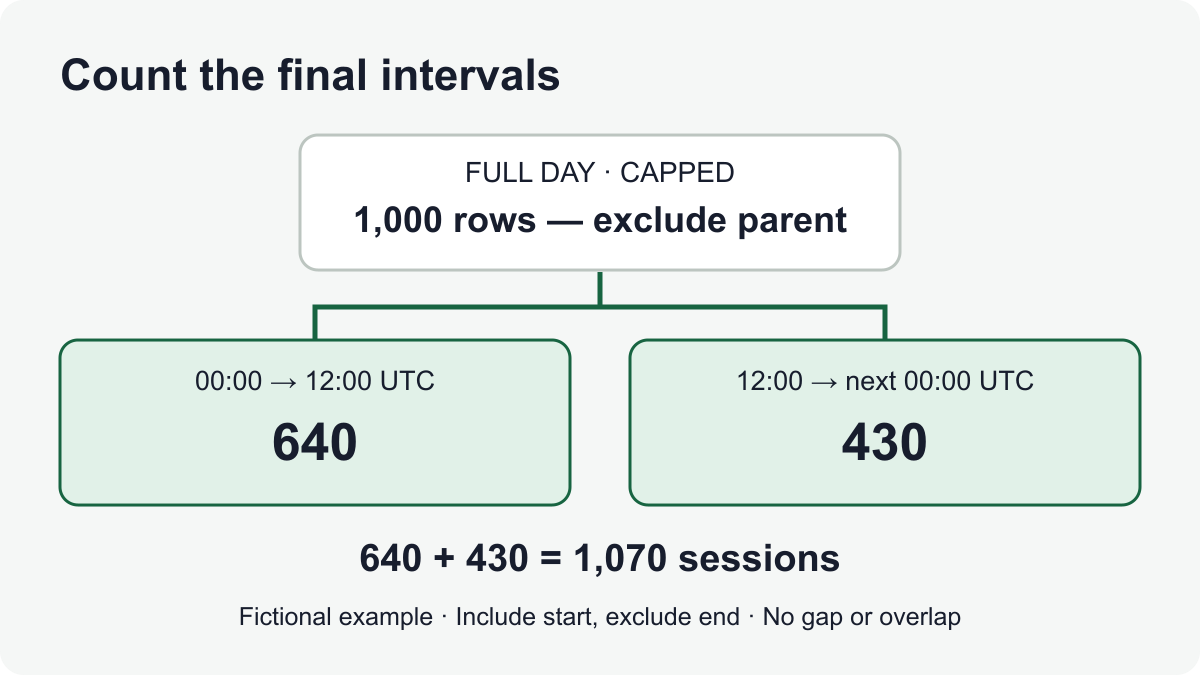
A fictional export: 1,000 rows become 1,070
All counts below are invented to explain the method, not Trellus benchmarks or a live API test. Assume the dataset stays unchanged during these requests, both children succeed, and their returned session IDs are distinct.
| Request | Interval | Rows / limit | Treatment |
|---|---|---|---|
| P | 00:00 inclusive → next 00:00 exclusive | 1,000 / 1,000 | Split. Keep for reference; exclude these rows from the final set. |
| P.1 | 00:00 inclusive → 12:00 exclusive | 640 / 1,000 | Successful uncapped leaf. Include once. |
| P.2 | 12:00 inclusive → next 00:00 exclusive | 430 / 1,000 | Successful uncapped leaf. Include once. |
The two leaves cover the parent's entire interval with no gap or overlap. Their combined count is 640 + 430 = 1,070. It is not 2,070: the parent's 1,000 rows are superseded, not another batch to add. A session starting exactly at noon belongs to P.2, not P.1.
Now change one detail: P.2 fails with a server error. You have 640 collected rows and an unresolved half-day, not a 640-call day. Keep that state visible. If a later successful P.2 response contains 1,000 rows, split P.2 rather than declaring the retry complete.
Make retries replace attempts, not create new calls
Give each interval a stable label such as P.2, and give its attempts separate labels such as P.2/a1 and P.2/a2. Only one accepted response for that leaf should feed the combined dataset. Preserve earlier attempt status and timing in the ledger without appending both bodies.
| Attempt | Result | Rows accepted | Decision |
|---|---|---|---|
| P.2/a1 | 503 response; no successful list | None | Keep P.2 unresolved. Retain status and time; use the bounded retry policy. |
| P.2/a2 | 200 response; 430 rows at limit 1,000 | 430 | Accept this response for P.2. P.1 plus P.2 now contributes 640 + 430 distinct IDs under the example's unchanged-data assumption. |
If you later re-collect P.2 successfully, replace its accepted response as a whole and record the change. Don't append the new 430 rows to the earlier 430. If the new response fills the cap, P.2 becomes unresolved again and needs splitting; an older accepted file cannot establish what the newer capped response omitted.
Deduplicate the combined rows by session_id. Do not use the phone number, contact or rep-plus-time as the unique key: separate calls can share those values. If the same session ID has conflicting values across responses, retain the discrepancy for investigation rather than silently choosing whichever arrived last. Deduplication removes repeated IDs; it does not recover an omitted interval.
A repeated ID across supposedly disjoint leaves also needs an explanation, even if its selected values match. Recheck the exact request bounds, scope and collection times before describing that union as fully covered. Removing the duplicate is not a substitute for that check.
The reference's default session-list budget is two requests per four seconds, shared by v5 and v6 for the same user. Pace calls at least 2.5 seconds apart and coordinate other workers using that user's key. Account overrides and upstream protection can differ.
For a 429 response, wait the Retry-After delay in seconds. Use a bounded retry policy for transient 5xx failures. Set your attempt and elapsed-time limits before starting; after those limits, leave the leaf unresolved. Errors may be plain text, so don't let a failed JSON parse hide the original status. Stop on authentication or permission failures and investigate the existing connection—don't rotate accounts or broaden access to finish the file.
Use this coverage worksheet before releasing the file
Copy these headings into an approved document. Add one interval row per leaf, with its attempt history linked or recorded alongside it. Keep credentials and unnecessary customer data out of the worksheet.
| Leaf / parent | Start inclusive / end exclusive, UTC | Scope / column-order reference | Accepted attempt / saved response | HTTP / rows / limit / retrieval times | Included, replaced or unresolved — reason |
|---|---|---|---|---|---|
| Fill in | Fill in both exact bounds | Link the unchanged scope | Fill in, or “none” | Fill in, including errors | Fill in; don't leave an unknown state blank |
Retain split parents separately with an excluded; replaced by these children entry. Sort the final leaves by their start. The first must start at the original start; each following start must equal the previous end; the last must end at the original end. Mark any failure of those checks on the affected leaf. Then apply the checks below to the whole file.
| Check | What to record | What blocks a full-coverage label |
|---|---|---|
| Original scope | Local dates, named zone, resolved UTC bounds, permitted team/reps, filters and column order. | Different scope between requests, or unreadable people treated as included. |
| Leaf identity | Leaf label, parent label, exact inclusive start and exclusive end. | A gap, overlap, or both a parent and its children included. |
| Accepted response | Attempt label, request/response times, HTTP status, requested limit, returned rows and saved result reference. | A failed or unvalidated response, or rows equal to the requested cap. |
| ID check | Combined row count, distinct session IDs, duplicates and conflicting versions. | Unexplained duplicates, missing IDs or conflicting values. |
| Coverage check | Sorted leaf bounds join exactly from the original start to its end. | Any unresolved or omitted leaf, including a dense interval you couldn't split usefully. |
| Count cross-check | Same-scope aggregate count, collection times and any difference from distinct exported IDs. | An unexplained difference; matching totals alone don't establish identical records. |
| Release note | What was collected, access limits, collection period and remaining uncertainty. | A claim of a point-in-time snapshot or company-wide access you haven't established. |
A successful 200 response containing [] is a zero-row leaf for that readable scope and those filters. A timeout, 401, 429 or 5xx is not. Keep these cases separate even when your collection program produces no rows for both.
Know when smaller windows stop helping
If a very narrow interval still fills the cap, inspect the documented rep filters only when they can form a known, exhaustive and nonoverlapping partition of the original readable scope. Don't quietly drop unassigned, unknown or inaccessible records to make the pieces fit. A directory of visible reps by itself is not proof that every matching session falls into exactly one proposed filter.
Sessions sharing a timestamp can make repeated time splits unhelpful. Stop at your chosen request/time budget and record the exact unresolved interval. Ask for supported help with that collection problem rather than inventing an offset or calling the remaining rows a sample of known size.
There is another limit even after every leaf is uncapped: these requests are made at different times. The documented API contract does not promise a frozen snapshot across them. A fixed end time stops the requested period moving forward; it doesn't freeze later corrections or changes to access.
Use metric-details-v7 with the same bounds and top-level filters and a counting select, { "cnf": [] }, as a cross-check. Record when you queried it. A mismatch needs investigation; a match is useful but isn't proof that every field or record is identical. If you need an immutable snapshot for a formal audit, establish a supported process for that requirement before labeling this export as one.
The final file should say what it actually contains: for example, “Call sessions collected for this readable scope and UTC interval; all recorded leaves returned below their cap; collected between these times.” If a leaf remains unresolved, label the file partial and name that gap. That gives the next reviewer a specific place to resume.
If the next question is why the CRM reports a different number, use the separate dialer-to-CRM reconciliation guide. For other calling tasks, return to How-to Guides.
Method: original collection worksheet and fictional worked example from Trellus. Product limits and request shapes follow the public Call Data API documentation checked October 24, 2026. No customer-data request, account connection or production export test is presented.