What Is Salesloft? CRM, Cadences and Calling Explained
Understand Salesloft's Person records, cadences, calling and conversation review through one worked example, then decide where Trellus fits.

On this page
Salesloft is software for sales engagement and revenue workflows. Reps use it to organize outreach, work email and call steps, and keep the next action with the buyer's record. Managers use its conversation, deal and reporting tools to review that work.
Its current platform overview describes a broader Predictive Revenue System, including Cadence, Conversation Intelligence, Deals, Rhythm and Clari Forecast. For a rep learning the platform, the useful starting point is simpler: understand the person you are contacting, the work due today and the result you need to save.
Is Salesloft a CRM?
Salesloft works alongside a CRM. The CRM holds the team's customer, account and opportunity records. Salesloft organizes outreach around connected records, with sequences, communication tools and work priorities.
That does not make a CRM contact, a Salesloft Person and a call task the same thing. A Person identifies someone in Salesloft. A call task identifies work to do. An activity records what happened. Salesloft's integration documentation distinguishes those identities and the relationship to a CRM record.
CRM products can also provide calling, tasks and automation. The practical question is which system your reps work from and which record owns the next action. Check the configured connection and field mappings before assuming that every update appears everywhere.
What does a Salesloft cadence do?
A sales cadence is a sequence of outreach steps spread over time. Salesloft's Cadence product supports work across email, phone and social touchpoints, with templates, snippets and due steps for the rep to execute.
For example, a prospect may receive an email before a call becomes due. The cadence keeps that planned sequence together. When the rep starts the call, they need the right Person, phone number and previous context, not just a count of today's tasks.
A planned step is different from a completed interaction. A social step is not proof that a message was sent automatically. Similarly, an email open or link click can inform prioritization without establishing buying interest or a booked meeting.
Follow one Person through a call and its next step
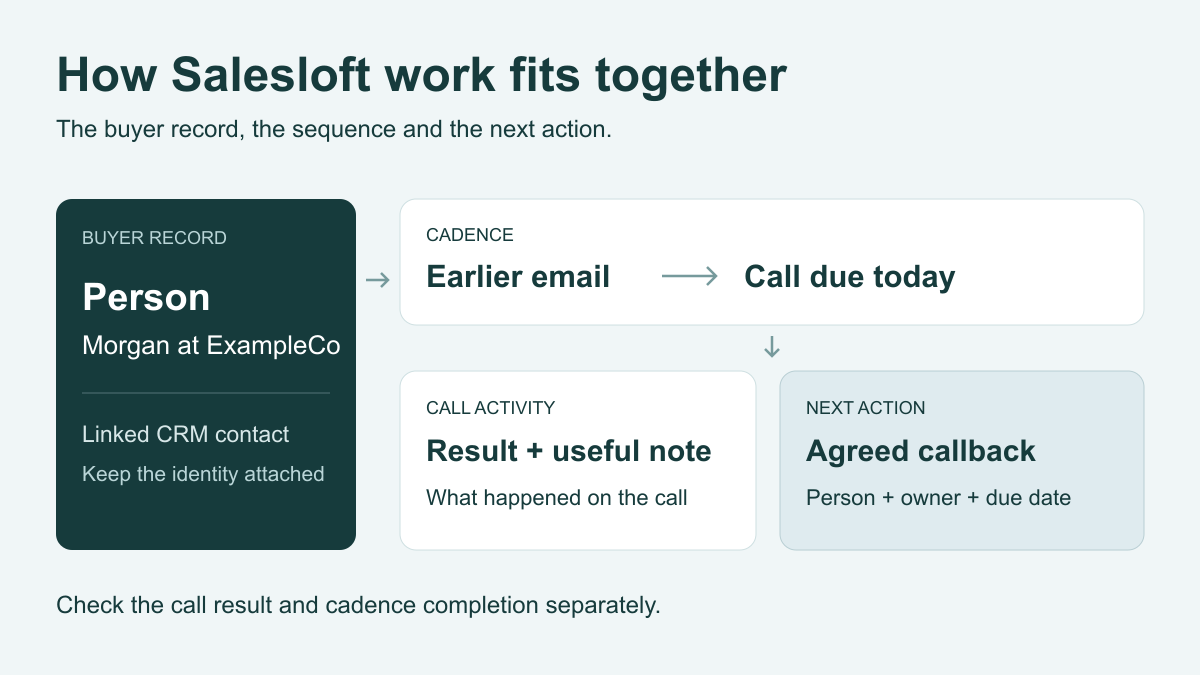
Consider a worked example: Morgan at the fictional company ExampleCo is linked to a CRM contact and enrolled in a cadence. A call is due after an earlier email. During the conversation, Morgan requests a callback about renewal.
| Record or work | What it means here | What to check |
|---|---|---|
| CRM contact and Salesloft Person | Related records identify Morgan and ExampleCo. | The call belongs to the intended person and uses the intended phone number. |
| Cadence | The planned outreach contains the earlier email and today's call step. | The rep can see the sequence and previous context. |
| Due call action | The rep has specific work to complete for Morgan. | Identify the originating step. A standalone call may have no cadence step to finish. |
| Call activity | The saved result describes the attempt and conversation. | The Person has the actual outcome, useful note and available call details. |
| Next action | Avery owns the agreed callback about renewal. | Confirm the owner, due date and context. Check completion of today's step separately. |
| Recording or transcript | The team can review the available conversation material. | Find it in the recording or call-note location used by this calling setup. |
A note saying “call next week” preserves part of the conversation, but the responsible rep still needs an actionable follow-up. A saved call, a completed cadence step and an assigned callback answer different questions.
What do native calling and conversation intelligence cover?
Salesloft already provides calling. Its Dialer + Messenger page describes one-click calls and texting, prerecorded voicemail drops, disposition and sentiment tracking, and notes. Live Call Studio lets managers listen to calls, whisper advice to the rep or join the conversation.
Conversation Intelligence serves the conversation-review and coaching job, with recordings, transcripts, summaries and searchable material. Salesloft also advertises live AI guidance and battlecards during calls. Evaluate live assistance and post-call review as separate needs.
Rhythm serves another job: prioritizing the seller's workflow using buyer signals. Deal and forecast tools address opportunity and revenue review. These names describe different work, so confirm which capabilities are included in the setup your team is evaluating.
When does this workflow fit your team?
Salesloft is worth evaluating when reps need coordinated outreach across channels, managers need conversation review, and operations needs consistent activity and ownership. An SDR may spend the day on due cadence steps; an account executive may need follow-up tied to an active account.
If your current CRM already handles a simple call list and its reminders well, define the missing job before adding another platform. A longer feature list is not a reason to maintain two competing worklists.
Use one representative contact and ask the vendor to show:
- The working day: where the rep sees due email, call and other steps, and how the team changes that order.
- The saved result: where the outcome, note and task completion appear in Salesloft and the connected CRM.
- The coaching requirement: which live guidance, manager assistance, recordings and review features are available to the intended users.
- The commercial setup: the quoted modules, calling mode, calling coverage, recording access and permissions your workflow needs.
Ask for a demonstration of the specific calling mode you need. A description of one-click calling does not, by itself, answer questions about power dialing, concurrent attempts or available lines.
Use Trellus with Salesloft
Trellus adds power and parallel dialing to supported Salesloft People and call-task workflows. It is an option inside that workflow, rather than a requirement to replace Salesloft's cadences or CRM connection.
Power dialing works through numbers one at a time. Parallel dialing attempts multiple numbers at once to find a conversation. Evaluate the mode with the list your reps actually call, then inspect the saved Person activity, intended task completion and callback.
The Salesloft calling guide explains those checks, including the difference between a Trellus recording link in a call note and a native Salesloft Conversations recording. The recorded Trellus calling walkthrough in Salesloft shows the platform context.
Keep native Salesloft calling if it meets the team's requirements. To evaluate Trellus, bring a worklist, your outcome fields and a follow-up example to the Trellus for Salesloft integration. The useful comparison is how the rep calls and how the next owner finds the result.
Salesloft public product and developer references checked October 22, 2026.