
Why Your Calls Show ‘Spam Likely’ and How to Fix It
Who sets a spam label, what the carriers and analytics providers say causes one, how to check a number and a checklist for registering, reporting and calling patterns.
Trellus adds power and parallel dialing inside the CRM your team already uses. See pricing Book a demo
On this page
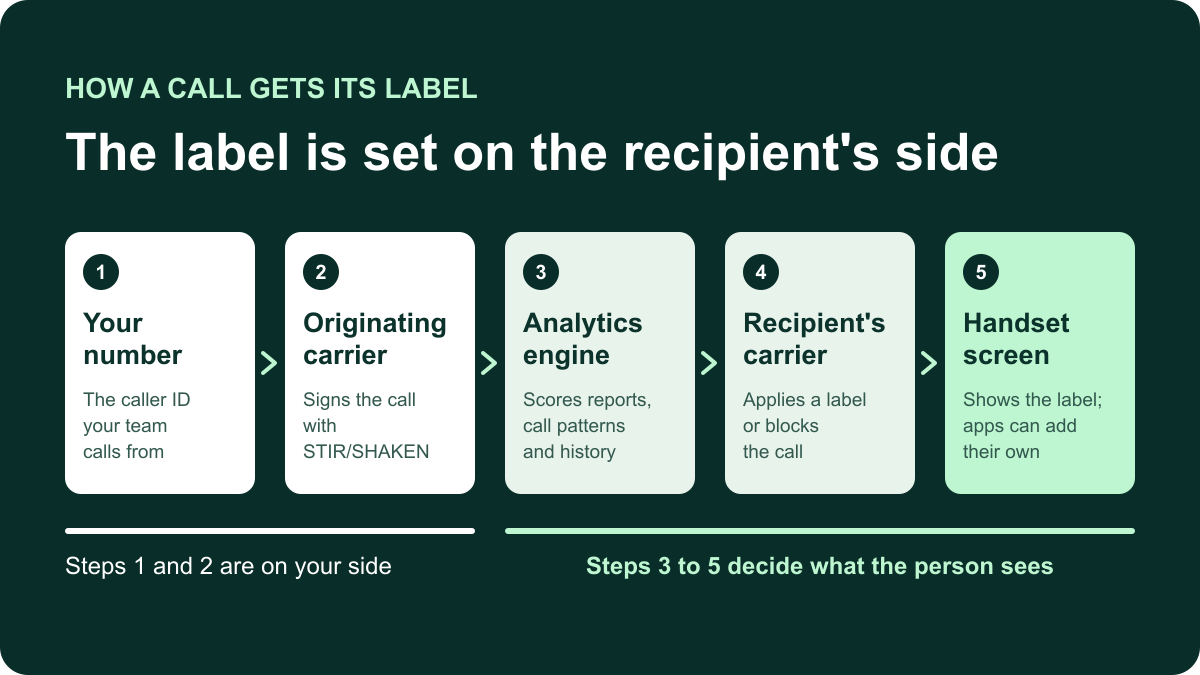
A “Spam Likely”, “Scam Likely” or “Spam Risk” label is set by the recipient's carrier and its call-analytics provider, and sometimes by an app or screening feature on the handset. Your dialer does not set it. What moves it: recipient reactions, your calling pattern, the number's history and whether the number is registered to your business.
This guide covers US calling. Every outside source linked here was checked on November 11, 2026. This is not legal advice.
Who labels a call, and how
The FCC says phone companies and their partner service providers look for suspicious calling patterns, and that some show a category on the caller ID display (FCC call blocking page). The wording differs by network, and this guide uses “Spam Likely” for all of it:
- T-Mobile: “Scam Likely”, plus tags such as Telemarketing, Political or Potential Spam (T-Mobile support).
- AT&T ActiveArmor: “Spam Risk” calls labeled by category, “Fraud Risk” calls blocked (AT&T ActiveArmor terms).
- Verizon Call Filter: “Potential Spam”, “Robo Caller” and “Potential Fraud” (Verizon Call Filter FAQs).
- Google's Phone app: “Suspected spam caller” or “Spam” (Google Phone app help).
The analytics providers behind the carriers
Three companies run the Free Caller Registry together: First Orion, Hiya and TNS. What their pages and the carriers' pages say:
- Hiya says its spam labeling is used by companies including AT&T and Samsung (Hiya help center). AT&T's terms name Hiya among its suppliers and licensors.
- TNS: Verizon's feedback site names TNS/Cequint as its robocall analytics vendor (Verizon caller guidance).
- First Orion says its free registration shows when a number is tagged as Potential Spam on the T-Mobile network (First Orion registration).
Hiya says labeling is decided call by call and is not a fixed property of a number.
What STIR/SHAKEN does and does not do
The FCC requires STIR/SHAKEN caller ID authentication on IP voice networks. The originating carrier signs the call so the recipient's carrier can verify that it comes from the number shown (FCC). The FCC's 2020 order describes three attestation levels. A, or full: the provider knows the subscriber and that the subscriber is using its own number. B, or partial: it knows the subscriber but not the number. C, or gateway: it is only where the call entered the network (Federal Register, 85 FR 22029).
It does not judge whether a call is wanted. The FCC describes authentication as support for carriers' blocking and labeling decisions, and First Orion says it only indicates confidence that the caller ID was not spoofed (First Orion, August 17, 2026). A fully attested call can still be labeled.
Reports, apps and screening on the handset
AT&T's terms say Spam Risk calls are categorized from customer complaints and feedback. Verizon says its vendor weighs complaints and crowdsourced data along with calling patterns. Caller ID apps keep their own lists; Hiya's guide names Hiya Spam Blocker, Truecaller and Nomorobo. Hiya's help center adds that another carrier, app or analytics provider can each label the same call.
Handset screening acts on any unknown number. On iPhone, Screen Unknown Callers can ask callers why they are calling before the phone rings, or send them to voicemail (Apple Support, published September 14, 2026). On Pixel phones, Call Screen asks who is calling and why, and hangs up on calls it judges to be spam (Google, Call Screen).
Why a number gets flagged
Each cause below is stated by a carrier, an analytics provider or the FCC.
- Recipients report, block, ignore or hang up. Hiya says labeling is heavily influenced by how recipients react, and grades numbers on whether people answer and stay on the line (Hiya help center).
- The pattern looks automated. Hiya names volume spikes, rapid dialing to unrelated numbers and unusual hours (Hiya, June 9, 2026). The FCC says to limit calls per minute and quick repeat calls to the same number.
- The number is new, or you keep changing numbers. Hiya's help center says little or no calling history can be a red flag, because it can suggest a caller is dodging labels.
- A previous owner was flagged. Hiya support lists this. First Orion says some bulk-bought numbers arrive already marked Scam Likely (First Orion, September 1, 2022).
- The number is not registered. First Orion says an unregistered business number risks an incorrect label.
- One number does several jobs. Verizon says using one number for marketing, surveys and support callbacks typically raises the risk.
- The caller ID is invalid or not yours. The FCC says to display only a valid number that is yours.
- There is a pause before a rep speaks. Hiya's help center asks whether there is a lag before an agent connects, and Verizon says to avoid perceptible connection delays.
- You rely only on local numbers. Hiya lists this among behaviors that can attract a label (Hiya, February 23, 2023). If you use local caller ID, use numbers you hold and register them.
False positives happen. The FCC says a legitimate caller can be blocked when its pattern resembles a robocaller's.
Is there a calls-per-day limit?
You will see advice to keep each number under a set number of calls a day. None of the carrier, analytics-provider or FCC pages linked here publishes a threshold. Hiya has written that some carriers act when a number places more than a certain number of calls in a period, without stating the limit (Hiya, April 5, 2021). Treat any figure as a vendor's rule of thumb.
How to check a number
- Place test calls. Call handsets on AT&T, Verizon and T-Mobile from each number and note exactly what each screen shows. Hiya's guide recommends test devices on different carriers and caller ID apps. Include an iPhone and an Android phone.
- Use the providers' portals. Hiya Number Registration is free and shows a spam status for each registered number on networks that use Hiya's labeling. First Orion's free Business Number Registration includes Watchlist, which shows when and why a registered number is tagged on T-Mobile. Its older calltransparency.com address now redirects there.
- Read your own reports. A sudden drop in pick-up rate or connect rate on one caller ID, with the same list and hours, is a reason to test that number. It is not proof of a label.
Each portal covers only its own provider.
How to fix and prevent it
1. Register every number
Start with the Free Caller Registry. One form sends your business details and numbers to First Orion, Hiya and TNS. Its terms say registration does not guarantee a fix and that the data is not used to deliver a caller name. Hiya says most numbers are verified within about 24 hours, that changes can take a few more days to reach carrier systems, and that registration lowers the risk of a label without fully preventing one.
2. Report a wrong label to the network that showed it
- T-Mobile: callreporting.t-mobile.com. T-Mobile's support page says: “Corrections are made within 48 hours of a verified request.”
- Verizon: the Verizon voice spam feedback form, which warns that submitting it does not mean calls will stop being labeled.
- AT&T and other Hiya networks: register first, then request a one-time review from Hiya's mislabeled-call page. The Hiya pages linked here give no review time.
- TNS: the TNS robocall feedback site takes reports of business numbers blocked or mislabeled.
A report is a request, not a guarantee. For blocked calls, FCC rules require each terminating provider that blocks calls to publish a single point of contact for blocking-error complaints and not to charge callers for resolving them (47 CFR 64.1200(k)(8)). Ask counsel how the rule applies to you.
3. Keep the caller name consistent
CNAM is the calling name a network can show next to the number (TNS, January 7, 2026). Verizon advises a consistent calling name that matches the purpose of the call. Ask your number provider how the name is set; registration does not set it. Branded calling goes further and shows a verified name, logo and call reason. CTIA's Branded Calling ID carries that data on calls signed with STIR/SHAKEN after vetting, and Hiya, First Orion and TNS sell their own versions.
4. Call in a pattern people expect
- Avoid sudden jumps in volume and quick repeat calls to the same person.
- Use one number for one purpose, and say who you are and why you are calling straight away.
- Leave a consistent callback number in messages, as the FCC advises, including in a voicemail drop.
- Honor opt-outs at once and keep to calling hours. The same FCC page says telemarketing calls are prohibited before 8 a.m. and after 9 p.m., and some states are stricter. See cold calling laws by state and check with counsel.
5. Do not outrun labels with fresh numbers
Hiya defines number rotation as switching numbers to avoid spam detection and says the fix is better calling practices on established numbers. First Orion's advice is to make fewer calls per number. Spreading calls across a few long-held, registered numbers is different from discarding a number each time it is flagged.
6. When one number is flagged
- Confirm which network shows the label with test calls.
- Check the number is registered, then report it to that network.
- Review how it was used: list source, repeat calls, time of day and any delay before the rep speaks.
- If you replace it so a rep can keep calling, still fix the cause. Hiya's help center says that when a number replaces labeled ones, the underlying problem probably still needs to be addressed.
Where a dialer helps, and where it cannot
A dialer affects two items above: how calls are spread across your numbers, and how soon a rep speaks after “hello”. A parallel dialer rings several numbers at once, so check what a person hears if they answer while the rep is on another call. A power dialer calls one number at a time. Our comparison of cold calling dialers lists number registration and monitoring among the things to test.
What Trellus does, per its own pages and recorded walkthrough:
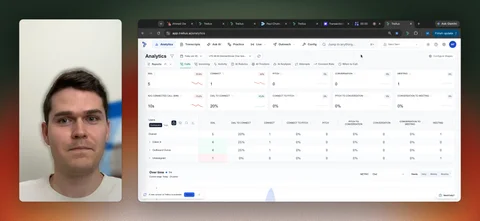
- In Number Management you check number health, review spam flags and manage caller-ID rotation. Smart caller ID picks an available number using destination matching and recent use. Auto-rotate cycles through your eligible pool.
- Power includes 5 additional phone numbers and Power + Parallel 8, both with spam remediation (Trellus pricing).
- In the walkthrough, spam remediation is a form that ties your numbers to your company, and a flagged number shows a warning icon and is replaced automatically.
What it cannot do: Trellus does not decide, prevent or remove a label. Carriers and their analytics providers do that, call by call. Treat a spam flag in any dialer as a prompt to run test calls. An automatic replacement keeps a rep calling, but does not change whatever drew the label.
A checklist to copy
| Step | When | Where |
|---|---|---|
| Register every outbound number | When a number is added | Free Caller Registry; Hiya and First Orion accounts |
| Test-call AT&T, Verizon and T-Mobile handsets | On a set schedule, and after a drop in pick-up rate | Your own iPhone and Android phones |
| Keep one purpose and one calling name per number | Always | Number provider and dialer settings |
| Avoid volume spikes and quick repeat calls; honor opt-outs and calling hours | Every call block | List rules; calling laws hub; your counsel |
| Report a wrong label, then review the cause | When a test call shows one | T-Mobile, Verizon, Hiya or TNS form |
Frequently asked questions
Who decides whether my call shows “Spam Likely”?
The recipient's carrier and the call-analytics provider it works with decide, call by call. Apps and screening features on the handset can add their own label or silence the call. Your dialer does not set the label, and neither does the carrier you call from.
Does STIR/SHAKEN A attestation stop spam labels?
No. STIR/SHAKEN lets the recipient's carrier verify that a call comes from the number shown. The FCC describes it as support for blocking and labeling decisions. Analytics engines still score reports, calling patterns and number history, so a fully attested call can be labeled.
How many calls a day can one number make before it gets flagged?
None of the carrier, analytics-provider or FCC pages checked for this guide publishes a number. Hiya has written that some carriers watch how many calls a number places in a period, without stating a limit. Daily figures you see quoted are vendor rules of thumb.
How long does it take to remove a spam label?
It depends on the network. T-Mobile's support page says: “Corrections are made within 48 hours of a verified request.” Verizon's form says not to assume calls will stop being labeled. Hiya gives a time for registration, and the pages checked give none for label reviews.
Does Trellus remove spam labels?
No. Carriers and their analytics providers decide labels. Trellus shows number health and spam flags in Number Management, manages caller-ID rotation and includes additional numbers with spam remediation on its Power and Power + Parallel plans. Use those tools alongside registration and test calls.