
 5:47
Real-Time AI Coaching Demo
A six-minute demo of Trellus real-time AI coaching, which shows reps live suggestions and a running transcript during sales calls.
Watch guideExplore practice bots, Ask AI, and automated call coaching in this Trellus feature overview.
Recorded walkthroughs may show earlier screens or settings.
Choose a chapter to move the player to that moment. Press play if needed.
Hey, it's Michael with Trellus and I wanted to make a quick video going over the AI features of our platform. So by default we have quite a few that are in play in the backend system. So you'll see in my URL app, Trellus AI this is going to be more so for the admins, but the users can also go into here as well if they want to get some information on analytics or get some perfect personal feedback if they want to
Do that. So first thing that I think would be worth pointing out is this practice bot feature. So we went over this a little bit beforehand with John, but I wanted to go over it just a real quick to refresh it. So this will bring you to your landing page and in order to create your bots you'll go down to the scenarios area. From here you can effectively use this as a chat GPT or a claude prompt where you essentially type in and describe what kind of scenario you want to create. And, and then you can go back and forth with the AI to really narrow down the situation or the bot that you want to configure for your reps to use. In addition to that, I think the cooler feature on here is you can actually upload a call either from your Trellus history, or you could paste in a transcript from another line, and then you can use that as context to build the bot. So what it will do is like for example, if I called somebody who was like the perfect ICP on paper, like very, very typical for what you would look at, you can use that call and the bot will mimic the cadence, the rhythm of the call, the objections that might have come up. So it's a great way to create a low stress practice scenario that would be realistic to what your reps would be looking at. So once the bot is created, of course you go back and forth and then you'll give it an approval. It will go into your left hand panel here as a draft. So if I were to click into this one here, you can of course do some more modifications inside this window. But this is where you would flip it from a draft to a live actual bot that your reps can go and access. So once it's live, you can go into your all scenarios here and then you'll notice that that person is right here. So then your reps can either click into it, select their difficulty. Of course if you added context or certain objections then you'll be able to see all that here. Like with this bot, I believe you'll have like a couple of objections that you can see like the context, the goal, and then all you have to do is click Start call and it will effectively be like the person just picked up and you start talking to it. So very cool feature, very customizable. You can essentially create bots for whatever circumstances you want, whether that be customer facing or even internal. Like if they have a presentation that they want to practice for, you can create a bot based on an individual in your company that they would be presenting to. So very, very flexible. You can also use this, to create like certain challenges for the reps. We do have like an interview portal. So if you wanted to, have new candidates for your team, do like a practice demo call with a bot, we have a portal link that you can use and just send over to them as part of the application process. And of course it probably will save you quite a bit of time if you're conducting those yourselves if you do that. But, it is an option for you if you wanted to look into it.
The second part of the AI tool is this Ask AI feature up at the top. So this is going to be more so from an overall team perspective where you can go and say, hey, for my entire team, how many dials, connects and meetings did each rep get this week? You can ask it like aggregate information, but you can also ask it certain things like what scripts are working the best for my team right now or what lines tend to be resonating the best with prospects on the other line. And it will give you information based on your call. So this is again like a GPT or a cloud prompt that you can ask really any question that you want and it will give you information based on your specific data.
Now the other part of the coaching is more on the backend side. So what I'm going to do is pull up a live customer of ours so that you can see exactly what that instance looks like. And to me this is probably one of the more powerful tools that we have. So essentially how it works is you set up a call rubric where you tell our system what you want the bot to look for in calls, what you want to grade it on, and then it will listen to every single call and then just make notes of things they did well and things that they can improve on from the rep's perspective. So then to access all of this, you go into your analytics and then your AI analysis and then after a period of about a week to two weeks, it'll start to throw you some information. So like if I were to click into like Anthony, for example, it's going to evaluate all his calls in the past 14 days and then it's going to provide a brief snapshot of what he did well and what he can improve on. So you'll see it's actively putting in notes here. You'll see the categories of what is working, his biggest opportunities right here. The biggest differentiator here is twofold. Number one, all of these points that it points to here have evidence in each call. So you can actually click into the call where it is pulling this information from. Listen to it yourself if you want to get an idea of the, I should say the credence of the point. And then you can of course, you know, share these calls, download them. Effectively this just does all of your coaching for you. So you don't have to listen to anything, develop any notes. All there for you. Now the second part of this, which I think again is very cool, is we have made this very AI forward in the way that you can ask this question specifically about this individual's performance and their call data. So one of my favorite ones that I always point to is this one. Where is Anthony losing winnable calls? This is a really great way to get data that wouldn't necessarily be accessible in your standard analytics screen or any of the other, I guess like metric tracking features that we would provide. So this is very, very easy to do. You can just click on that if you want to, or just type in another question and then it will continue to read those calls and then give you the information that you asked for. So very, very cool. Of course this adapts as your users use it. So the more that you put calls in the, the better it gets at actually evaluating your user's performance and then creating almost like a evolving, evolving coaching, material for them to use. So this is loading. I think you get the idea here. We're going to go ahead and exit out of this. That is just about the last feature we
Have. We do also have live coaching. So if we went to our settings and went to our AI features and then the scripts page, this allows you to essentially trigger a script or maybe a question response. Like basically suggestions live on the call for your reps, based on treat kick, excuse me, trigger keywords or let's say maybe if your customer mentions a competitor, that's a great way to do it. This essentially just allows you to pop up certain scripting, certain questions that you want to be asked at certain times within the call. Just be aware this is currently in like beta right now. We're testing this. I suspect this will be rolled out probably within the next two weeks, at least upon recording. But this will be something that could be fun to leverage as well. Of course, if you want to mess with any other AI features, we have plenty of things in here. Usually the only things that you'll likely be messing with is this scripting and then your rubrics here to program the post call coaching. But of course, if there's any questions, let me know. More than happy to jump in. And thanks for watching.
Transcribed from the recording, with product names corrected.
5:47
A six-minute demo of Trellus real-time AI coaching, which shows reps live suggestions and a running transcript during sales calls.
Watch guide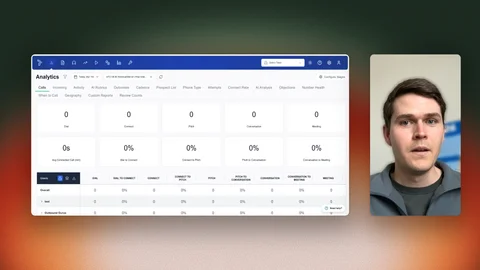 4:09
Explore the Trellus coaching suite for call practice and team enablement.
Watch guide 1:36
Learn how to create and customize AI roleplay bots for practice sessions.
Watch guide