A call disposition template that makes the next step clear
Build a useful call disposition list with clear definitions, follow-up owners and next steps. Includes a copyable worksheet and CRM rollout checklist.
On this page
Our Top Picks


“Connected” is a starting point, not a follow-up plan. The next rep still needs to know whether to call tomorrow, send the promised information or leave the person alone.
A call disposition is a label that summarizes the outcome of a call. A useful disposition list helps your team distinguish the phone result, the business outcome and the next action. Give every label a definition your reps can apply without guessing.
The worksheet below is for the manager setting those rules. It is not another place for reps to copy every call out of their CRM.
Want to see Trellus inside your CRM? Explore the HubSpot workflow and walkthrough before mapping your team's outcomes.
Three questions, not one overloaded dropdown
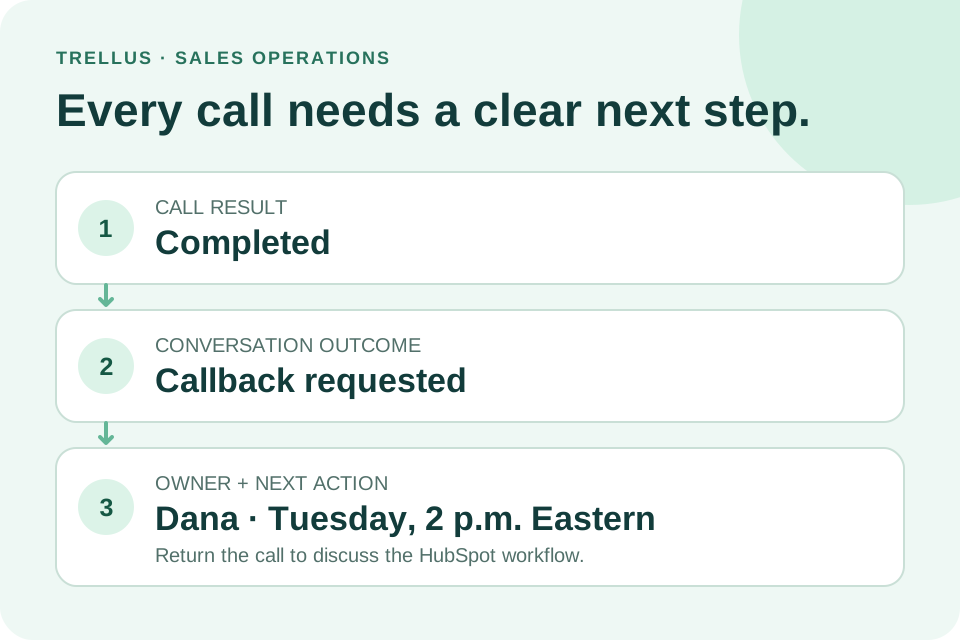
After a call, your team needs three answers:
- What happened to the call? No answer, voicemail, busy or another system-recorded result. A technical “completed” status does not, by itself, describe the conversation.
- What happened in the conversation? A callback was requested, a meeting was agreed, or the prospect said there was no fit.
- What should happen next? A particular person owns a specific action, with a time when one was agreed.
Your CRM may use different names for these fields. HubSpot, for example, lists call status, call outcome and call notes separately. Its call index also associates the activity with contacts, companies and deals. HubSpot's call-record guide shows those distinctions.
These are three questions to answer, not a requirement to create three new CRM fields. HubSpot's default call outcomes, for example, already include no answer, busy and connected. Map the worksheet to your existing fields and notes. Keep useful system results intact; let the selected outcome summarize the call and the note explain the commitment.
Copy this six-outcome template
Use these suggested labels to agree on what each outcome means and what follows it. Fill in the CRM location and responsible owner for your team. Map them to existing fields before adding new ones.
Callback requested
Use when: The person asks for another call—not simply when the rep wants another attempt.
Required context: Why you are returning; the agreed date, time and time zone.
Next action: Create the callback task with that context.
Owner and timing: Assigned rep __________; agreed callback __________.
CRM location: Outcome __________; note __________; task list __________.
Check: Another rep can find the commitment without asking the original caller.
Information requested
Use when: The person asks for specific material or an answer.
Required context: What was promised, where to send it and whether a follow-up was agreed.
Next action: Send the requested material; schedule a follow-up only when appropriate to the agreement and your team's contact rules.
Owner and timing: Person sending it __________; promised delivery __________.
CRM location: Outcome __________; note __________; delivery/task record __________.
Check: “Send me something” is not automatically counted as buying interest or a booked meeting.
Meeting agreed
Use when: The person agrees to meet.
Required context: Purpose, attendees and scheduling commitment.
Next action: Send the invitation or complete the agreed scheduling step.
Owner and timing: Meeting coordinator __________; next scheduling action due __________.
CRM location: Outcome __________; note __________; meeting record __________.
Check: Keep agreement, invitation sent, booking confirmed and meeting held distinguishable. A calendar entry alone does not establish a qualified opportunity.
Revisit later
Use when: A specific future event makes another conversation appropriate, such as a project milestone or contract review.
Required context: The trigger and whether the person agreed to another contact.
Next action: Record the trigger and the agreed next step; do not invent a callback date.
Owner and timing: Account owner __________; agreed date or review trigger __________.
CRM location: Outcome __________; note __________; reminder or account record __________.
Check: Use “callback requested” for an actual request to call again; use this label for the future circumstance that needs review.
Not a fit
Use when: A concrete mismatch makes the account unsuitable, such as an absent required capability or an incompatible workflow.
Required context: The factual reason and whether it applies to this contact or the whole account.
Next action: Route the record through your team's disqualification or data-review process.
Owner and timing: Account/data owner __________; review needed __________.
CRM location: Outcome __________; fit reason __________; contact/account __________.
Check: Reaching the wrong person is not enough to reject the entire account.
Not interested
Use when: The person declines without establishing a fit issue or agreeing to a later next step.
Required context: The stated reason, if offered. “Declined; no reason given” is better than a guess.
Next action: Apply your team's contact policy. A request not to be called again also needs the suppression process.
Owner and timing: Responsible rep or operations owner __________; required action __________.
CRM location: Outcome __________; note __________; suppression record when applicable __________.
Check: Selecting a disposition is not proof that a stop-calling request has been applied to the active calling list.
Keep phone results accurate alongside these definitions. “No answer” may follow the existing cadence; “wrong number” needs a phone-data correction. Neither means “not interested.”
For the broader measurement model, see sales call tracking. For the tradeoffs between a separate sheet and a connected call record, see our call-logging guide. This worksheet has the narrower job of making the labels and handoff consistent.
Make the note useful to someone who missed the call
A good handoff answers three questions: what did the person say, what did we agree, and who does what next?
For example:
The team reviews its calling setup next month. Morgan asked for the HubSpot workflow and requested a callback Tuesday at 2 p.m. Eastern. Dana will send the walkthrough today and owns the callback.
For this example, choose Callback requested. Put the promised HubSpot walkthrough in the note, and create the callback task for Dana at the agreed time. If a person asks for both information and a callback, the callback is the primary outcome; the note keeps the other promise visible. If they agree to a meeting instead, use Meeting agreed and track the scheduling step separately. Your team can adopt this rule when mapping the template to its existing fields.
The useful part is the structure: the reason, the promise and the owner. You do not need a transcript pasted into the task title.
Compare it with “Interested. Follow up.” The shorter note creates work for whoever reads it next. They have to reconstruct what happened before they can act.
If an automatic summary helps prepare the note, review the commitments and dates before saving it. An implied next step is not the same as one the prospect accepted.
Map the dictionary to your CRM before changing automation
Do not rename every option on a live team account at once. Start by writing the current field beside the proposed meaning. Include the reports and workflows that already depend on it.
In HubSpot, custom call and meeting outcomes have subscription and permission requirements. HubSpot's documentation also warns that a saved custom outcome cannot simply be edited afterward. Check the current custom-outcome instructions before making changes.
HighLevel distinguishes system-recorded Call Status from user-selected Custom Disposition. Its disposition guide explains how to use that selected outcome in follow-up workflows. Before attaching an automation, check which field your calling workflow actually updates.
The practical question is simple: after a rep selects the outcome in the calling tool, where does it appear in the CRM, and what happens next? Test the exact combination you will use.
Keep old results honest when labels change
A clearer dropdown can make future calls easier to classify without making the old records any more specific. Before replacing a label, write down what it meant and what the new values will mean. Keep the original information available through your team's normal change process.
Consider a fictional ten-record sample. The old label “connected” covered conversations with both the intended person and someone else. Four notes clearly describe reaching the intended person, three describe another person answering, and three contain only the old label.
The useful split is four intended-person conversations, three other-person conversations and three unresolved. Don't distribute those three unknown records in the same proportions as the seven clearer ones. That would turn an assumption into apparent call history. The sample helps explain the change; it isn't a benchmark or a result from a Trellus customer.
For a trend report, retain the old combined category through the change date and show the new categories afterward, with the definition change visible. Alternatively, compare a broader category that both periods genuinely support. A rise in a newly defined category isn't automatically an improvement in rep performance.
Use one mapping note for each changed value:
- Old value and meaning: what did a rep selecting it establish?
- New value and meaning: what observation will qualify a call now?
- Historical mapping: which records support the new meaning, and which must remain unresolved?
- Dependencies and owner: who checks each affected report, task rule or queue filter?
- Effective time: when does the definition change, in which time zone?
- Recovery: how can the team pause the change while preserving the original information?
Before wider use, ask two people to classify a few approved practice examples independently. If they repeatedly disagree, improve the definitions first. Adding more options won't solve an unclear distinction.
Try five cases before asking the whole team to use it
Use approved test records, not real prospect outreach, to check the mapping:
- An unanswered attempt stays unanswered. It does not add a positive sales outcome.
- A callback request carries the agreed time and owner into the right task.
- An information request records the actual promised material, without being counted as a booked meeting.
- A not-fit conversation keeps its reason with the correct contact or account.
- A stop-calling request follows the team's suppression process and is not put back into the active calling list.
Have a second person read the saved records. Can they tell what happened and what they own? If they need the original rep to explain every entry, improve the definition or required note before adding more labels.
After a real call block, review a small sample together. Focus on disagreements: one rep chose “revisit later,” another chose “callback requested.” Clarify the rule using the conversation, not a target percentage. Once the labels are consistent, use the actual results in your next call-block plan.
When a promised callback is missing
Pick one call where someone actually requested a callback. Look for the saved call record, then open the intended callback owner's task list. Stop at the first place the promise disappears:
- No saved call record or callback details: ask the caller what was agreed and check for a save error. Don't reconstruct a promise from “interested.”
- The promise is saved, but there is no task: check whether the rep needed to create it or a configured workflow was meant to do so. Correct that step before adding another automation.
- The task exists, but its owner can't find it: check assignment, due date, time zone, list filters and access. Recreating it before checking can leave two people calling the same prospect.
Use a short repair note inside the CRM: Where it broke: ____; person fixing it: ____; check again by: ____; task visible to its owner: yes / not yet. If no callback time was agreed, leave that uncertainty clear instead of inventing one. Close the repair only when the intended owner can find the right contact, reason and agreed timing.
A few records can uncover a broken handoff; they can't tell you the team's callback success rate. Keep unanswered attempts out of this check, and follow the existing suppression process for anyone who asked not to be called again.
Keep the follow-up beside the worklist
Trellus adds power and parallel dialing to supported sales-platform workflows. For HubSpot, use the integration guide to review the supported calling views, call logging and follow-up options for your setup.
Your reps can apply the agreed definitions while logging the calls they are already making. Available fields and actions depend on the platform and setup; use the integration directory to check yours.
Bring one real worklist and your current outcome labels to a HubSpot workflow demo. The question to answer is not how many dropdown options you can create. It is whether the next person knows what to do.