How to Correct Sales Information You Already Sent a Buyer
Make the old claim and its correction visible. Use a fictional report-delivery mistake to repair an evaluation document and reconsider the next sales step.
On this page
If you discover that a product answer you emailed a buyer was wrong, reply with the correction where they can connect it to the original statement. Name what you said, give the answer you have now verified and explain which part of the proposed workflow changes. A revised attachment alone leaves the buyer to find the mistake.
The awkward part usually isn't writing “I was wrong.” It's finding out where the old answer went. The buyer may have copied it into an evaluation sheet, forwarded it to a colleague or used it to rule out an alternative. Your next message needs to give them something they can use to repair that decision.
This guide uses a fictional seller, buyer and unnamed product. Its messages illustrate a correction process; they do not describe Trellus capabilities, customer conversations or results.
Put the old answer beside the verified answer
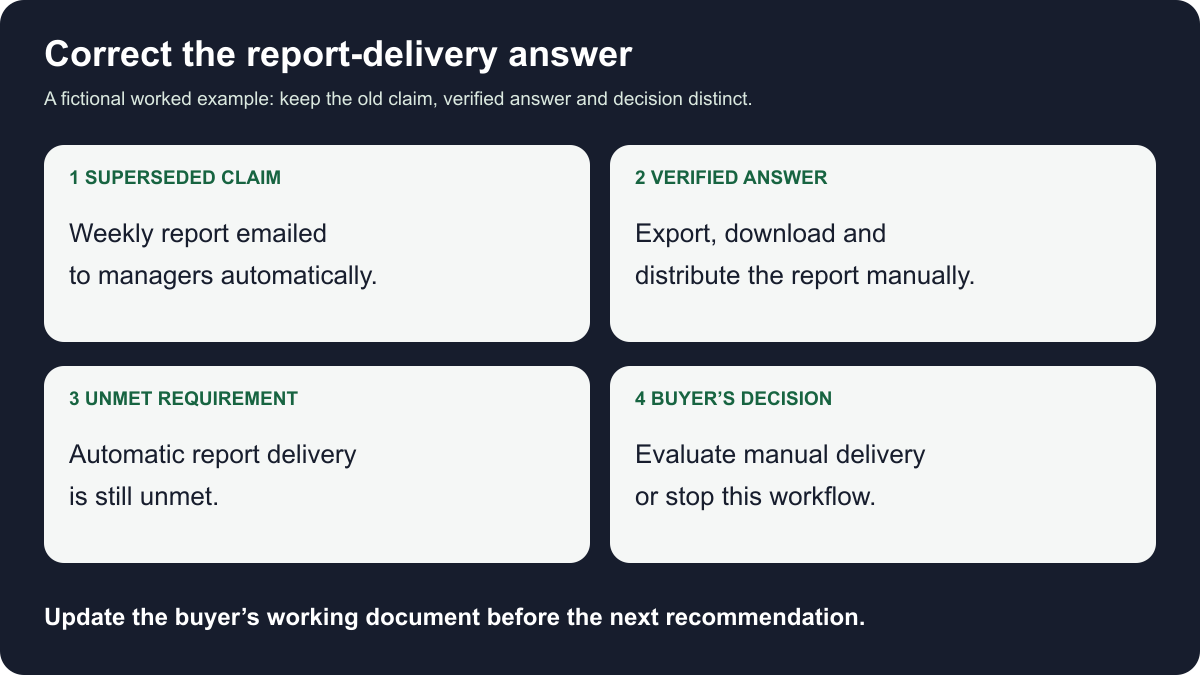
Suppose you emailed a buyer, Lena, that a weekly activity report would arrive automatically in her managers’ inboxes. After checking the intended setup, you learn that someone can export the report, but must download and distribute it manually.
“There's a small clarification about the report delivery” doesn't tell Lena what to stop relying on. Neither does a link to a general help page. Before writing, pull up your actual sent message and the evidence that changes the answer. Don't reconstruct the claim from memory.
A short working record helps keep the correction precise:
- Sent statement: “The weekly activity report will be emailed to your managers automatically.”
- Checked requirement: The buyer needs managers to receive the weekly report without someone downloading and emailing a file.
- Verified answer for the setup checked: A person can export the report, then download and distribute the file manually.
- Effect on the recommendation: The proposed workflow includes an extra task and does not meet the stated automatic-delivery requirement.
- Still unresolved: Whether the buyer would consider manual report distribution acceptable. The seller cannot decide that for them.
Keep this note wherever your team records the evaluation. Record where the verified answer came from and any conditions that matter. A demonstration of one setup doesn't establish that every configuration behaves the same way.
If you have only established that your original answer was unsupported, don't replace it with an equally unsupported “no.” You can retract the earlier promise while checking the result: “I haven't confirmed the scheduled report delivery I described. Please don't use that statement in the evaluation while I check it.” The guide to answering an unfamiliar product question covers that verification step.
Send a correction the buyer can forward
For the fictional example, assume the limitation and manual alternative have now been verified. A useful reply in the original email thread could read:
Subject: Correction to the weekly report workflow I sent
Lena, I gave you an incorrect answer in my earlier email. I said the weekly activity report would be emailed to your managers automatically.
In the setup we checked, a person can export the report, but has to download and distribute the file manually. That adds a task and doesn't meet the automatic-delivery requirement you described.
I've marked the earlier workflow note as superseded and attached a corrected version that identifies the download and distribution steps. Please use this answer in place of the automatic-delivery statement. If you copied the old answer into your evaluation sheet, that is the row to change.
I'm sorry I sent the wrong information. Is manual report distribution worth evaluating, or should we stop work on this proposed workflow? You don't need another call to get the correction.
The note takes responsibility without spending a paragraph explaining how the mistake happened. It also gives Lena a usable description of the change. If she forwards it internally, her colleague can understand both the old claim and its replacement.
Don't copy the example's verification language until you have done the check. “In the setup we checked” needs an actual setup and a reliable answer behind it. If the answer depends on an edition, prerequisite or configuration, put that condition beside the answer rather than leaving it in a footnote.
The final question is optional. A buyer may only need the correction and may choose not to continue. Avoid making a meeting, a renewed sales conversation or acceptance of a workaround the price of receiving accurate information.
Correct the document the buyer is actually using
A clean replacement file is useful, but it can conceal the change if it looks like the same document. Give the corrected version a clear revision label and identify the affected section. If you control a shared document, use its normal revision or annotation tools so a reader can see that the prior statement changed.
For Lena's report workflow note, the change might be:
Superseded statement: Weekly activity report is emailed to managers automatically.
Corrected workflow: A person exports the report, downloads the file and distributes it to managers manually.
Evaluation effect: Automatic report delivery remains unmet in the setup checked.
Keep the original sent record according to your team's normal recordkeeping process. Don't silently replace history or delete evidence that explains the correction. The goal is to make the current answer obvious while retaining a record of what changed.
You may not control the buyer's spreadsheet or forwarded email. Say exactly what needs updating and offer a short replacement sentence. Ask whether someone else using the answer needs the correction; let the buyer guide any introduction or forwarding. Don't contact an entire buying group just because their addresses appear in an old thread.
If the buyer says, “We already put that in the approval document,” ask which statement they used and what decision depends on it. You need enough context to correct the affected material, not a copy of every internal discussion.

Stop the recommendation that depends on the mistake
Accurate wording won't help if the next sales step still assumes the original claim is true. Check the planned demo, proposed scope and your internal handoff. If the recommendation depends on automatic report delivery, flag that dependency before another colleague presents it as settled.
A manual alternative can be worth exploring, but it changes the work. Who performs the extra step? When? What happens if it is missed? Give the buyer the verified description, then let them assess whether it fits. “We have a workaround” doesn't establish that the requirement has been met.
If the incorrect statement appears in signed terms, a security response or another formal commitment, involve the person responsible for that document through your team's established process. An informal sales email shouldn't claim to rewrite an agreement. Keep the buyer informed about what is known while the responsible owner handles the affected commitment.
Some errors concern scope before an offer goes out. The guide to responding to a quote request before discovery explains how to separate confirmed information from missing details at that earlier stage. Here, the information has already been sent, so correcting its use is part of the job.
Keep the issue open until the information is usable
“Email sent” is a useful activity note. It doesn't tell you whether the buyer has seen the correction or changed the document they were relying on. Record those as separate facts. If there is no reply, don't mark the requirement accepted or the concern resolved.
Any follow-up should fit the buyer's existing communication preferences and the importance of the affected decision. A short message can point back to the exact correction and ask whether the replacement wording reached the person evaluating it. Repeatedly sending “just checking” won't supply new information. Respect a request to stop contact.
When the buyer does respond, save their decision in their terms. “Lena will evaluate manual report distribution” is different from “automatic-delivery requirement resolved.” If they decline because the limitation matters, preserve that reason rather than turning it into a vague timing objection.
Afterward, check the reusable material that produced the wrong answer. Was it your own assumption, an old slide or an internal answer that omitted a condition? Correct the item you control and route shared material to its owner. The incorrect sales research guide handles a related repair when the mistaken claim concerns the prospect rather than your product.
Before recommending a dialer for a CRM or sales engagement platform, walk through any corrected workflow in the intended setup. Use the corrected document to decide what to show next. If the new answer leaves an essential requirement unmet, say so before continuing the recommendation.