Our Top Picks


You set aside 45 minutes to call. Twenty minutes later, the rep is searching for another list, checking a contact that won't load, or finishing notes from the last conversation. The block is still on the calendar, but the calling has stopped.
Before changing the script or asking for more dials, find out where the work stopped. An empty list, a missing phone number, a long conversation and a failed save can all produce a low dial count. They need different fixes.
This guide is for the rep or manager looking back at a stalled session. Start with one block you can reconstruct. You don't need a new dashboard to identify the first problem worth solving.
Ask what the rep was trying to do next
“The dialer stopped” isn't a diagnosis. What was on the screen? Was the rep waiting for a call to start, looking for someone else to call, reading account context, or trying to save the result of a conversation?
Capture that step while it's still fresh. If there's an error, keep its wording and the time it happened. Use a record link your team is allowed to share; don't put a prospect's phone number or private conversation into a public troubleshooting channel.
First, check whether the rep had anyone left to call. A queue can be empty because the rep finished the eligible contacts. It can also be empty because the chosen view excluded them, their numbers were missing, or the records were assigned elsewhere. “We have 200 contacts in the CRM” doesn't answer whether this rep had another appropriate call to make.
For a block built around promised callbacks, look at the callback worklist. Don't replace it with fresh prospecting simply to keep the dial count moving. The session had a job; first check whether that job was finished.
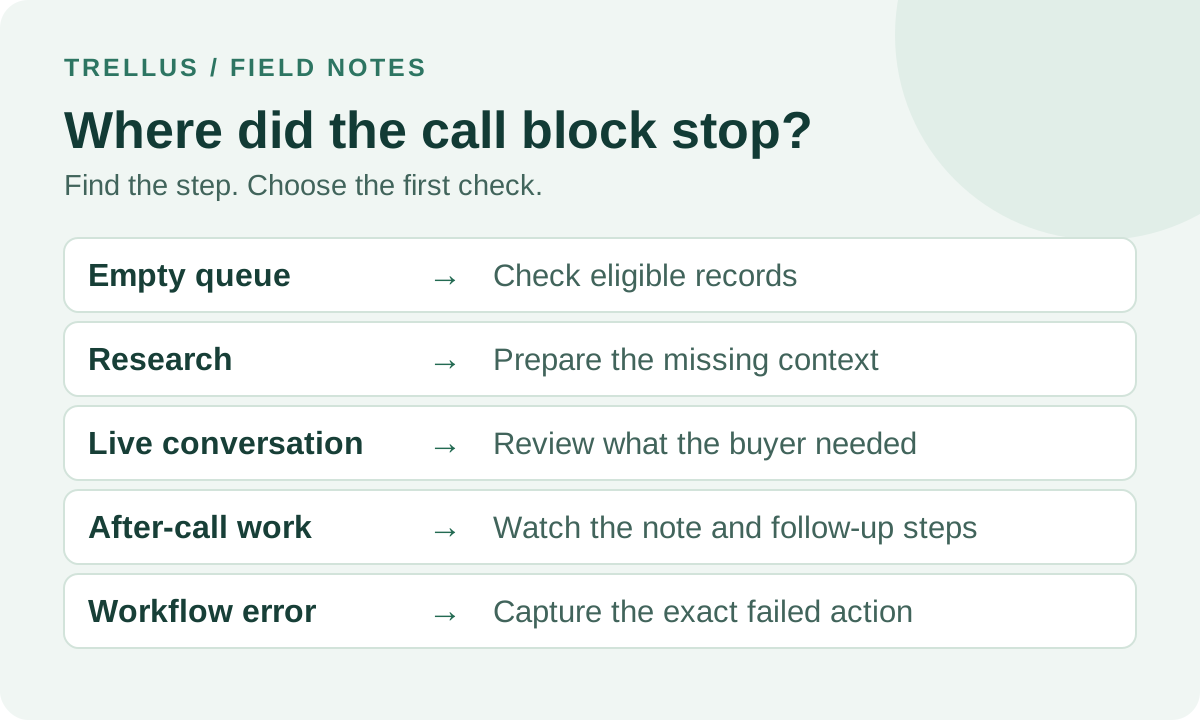
Separate five common stopping points
1. The list ran out
Compare the original selected records with the records the rep actually attempted. Count people separately from phone numbers and repeat attempts. Ten rows with several numbers each aren't the same as thirty new people to reach.
If the intended work is finished, end the block or switch deliberately to the next prepared audience. If it isn't, sample the unattempted records. Check ownership, view filters, usable phone data and your team's contact restrictions. Don't loosen exclusions or redial restricted people just to fill the remaining time.
The list-penetration guide explains how to measure coverage of a defined list. Keep that denominator fixed when investigating a stall; adding records halfway through changes the question.
2. The rep had to research every record
A list can be callable and still be unprepared. If every contact requires a company search, a history check and a new opening question, the rep is alternating between research and calling.
That may be appropriate for a small set of high-value accounts. The problem is expecting the same pace as a prepared prospecting list. Decide which context must be ready before the block and which questions belong in the conversation. Prepare a smaller audience with one clear reason to call rather than removing the research that makes the call relevant.
Ask the rep to show one record that took too long. “Research is slow” is vague. “I couldn't tell whether another teammate had already promised a callback” is something the team can fix.
3. A useful conversation took time
A longer conversation isn't automatically a stalled block. If the buyer is explaining a relevant problem, asking a meaningful question or agreeing on a next step, the session may be doing exactly what it should.
Review the outcome before treating duration as waste. Did the rep learn something useful? Is the next action clear? A short conversation that leaves no understandable result isn't necessarily better.
Don't use this troubleshooting exercise to set a universal call-length target. The talk-time guide covers that separate measure. Here, the question is why the rep couldn't move to the next appropriate action.
4. The rep was still finishing the last call
Notes, dispositions and follow-up tasks are part of calling work. If they take most of the block, watch what the rep has to do rather than assuming they type too slowly.
Are they entering the same information twice? Deciding between unclear outcome labels? Looking for the person who should own the follow-up? Or correcting a summary that doesn't reflect the conversation?
Remove redundant work where you can, but keep the information the next owner needs. “Send details” is quick to type and expensive to interpret later. A short note that names the request, owner and due time is more useful.
Use the after-call work guide to review this step in more detail. Faster logging only helps if the result still reaches the right record and the follow-up can be found.
5. The workflow failed
If a call won't start, a contact won't open, or a result won't save, record the exact failed step. Don't group every failure under “slow.” A loading delay, a denied action and a rejected required field are different problems.
Give the person investigating enough context to reproduce the issue: the calling tool and CRM, the view or record used, the action attempted, the visible error, and whether it affects one record or several. Share sensitive details only through your team's approved support route.
On an uncertain save, inspect the contact and activity before trying again. A second attempt can create duplicate notes or tasks if the first one succeeded but the screen didn't confirm it. Don't repeatedly redial someone to test a workflow problem; use a team-controlled test contact when a test call is needed.
A 45-minute example: where did the block go?
Here's a fictional session, not a benchmark. A rep reserves 45 minutes to work a prepared list. Their short debrief records these non-overlapping periods:
- 5 minutes: finding the intended view and checking its filters.
- 28 minutes: active calling, including waiting for answers and speaking with people.
- 7 minutes: finishing notes and follow-ups outside active calling.
- 5 minutes: waiting on a failed save and checking whether the result reached the CRM.
Those periods add up to 45 minutes. They're elapsed time, not the sum of every call's duration. With overlapping calls, adding ringing and talk time across lines can exceed the length of the block. Use one timeline for this exercise, and don't count the same minute twice.
The rep shouldn't be told to shorten every conversation because calling occupied only 28 minutes. In this example, the failed save is the first thing to investigate. It consumed five minutes and left the rep unsure whether a follow-up was recorded.
After that, the team can prepare the correct view before the next block. The seven minutes of notes need a closer look, not an automatic cut: they might contain necessary follow-up work. Choose a change based on what happened in those minutes.
Now imagine the same rep made fewer attempts because two relevant buyers stayed on the phone. That is a different session, even if the dial counts match. A count alone can't tell you which problem to solve.
Use this short incident note
Copy these prompts into the place your team already uses for a block debrief. Keep it short enough that someone will actually fill it in.
- Intended work: Which list or view, which owner, and what was the block meant to finish?
- Stopping point: What was the rep trying to do when the work stopped?
- Visible symptom: Empty queue, missing context, ongoing conversation, unfinished follow-up, or a specific error?
- What remains: Which appropriate records still need attention? Are any promised actions at risk?
- First check: What single record, setting or step will someone inspect?
- Next owner: Who will make the change, and when will the team check it again?
A useful entry might say: “Renewal callbacks, assigned to Sam, 2–2:45 p.m. Work stopped while saving the fourth conversation. CRM required an outcome field; callback owner wasn't confirmed. Sam will check the contact before retrying, and the admin will review that required field before tomorrow's block.” This is a hypothetical example. It names a fixable step without declaring the whole tool broken.
Change one thing, then watch the next comparable block
Fix the confirmed obstacle first. If records weren't callable, clean that list. If the saved result was uncertain, resolve the save. If the audience needed research, prepare it. More simultaneous dialing won't repair those issues.
Write down what you changed and use a similar audience and block length for the follow-up check. Compare whether the stopping point returned, whether the planned contacts were covered, and whether the saved outcomes and next actions are usable. A different list or calling window can change the results even when the workflow hasn't changed.
For platform setup rather than diagnosis, use the existing Attio call-block guide or Salesforce call-Task workflow. If you're deciding whether to change calling tools, the one-week dialer pilot gives you a way to test that decision.
You can also bring the failing step to a Trellus demo. Ask to see the workflow your rep needs, including what happens when a record or save isn't ready.

Power and parallel dialing in your CRM.