
How to Make Calls From Salesloft
What the Salesloft Dialer does, the steps for each way to call from a Person, a cadence phone step or your own phone, and what each route writes back to Salesloft.
Trellus adds power and parallel dialing inside the CRM your team already uses. See pricing Book a demo
On this page
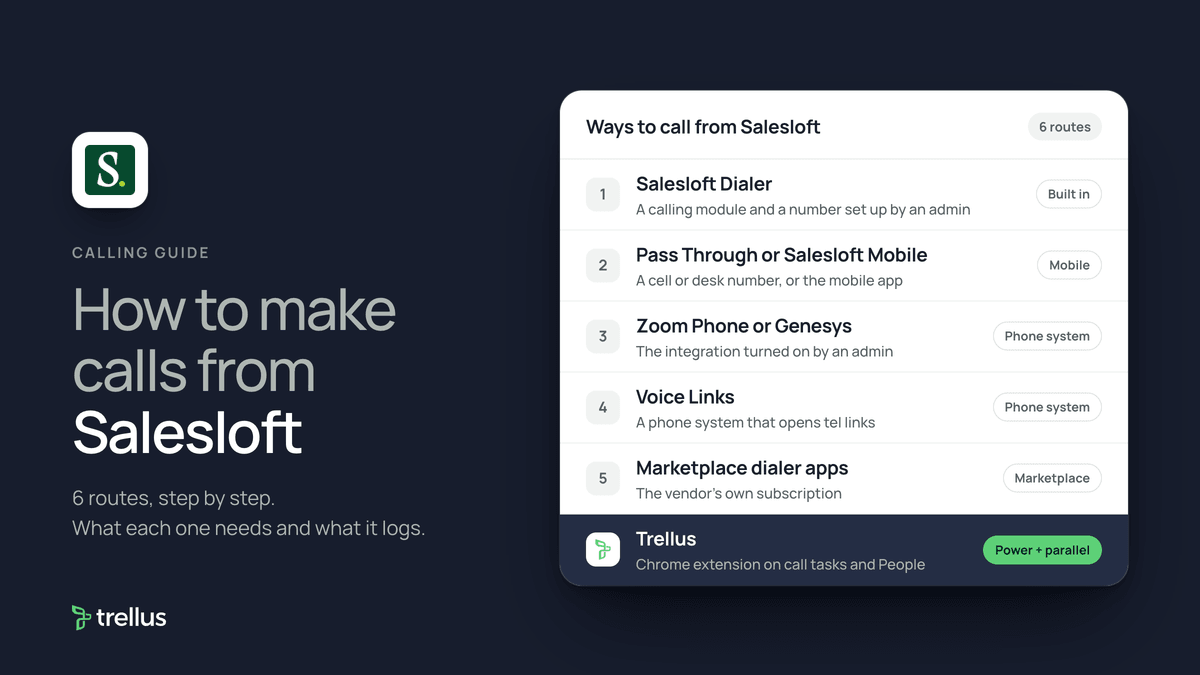
Salesloft has its own dialer. Once an admin has set it up, you can call from a Person's profile, the dial pad or a cadence phone step, and log the disposition and sentiment. Calls can also run through your own phone with Pass Through, through Zoom Phone or Genesys as an integrated dialer, or through another phone system with Voice Links. Dialer apps in the Salesloft Marketplace and Trellus can power or parallel dial call tasks. Here is how each route works and what lands in Salesloft.
Trellus publishes this guide and sells one of the routes below. Details about Salesloft come from salesloft.com, help.salesloft.com and marketplace.salesloft.com, and details about each vendor come from that vendor's own Marketplace listing, all opened on November 17, 2026. The steps are as those pages give them, and nothing was tested. To compare the products, see the best Salesloft integrations for sales calls and Salesloft dialer: from call tasks to logged outcomes.
Ways to call from Salesloft at a glance
| Route | What you need | How the call starts | What lands in Salesloft |
|---|---|---|---|
| Salesloft Dialer | A calling module, and an admin who has set up a TrustHub profile and your number | Dial pad, a Person's number, a cadence phone step, or Salesloft Connect in Chrome | A call log with notes, disposition and sentiment, also synced to your CRM |
| Pass Through or Salesloft Mobile | A cell or desk number in your Calls settings, or the mobile app | Salesloft rings your phone and dials the Person, or the app calls over your mobile network | A call log, as with the Dialer |
| Zoom Phone or Genesys | The integration turned on by an admin. Each user connects an account | The Zoom Phone or Genesys dialer opens in place of the Salesloft Dialer | A call log in Salesloft and the provider. Recordings pulled in from the provider |
| Voice Links | A phone system that opens tel links, set up by IT and turned on by your Customer Success Manager | Click Call in a small box. Your phone system places the call | A Salesloft call log, or nothing unless the vendor logs through the API |
| Marketplace dialer apps | The vendor's own subscription | Click-to-call, or the vendor's app working your call tasks | As each listing states |
| Trellus, a Chrome extension | Chrome and a Trellus plan | From Salesloft call tasks or People, in power or parallel mode | Disposition, sentiment, a note and a Person-linked callback task |
What Salesloft does natively today
Salesloft's Dialer and Messenger page describes one-click calling and texting, LocalDial, voicemail drop and live listen, whisper and join for managers. The Dialer overview says calls run over VoIP through Twilio, and that admins can choose a dialer for each user: the Salesloft Dialer or an integrated one such as Zoom Phone or Genesys.
The Dialer pricing guide says a team admin must buy Unlimited Calling modules through your Customer Success Manager. Plans cover unlimited calls to +1 numbers in North America, or to listed European countries, under a fair usage policy. LocalDial numbers cost $1 each to provision and $1 each per month.
Setup is in the Set Up the Dialer article. A team admin first creates a TrustHub profile and provisions your number. Then:
- Click your name at the top right, then Settings, then Calls.
- Optionally add a custom caller ID. Click Verify, then enter the on-screen code when Salesloft calls that number.
- Check Click to Call Enabled? to add Salesloft call buttons in Salesforce and Dynamics.
- Choose inbound settings and record voicemail drops, then allow the microphone in Chrome.
Call a Person with the Salesloft Dialer
These steps are from Salesloft's article on making calls with the Dialer.
- Open the Dialer in Salesloft.
- Click the dial pad icon and type a number, pick another of the Person's numbers from the dropdown, or search for the Person in the Dialer's Person tab.
- Click Call. Add notes in the Dialer Log box during the call.
- If nobody answers, drop a voicemail or hang up.
- Log the call: add notes, choose a disposition and, if you connected, a sentiment. Click Log.
With the Salesloft Connect Chrome extension, the same Dialer opens anywhere in Chrome. Right-click a page and select Salesloft Dial, use the extension's Open Dialer, or click a Salesloft call button in your CRM.
Run a cadence phone step
To add a phone step, from Salesloft's phone step article:
- From the cadence overview page, add a cadence step and select the phone icon.
- Enter the day the step should run and click Next.
- Name the step, such as Intro Call, and add instructions or a script.
- Click Add Step.
Salesloft says phone steps do not require the Salesloft Dialer. To run them with it, from the run a phone step article:
- Click Run Step next to the step in the Cadences list. The first Person's profile opens with the Dialer.
- Make the call and take notes in the Dialer Log box.
- Select the disposition and sentiment. A red asterisk means your team requires the field.
- Choose Log and Complete, Log Only, Complete Only or Success. Salesloft moves to the next Person or step.
Call from your own phone with Pass Through or Salesloft Mobile
Pass Through starts the call in Salesloft and carries it on your cell or desk line. Salesloft's Pass Through article recommends it as a last resort for weak internet, says the call rate is doubled, and says numbers with extensions are not supported.
- Go to Settings, then Calls, and enter your number in the Pass Through Number box. Click Save.
- Open the Dialer. Pass Through is on by default and toggles from the dial pad.
- Enter a number and click Call. Your phone rings.
- Answer and press 1. Salesloft dials the Person.
The Salesloft Mobile app places calls over your mobile network, so carrier charges may apply. Virtual numbers such as Google Voice are not supported. Open the Calls tab keypad, or search for a Person, tap Call and confirm. The app then prompts you to log the call.
Use Zoom Phone, Genesys or another phone system
An integrated dialer replaces the Salesloft Dialer while keeping Salesloft's dispositions and sentiments.
- Zoom Phone: an admin asks Salesloft Support to enable it, then adds and configures the Zoom Phone Smart Embed app in Zoom, per the Zoom Phone integration article. Each user goes to Settings, Calls, clicks Connect in the Zoom Phone tile and signs in, per the connect article. Caller ID follows your Zoom settings.
- Genesys: an admin buys and installs Genesys Integration by Salesloft from Genesys AppFoundry and adds the permission to user roles. Each user links a Genesys account, per the Genesys article.
- Voice Links: for any phone system that opens tel links. IT sets it as the device's default calling app, and your Customer Success Manager turns the feature on. Clicking Call passes the number to that system. The Voice Links article says all Salesloft Dialer features are then unavailable.
Dialer apps in the Salesloft Marketplace
The Dialer category of the Salesloft Marketplace listed 19 entries on November 17, 2026, including Aircall, CloudTalk, ConnectAndSell, JustCall, Koncert, Nooks, Orum, Quack, Ringover and Zoom. What some listings say:
- Aircall: click-to-dial on numbers in Salesloft and automatic call logging. Aircall tags can update cadence steps.
- Orum: dials multiple numbers in parallel to complete Salesloft call tasks, logs unanswered calls and advances cadences.
- Nooks: dials tasks due or contact lists, and logs dispositions, sentiments, notes, duration and task details back to Salesloft.
Each app is a separate subscription billed by its vendor.
Power or parallel dial call tasks with Trellus
Trellus is our product. It is a Chrome extension, installed from the Chrome Web Store and not from the Salesloft Marketplace. The steps below are from the Trellus for Salesloft page.
- Add Trellus to Chrome from the Chrome Web Store.
- Open the work. Use your Salesloft call tasks or People, with the ownership, cadence and order already set.
- Confirm phone fields. Standard mobile, work and home fields work, plus approved custom phone fields.
- Choose a dialing mode. The Trellus power dialer calls one number at a time. On an eligible plan, the Trellus parallel dialer calls up to five lines at once.
- Finish the record. Select your team's disposition and sentiment, add the summary and schedule a follow-up.
Trellus recordings are linked in the Salesloft call note, not added as Conversations recordings. A callback task needs a Salesloft Person and an assigned Salesloft user.
Power is $99.99 per seat per month and Power + Parallel is $149.99. Both are bought online with no seat minimum, and there is no free plan or free trial (see Trellus pricing). Watch parallel dialing in Salesloft, or read parallel dialer vs. power dialer.
Which route fits
If your team already has a Salesloft calling module, the Dialer may be enough. It covers cadence phone steps, LocalDial, voicemail drop, recording and live coaching. If your company runs on Zoom Phone or Genesys, use that integration. For several lines at once, add a parallel dialer. Our cold calling report has live answer rates by hour, weekday and dialing mode.
How calls end up on the record
- Salesloft Dialer and Pass Through: a call log on the step and the Person's page, with notes, disposition and sentiment. The Log a Call article says it syncs to your CRM as a completed task, and calls can only be logged to imported People. Missed logs can be added from the Calls page.
- Zoom Phone and Genesys: a call log in both systems. Recordings must exceed 120 seconds to appear in Conversations.
- Voice Links: a Salesloft call log if the Salesloft Logger option is on. Otherwise nothing, unless the vendor logs calls through Salesloft's API.
- Marketplace apps: as each listing states.
- Trellus: the called number, disposition, sentiment when used, duration, task or cadence action, a note or summary, and a recording or transcript link in the call note.
Recording and consent
An admin turns recording on under Team settings, Dialer, Call Recordings. Record as soon as call starts is on by default, per the recording governance article. Admins can also set a recording announcement to play before you record. It is only for US-based users and turns off automatic recording. The cold calling laws by state hub lists recording consent rules for each state, with the statute. This guide is not legal advice.
Troubleshooting
- Pass Through stopped working. Salesloft says a Dialer reset can turn it off. Click the Pass Through button on the dial pad until it turns green.
- You hear inbound calls but see no pop-up. Allow Chrome notifications and turn on Accept Inbound Calling in your Calls settings. Your Pass Through number cannot be your Salesloft number.
- You cannot change a disposition. Salesloft locks disposition and sentiment once a call is logged. Only notes can be edited.
- Mobile setup fails. Use a carrier-provided number. Virtual numbers are not supported.
If fewer people pick up, read why calls show Spam Likely.
Frequently asked questions
Does Salesloft have a built-in dialer?
Yes. The Salesloft Dialer calls over VoIP from your browser, with LocalDial, voicemail drop and call recording. A team admin buys a calling module and provisions your number before you can call.
How do I make calls from a Salesloft cadence?
Add a phone step to the cadence, then click Run Step next to it in the Cadences list. Call from the Dialer, select a disposition and sentiment, and click Log and Complete to move to the next Person.
Can I use my own phone or phone system with Salesloft?
Yes. Pass Through rings your cell or desk phone first, Salesloft Mobile uses your mobile network, and Zoom Phone or Genesys can replace the Salesloft Dialer. Any system that opens tel links can work through Voice Links.
Can I power dial or parallel dial from Salesloft?
Yes, with an added tool. Orum and Nooks listings in the Salesloft Marketplace describe parallel dialing of Salesloft tasks. Trellus, a Chrome extension, power dials call tasks or People one number at a time, or parallel dials up to five lines on eligible plans.
Do Salesloft calls sync to my CRM?
Salesloft says a logged call is recorded in Salesloft and your connected CRM, where it syncs as a completed task. Edits to call notes made later do not reach the CRM.
Sources
Every page below was read on November 17, 2026.
- Salesloft help: Dialer overview, Dialer setup, making calls, Salesloft Connect, logging a call and the Dialer pricing guide
- Salesloft help: adding a phone step, running a phone step, Pass Through and Salesloft Mobile
- Salesloft help: Zoom Phone integration, connecting Zoom Phone, Genesys and Voice Links
- Salesloft help: recording governance, recording announcements and troubleshooting, and the Dialer and Messenger page
- Salesloft Marketplace Dialer category and its Aircall, Orum and Nooks listings
- Trellus: Trellus for Salesloft and Trellus pricing