
How to Make Calls From HubSpot
What HubSpot's own calling does on each plan, the steps for each way to call from a record, list or task, and what each route writes back to HubSpot.
Trellus adds power and parallel dialing inside the CRM your team already uses. See pricing Book a demo
On this page
HubSpot can place phone calls itself. Its calling tool works in the browser on Sales Hub and Service Hub Starter, Professional and Enterprise, and the HubSpot mobile app can call through your own carrier on any plan. You can also connect a calling app from the HubSpot Marketplace, or call a list with a dialer such as Trellus. Here is how each route works and what lands on the record.
Trellus publishes this guide and sells one of the routes below. Details about HubSpot come from hubspot.com, its knowledge base and the HubSpot Marketplace, and details about each vendor come from that vendor's own HubSpot Marketplace listing, opened on November 17, 2026. The steps are as those pages give them, and nothing was tested. To compare the apps, see HubSpot calling integrations compared.
Ways to call from HubSpot at a glance
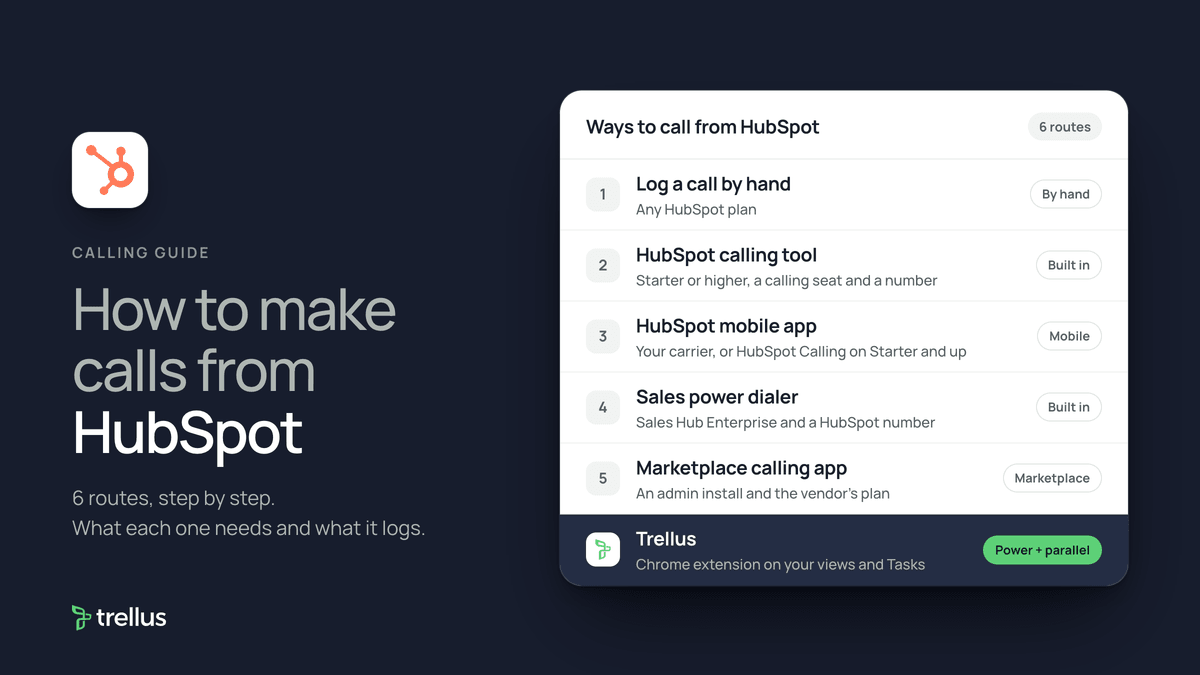
| Route | What you need | How the call starts | What lands in HubSpot |
|---|---|---|---|
| Log a call by hand | Any HubSpot plan | On any phone. Nothing starts in HubSpot | A logged call on the record timeline |
| HubSpot calling tool | Sales Hub or Service Hub Starter or higher, a seat that can call, and a number | The call icon on a record, the Contacts index page, the calling remote or the inbox | A call on the call index and the record, with outcome and notes |
| HubSpot mobile app | Your carrier on any plan, or HubSpot Calling on Starter and up | Tap Call on a task, record or search result | A call log on the timeline, when you save it |
| Sales power dialer | Sales Hub Enterprise and a HubSpot-provided number | Select contacts on the Contacts index page, then + Add to Power Dialer | A call log for each call, filled in during wrap-up |
| Marketplace calling app | An admin install and the vendor's own plan | The call icon on a record, with the app as provider | A call on the call index. Notes and recordings if the app supports them |
| Trellus, a Chrome extension | Chrome and a Trellus plan | From Tasks, prospecting, Contacts or Companies, in power or parallel mode | A call activity with disposition and summary, task completion and callback tasks |
Log a call by hand
HubSpot's article Create or log activities on a record covers calls made outside HubSpot, on all plans:
- Open the record and click the Log call icon in the upper left.
- Set the date and time and the associated records.
- Pick a call outcome, such as Connected, Left voicemail, No answer or Wrong number, and the direction, Outbound or Inbound.
- Click Log activity. The call appears on the record's timeline.
Call in the browser with the HubSpot calling tool
HubSpot's article Make calls in the HubSpot browser, last updated October 27, 2026, lists the calling tool on Sales Hub and Service Hub Starter, Professional and Enterprise. Professional and Enterprise users need a Sales or Service seat. On Starter, Core Seat users can also call. The Sales Hub pricing page listed 500 calling minutes on Starter, 3,000 on Professional and 12,000 on Enterprise on November 17, 2026, and none on the free plan. Minutes reset on the first day of each month.
Set up a number to call from
HubSpot's Set up calling guide offers two kinds of number. For a HubSpot-provided number, which can also take calls in HubSpot, a Super Admin opens settings, goes to Calling, then Call Setup, and clicks Get a HubSpot number on the Phone numbers tab. They pick a country and area code, click Generate a number, and assign it to a user with a Sales or Service seat. Some countries first need a business verification.
To show your own phone as caller ID, register an outbound number: open settings, go to General, then the Calling tab, click Add phone number, verify it by text or call, and save. HubSpot says these calls are more likely to be marked as spam, and toll-free numbers cannot be registered.
Place the call
- Go to CRM, then Contacts, and click a contact's name.
- In the left sidebar, click the call icon and select a phone number. The call begins at once.
- To change the number, add notes or switch provider first, click Open call options.
- Under Device, Call from browser uses your computer's audio. Call from phone uses your registered phone, and twice the minutes because it makes two calls. Call from HubSpot app starts the call on your mobile.
After the call, the call window asks for an outcome, notes and an optional follow-up task, then you click Done.
Call from the HubSpot mobile app
HubSpot's mobile calling article lists carrier calls on all plans. HubSpot Calling in the app needs Starter or higher and a Sales or Service seat.
- Open a call task from Home, a record from the menu, or a contact from Search, and tap Call.
- Tap Call to use your carrier. HubSpot says carrier calls cannot be recorded. To use HubSpot Calling instead, select it under Call method and pick the outgoing number first.
- After you hang up, fill in the Log Call box with notes, outcome and any follow-up task, and tap Save. The call appears on the record's timeline.
Queue contacts in the sales power dialer
HubSpot's sales power dialer is on Sales Hub Enterprise. It needs a HubSpot-provided number, calls routed to the HubSpot browser and the calling remote turned on.
- Go to CRM, then Contacts, and tick the contacts you want in the queue.
- Click More and select + Add to Power Dialer.
- Choose the number you call from, the wrap-up time and your voicemail preference, then click Start Session.
- After each call, complete the call log. Pause on the wrap-up screen, or click End Wrap Up Time to start the next call.
Calling apps in the HubSpot Marketplace
HubSpot's article Use a calling app to make and receive calls in HubSpot lists calling apps on all plans, and says an integrated app does not use your HubSpot minutes. The Marketplace's Calling category showed 191 apps on November 17, 2026.
- Click the marketplace icon in the top bar and select HubSpot Marketplace. Search for the app and open its listing.
- Click Install and complete the app's setup. HubSpot's install article says this needs Super Admin or App Marketplace access. Others can click Request to install.
- To call, open the calling remote, pick the app or click Change provider, then close the box.
- Open a record, click the call icon and pick a number. The app opens and starts the call. HubSpot says this does not work from custom object records.
What four vendors' listings say:
- Aircall: click-to-call and power dialing from a HubSpot list or a CSV file. Calls and messages sync to contacts, deals and tickets. It needs an Aircall Essentials or Professional plan.
- CloudTalk: click-to-call from records, with calls logged to the timeline with recording links. HubSpot lists feed a dialer that calls one at a time or up to 10 lines at once.
- Kixie PowerCall & SMS: click-to-call on any web page and a PowerDialer that dials up to 10 numbers in parallel. Calls, outcomes and recordings log to the contact.
- Dialpad: calls made and received inside HubSpot, logged and matched to existing contacts. It needs a Dialpad Pro or Enterprise plan.
Each app is billed by its vendor.
Power or parallel dial a HubSpot view with Trellus
Trellus is our product. It is a Chrome extension, installed from the Chrome Web Store and not from the HubSpot Marketplace. The steps below are from the Trellus for HubSpot page.
- Add Trellus to Chrome from the Chrome Web Store.
- Open a supported HubSpot view. Start from Tasks, prospecting, Contacts or a company list, with the filters your team already set.
- Choose the number to call. See the contact and company numbers before dialing.
- Power or parallel dial. The Trellus power dialer calls one number at a time. On an eligible plan, the Trellus parallel dialer calls up to five lines at once.
- Log the result and next step. Choose a call outcome, add notes and schedule a follow-up. Keep HubSpot open during each conversation.
Your HubSpot subscription and permissions affect which views and call outcomes are available. Power is $99.99 per seat per month and Power + Parallel is $149.99. Both are bought online with no seat minimum, and there is no free plan or free trial (see Trellus pricing). Watch Trellus dialing in HubSpot, or compare HubSpot power dialers and parallel dialers for HubSpot. To choose a mode, read parallel dialer vs. power dialer.
Which route fits
If you already pay for Sales Hub or Service Hub Starter or higher, the built-in calling tool may be all you need. It includes a monthly pool of minutes and logs each call. For countries HubSpot's tool does not support, or to keep a phone system you already use, HubSpot points to calling apps. For long lists, or several lines at once, use a dialer. Our cold calling report has live answer and conversation rates by hour, weekday and dialing mode.
How calls end up on the record
- Logged by hand: a call on the timeline with the outcome and direction you set.
- Calling tool and power dialer: a call on the call index and the record, with the outcome, notes and any follow-up task from the call log.
- Mobile app: a call log on the timeline with the date, duration, notes and outcome, once you tap Save.
- Calling apps: a call on the call index. Unanswered inbound calls are logged as missed. Notes, details and recordings show on the record if the app supports them.
- Trellus: a call activity with direction, status, timing, duration, HubSpot call disposition, summary and recording URL when available, linked to the contact and company. Task workflows can complete the originating task, and a callback creates a linked call task.
Recording and consent
HubSpot's call recording best practices say recording and transcription are on by default, and that getting consent is the user's job. Its article on recordings not saved says that for 13 U.S. states and international calls that need two-party consent, you must click Record and select I have informed them, or the call is not recorded. Calling apps and dialers record under their own settings. The cold calling laws by state hub lists recording consent, calling hours and do-not-call rules for each state, with the statute. This guide is not legal advice.
Troubleshooting
- “Call Failed.” HubSpot's calling FAQ says to check that the number is live and correctly formatted, with a country code outside the United States.
- The Call button is disabled. You may have used the month's minutes. New calls wait until the minutes reset, unless you add minutes or use a calling app.
- No Record button. Recording is an account-wide setting. An admin turns it on under Calling, Call Setup, then the Call Configurations tab.
If calls connect but fewer people pick up, read why calls show Spam Likely.
Frequently asked questions
Can you make phone calls directly from HubSpot?
Yes. HubSpot's calling tool places calls from records and the calling remote on Sales Hub and Service Hub Starter and higher. The mobile app can call through your carrier on any plan. Marketplace calling apps and dialers such as Trellus are other routes.
Which HubSpot plan do I need to make calls?
The calling tool needs Sales Hub or Service Hub Starter or higher, and a seat that can call. Carrier calls from the mobile app, manual logging and calling apps are listed on all plans. The sales power dialer needs Sales Hub Enterprise.
How many calling minutes does HubSpot include?
On November 17, 2026, the Sales Hub pricing page listed 500 calling minutes on Starter, 3,000 on Professional and 12,000 on Enterprise. Minutes reset on the first day of each month. Calling from your phone instead of the browser uses twice the minutes, and a connected calling app uses none.
Can I power dial or parallel dial from HubSpot?
HubSpot's sales power dialer, on Sales Hub Enterprise, queues contacts from the Contacts index page. The CloudTalk and Kixie listings describe dialing up to 10 lines at once. Trellus, a Chrome extension, power dials HubSpot views one number at a time, or parallel dials up to five lines at once on eligible plans.
Does HubSpot record calls?
HubSpot says recording and transcription are on by default for its calling tool. For two-party consent states and countries, you must click Record and confirm you told the other person. Carrier calls from the mobile app cannot be recorded.
Sources
Every page below was read on November 17, 2026.
- HubSpot knowledge base: calling in the browser, Set up calling, HubSpot-provided numbers, outbound numbers, receiving calls, the mobile app, the sales power dialer and logging activities
- HubSpot knowledge base: calling apps, installing apps, recording best practices, recordings not saved and the calling FAQ
- HubSpot Sales Hub pricing
- HubSpot Marketplace: the Calling category and the Aircall, CloudTalk, Kixie and Dialpad listings
- Trellus: Trellus for HubSpot and Trellus pricing