
How to Call a List in Google Sheets
What Google Sheets does and does not do with phone numbers, the steps for calling a list by hand, exporting it to a CRM or dialer, or dialing the rows directly, and what each route writes back to the sheet.
Trellus adds power and parallel dialing inside the CRM your team already uses. See pricing Book a demo
On this page
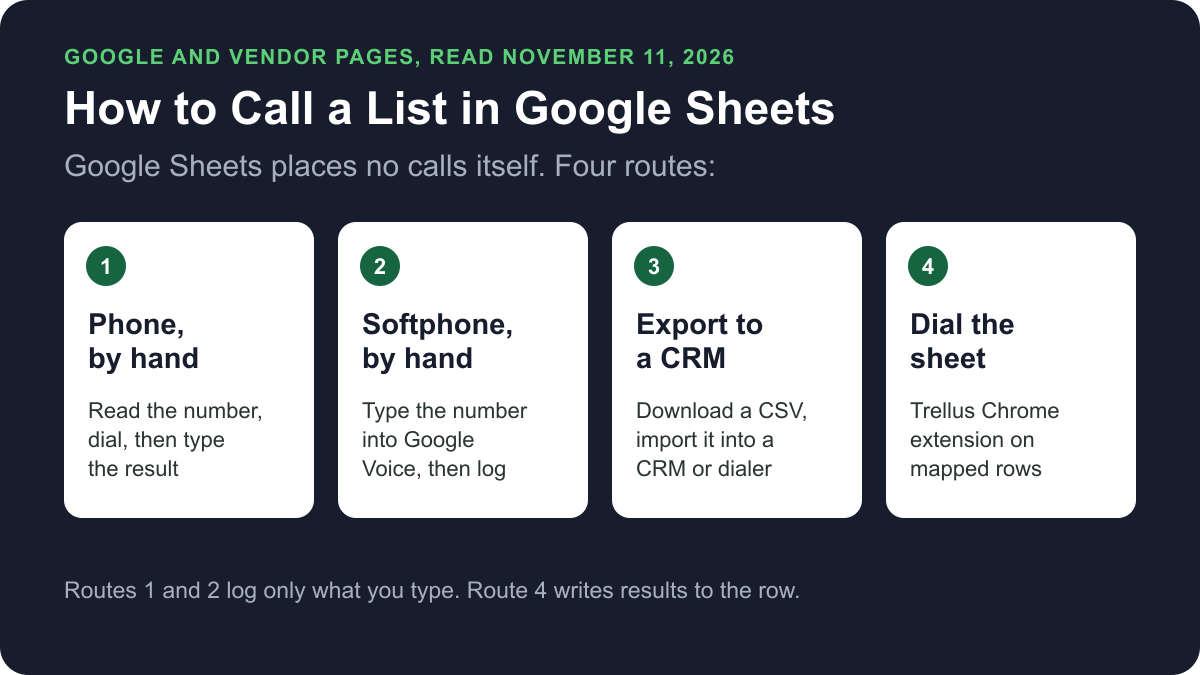
Google Sheets does not place phone calls. It holds the list. To call it, you dial each number yourself on a phone or softphone, export the sheet into a CRM or dialer that places calls, or use a dialer that works on the sheet itself, such as Trellus. Here is how each route works and what it writes back to the sheet.
Trellus publishes this guide and sells one of the routes below. Details about Google Sheets and Google Voice come from Google's own help pages, and details about each other vendor come from that vendor's own help centre, opened on November 11, 2026. The steps are as those pages give them, and nothing was tested.
Ways to call a Google Sheet at a glance
| Route | What you need | How the call starts | What gets written back to the sheet |
|---|---|---|---|
| A phone, by hand | Any phone and the sheet open beside it | You read the number and dial it | Only what you type |
| A softphone, by hand | A calling app such as Google Voice, in a supported browser | You dial the number on the keypad and click Call | Only what you type |
| Export to a CRM or dialer | An account with that tool, and the list downloaded as a file | That tool calls from its own copy of the list | Nothing, on the pages we read |
| Trellus, a Chrome extension | Chrome, a Trellus plan and your phone columns mapped | From the sheet's mapped rows, in power or parallel mode | Results and callbacks in designated Trellus columns on the same row |
What Google Sheets does with phone numbers
Google's help centre describes Sheets as an online spreadsheet app for creating and formatting spreadsheets and working with other people. Its pages describe no calling feature.
- Links. Google's page on working with links says that to create a link you click Insert, then Link, and enter a URL or email address, or search for a website. It does not mention phone numbers.
- The HYPERLINK function. Google's HYPERLINK page says only certain link types are allowed: http://, https://, mailto:, aim:, ftp://, gopher://, telnet:// and news://. With any other type, the cell shows the label but it is not a link. The tel: type used for phone numbers is not on that list.
- Number formats. Google's page on formatting numbers covers numbers, dates, currencies and custom formats. It lists no phone number format.
Before you connect any tool to the sheet, note how access works. Google's Sheets API guide says access scopes apply to a spreadsheet file and cannot be limited to one sheet. So a tool that connects through the Sheets API is given the whole file, not one tab.
Call the list by hand
Calling by hand is enough for a short list, or for calls where you prepare for each person. It needs no new tool. You keep the log yourself.
- Add result columns. For example Last call, Outcome, Notes and Callback date.
- Make Outcome a dropdown. Google's dropdown page says to select the cells, click Insert, then Dropdown, enter the values and click Done.
- Filter to the rows to call. Google's filter page says to select a range and click Data, then Create a filter. Under Filter by values, uncheck a value to hide those rows.
- Dial the number on your phone or softphone.
- Type the outcome on the row before you move to the next one.
For a ready layout, see our sales call log template.
Dialing from Google Voice
Google's page on making a call with Google Voice gives these steps on a computer, in Chrome, Firefox, Edge or Safari:
- Go to Google Voice.
- At the bottom right, click Show keypad.
- Dial the number and click Call. For international calls, enter the country code first.
Google says almost all Google Voice calls from the US to the US and Canada are free, and calls to places outside the US are at listed rates. The same page gives a web address that starts a call to a number. Google's page on one-click dialing says Google Voice can call from any web page with a phone number link, on computers only. Google's pages do not describe using either one from a Sheets cell.
Export the sheet into a CRM or dialer
If the calls should live in a CRM or a dialer, move a copy of the list there. Google's page on downloading a file says to click File, then Download, and choose a file type. Google's contacts import page names the CSV option: File, then Download, then Comma Separated Values (.csv). Three vendors' pages show what an import needs.
- Close. Close's Lead Importer page says to click your name in the upper right and choose Import data. It takes a CSV or Excel file, or rows pasted straight from a spreadsheet. The first row should be a header row, and phone numbers should start with + and the country code. Our guide on how to make calls from Close covers the calling.
- HubSpot. HubSpot's import format page says a file must be .csv, .xlsx or .xls, contain one sheet and include a header row. It gives the phone format as + then the country code and number. HubSpot's calling page lists calling with Sales Hub or Service Hub Starter, Professional and Enterprise.
- JustCall. JustCall's Sales Dialer page says to click Create Campaign, choose a dialing mode and upload a CSV. Phone numbers must be in E.164 format with the country code, and rows with no phone number are not imported. JustCall says this needs its Pro plan or above.
These pages describe importing a copy. None describes writing call results back to the Google Sheet. After the import, you call from the copy in that tool.
Dial the sheet directly with Trellus
Trellus is our product. It is a Chrome extension, installed from the Chrome Web Store, that adds power and parallel dialing to Google Sheets. You map the phone columns once, then dial rows while results and callbacks write back to the same row. The steps below are from the Trellus for Google Sheets page.
- Add Trellus to Chrome from the Chrome Web Store.
- Open the right tab. Start in the spreadsheet and sheet tab that owns the list. Each tab keeps its own queue and resume point.
- Map the columns once. Map the mobile, work, home or other phone columns, with the name and context for the call.
- Review the callable rows. Confirm filters, missing numbers, wrong-number markers and any “do not call again” state. Rows without a usable number stay out of the call block.
- Choose power or parallel. The Trellus power dialer calls one number at a time. On an eligible plan, the Trellus parallel dialer calls up to five numbers at once.
- Return to the same row. The result or callback marker goes to the designated Trellus columns.
Google authorizes access for the whole spreadsheet file, not only the open tab, so start with a sample copy. Our guide to preparing a Google Sheets sample builds one from fictional rows. Trellus is less useful when the sheet is an ungoverned export full of duplicates, unclear consent and shifting columns.
Power is $99.99 per seat per month and covers power dialing in Google Sheets. Power + Parallel is $149.99. Both are bought online with no seat minimum, and there is no free plan or free trial (see Trellus pricing). Watch the Google Sheets setup walkthrough and the parallel dialing demo. To choose a mode, read parallel dialer vs. power dialer.
What gets written back to the sheet
- Calling by hand: only what you type.
- Export to a CRM or dialer: nothing, on the pages we read. Close, HubSpot and JustCall describe an import of the file, not a link back to the sheet.
- Trellus: designated Trellus columns on the same row. They hold the last call attempt, last outcome, last human reached, total attempts, call notes and history, wrong-number state, a callback marker and the callback due time. The Trellus page says to use a sample file with your real column layout to confirm the result fields and unrelated values.
Which route fits
- A short list, or calls that need preparation: call by hand. It needs no new tool.
- A team that already works in a CRM: import the list and place the calls there.
- A maintained list that should stay in Sheets: a dialer on the sheet removes the copying between dialing and logging. The cold calling report gives answer and conversation rates by dialing mode.
Before you call a list
Check consent, calling hours and do-not-call status before you dial any list. The cold calling laws by state hub lists those rules for each state. This guide is not legal advice. If calls connect but fewer people pick up, read why calls show Spam Likely.
Troubleshooting
- A tel: link will not become clickable. Google's HYPERLINK page says a link type outside its list shows the label without a link.
- “Create a filter” is unavailable. Google says to check for merged cells, hidden rows or columns, conditional formatting and data validation rules.
- An import reads numbers as the wrong country. Close says that without a country code it falls back to the default country in your account settings. Add + and the country code in the sheet first.
- You want to share only one tab with a tool. Google says Sheets API access applies to the whole file. Put the list in its own file.
Frequently asked questions
Can you make calls from Google Sheets?
Not with Google Sheets alone. Google's help pages describe Sheets as a spreadsheet app and describe no calling feature. You dial each number yourself, import the list into a CRM or dialer, or use a dialer that works on the sheet. Trellus, a Chrome extension, dials mapped rows in the sheet.
Can I click a phone number in Google Sheets to call it?
Google's pages do not describe click-to-call in Sheets. The link dialog takes a URL or an email address. The HYPERLINK function accepts link types such as https:// and mailto:. The tel: type is not on its list, so the cell shows the label without a link.
How do I move a Google Sheet into a CRM or dialer?
In Sheets, click File, then Download, and choose Comma Separated Values (.csv). Then import that file in the tool. Close and HubSpot ask for a header row, and Close, HubSpot and JustCall all describe phone numbers with the country code. None of their pages describes writing results back to the sheet.
What gets written back to the sheet after a call?
It depends on the route. By hand, only what you type. After an export, nothing on the vendor pages we read. With Trellus, designated columns on the same row hold the last attempt, the outcome, notes, total attempts, wrong-number state and any callback.
How much does it cost to dial a Google Sheet?
Calling by hand costs what your phone or softphone costs. Google says almost all Google Voice calls from the US to the US and Canada are free. With Trellus, Power is $99.99 per seat per month and Power + Parallel is $149.99. There is no free plan or free trial.
Sources
Every page below was read on November 11, 2026.
- Google Docs Editors help: how to use Google Sheets, working with links, the HYPERLINK function and formatting numbers
- Google Docs Editors help: in-cell dropdown lists, sorting and filtering and downloading a file
- Google Voice help: making a call and one-click dialing
- Google: importing contacts into Google Contacts, for the CSV download option, and Sheets API scopes
- Vendor pages: Close's Lead Importer, HubSpot's import file format and calling page, and JustCall's Sales Dialer contacts
- Trellus: Trellus for Google Sheets, preparing a Google Sheets sample and Trellus pricing