
How to Make Calls From Close CRM
What Close's built-in calling does on each plan, the steps for the Power Dialer and Predictive Dialer, the phone apps in Close's directory, and what each route logs on the Lead.
Trellus adds power and parallel dialing inside the CRM your team already uses. See pricing Book a demo
On this page
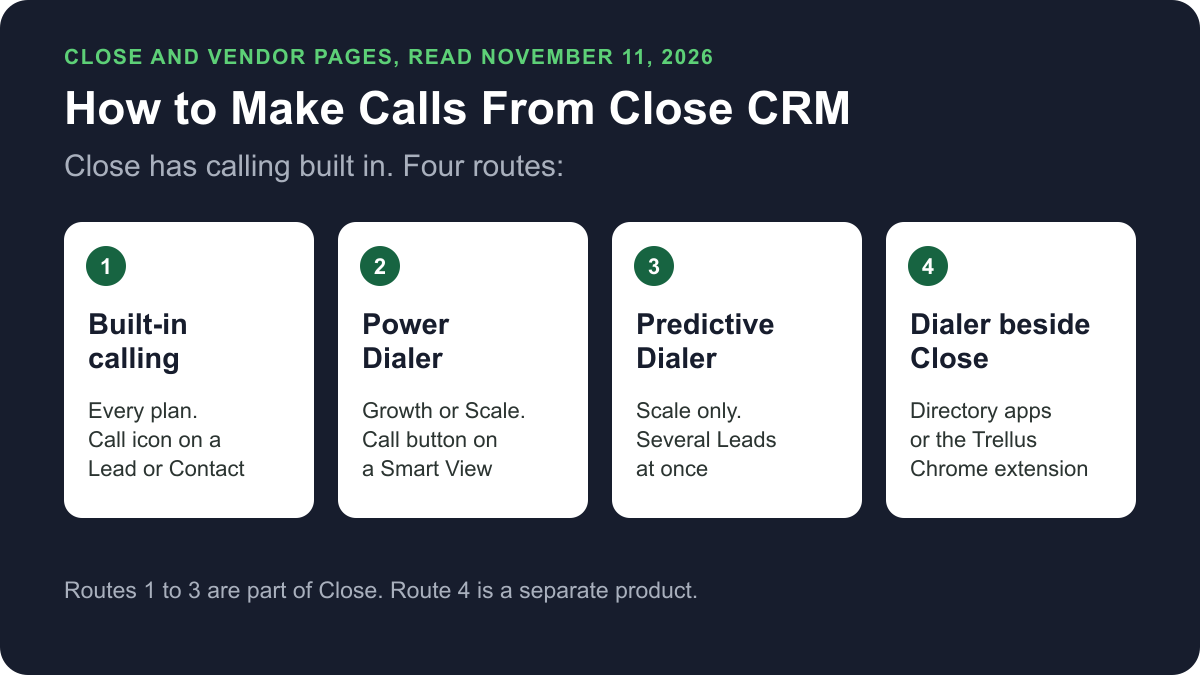
Close has calling built in. On every plan you can make and receive calls from the Close desktop app, the mobile app or a web browser, and Close logs each call on the Lead. The Power Dialer needs the Growth or Scale plan. The Predictive Dialer needs Scale. You can also call through a phone app from Close's integrations directory or a dialer such as Trellus.
Trellus publishes this guide and sells one of the routes below. Details about Close come from close.com and help.close.com, and details about each other vendor come from that vendor's own listing in Close's integrations directory, opened on November 11, 2026. The steps are as those pages give them, and nothing was tested. To compare CRMs, see Attio vs Close.
Ways to call from Close at a glance
| Route | What you need | How the call starts | What lands in Close |
|---|---|---|---|
| Built-in calling | Any Close plan. Usage is billed per minute | The calling icon on a Lead or Contact | The call on the Lead page with its time and duration |
| Power Dialer | Growth or Scale, and a Smart View | The Call button on the Smart View | Each call on its Lead page |
| Predictive Dialer | Scale, a shared caller ID and an abandonment message | Close calls several Leads at once and connects you when a person answers | A call note on the Lead that answered |
| Another phone, logged in Close | Any phone or calling app outside Close | A tel: link or any phone | A logged call, with the duration entered by hand |
| Phone apps in Close's directory | An account with that vendor | It varies by app | It varies, as each listing states |
| Trellus, a Chrome extension | Chrome and a Trellus plan | From a Lead or Contact Smart View, in power or parallel mode | A Call Activity with notes and outcome, and a callback Task |
What each Close plan includes
Close's Calling help page says calling is available on all plans and usage is charged separately. The Close pricing page lists calls worldwide, automatic call logging and call recording on every plan. The dialers and voicemail drop depend on the plan.
| Plan | Billed monthly | Billed annually | Power Dialer | Predictive Dialer | Voicemail drop | Recordings kept |
|---|---|---|---|---|---|---|
| Solo | $19 | $9 | No | No | No | 30 days |
| Essentials | $49 | $35 | No | No | No | 30 days |
| Growth | $109 | $99 | Yes | No | Yes | 90 days |
| Scale | $149 | $139 | Yes | Yes | Yes | Unlimited |
Usage is billed on top of the seat price. The pricing page says usage is passed through at cost: most outbound calls are around $0.02 a minute, and phone numbers start at about $1 a month. It also lists a 14-day free trial.
Set up and place a call with built-in calling
These steps are from Close's Calling Setup page and its Calling help page.
- Choose where you will call: the desktop app, the mobile app or a browser.
- In a browser, click the phone icon in the upper right and give the browser access to your microphone.
- Go to Settings, then Communication, then Phone & Voicemail, and select New Number.
- Find the Lead and click the calling icon on the Lead or on one Contact. A call bar appears.
- When the person picks up, use the call bar to mute, transfer, open a dial pad or hang up. Close creates a Call Note for your notes.
In the mobile app, Close's mobile app page says to open the Lead's Details tab and tap the phone icon next to the Contact's name. Voicemail drop needs Growth or Scale.
Work through a Smart View with the Power Dialer
Close's Power Dialer page says the dialer calls through a Smart View without you clicking into each Lead. The Solo, Essentials and legacy Base plans do not allow it, so you need Growth or Scale.
- Build a Smart View that holds the Leads to call. Close's guide to calling Smart Views suggests filtering by Lead status and leaving out Leads called recently.
- Open the Smart View and select the Call button at the top. The dialer calls the first Lead.
- If the call is answered, take notes and edit the Lead before the dialer calls the next one.
- To pause, click the pause icon on the call bar. If you leave Close, return to the Smart View and select Continue Calling.
The dialer rechecks the Smart View every five minutes or less, so Leads can join or leave the queue. Close says its dialers call only the primary number of the primary Contact on each Lead.
Call several Leads at once with the Predictive Dialer
Close's Predictive Dialer page says it calls several Leads in a Smart View at the same time and connects you only when a person answers. It is available on the Scale plan.
- On any Smart View, click the Call dropdown and select Manage. Under Dialer Options, open the Predictive Calling setup.
- Choose a caller ID number that anyone in your organization is allowed to use.
- Record an abandonment message under Settings, then Communication, then Dialer. A Lead hears it when no user is free to take the call.
- Turn on predictive mode for the Smart View and wait in the calling queue.
- When a Lead answers, the Lead page opens and Close adds a call note.
Close gives no fixed number of lines. The dialer adjusts how many Leads it calls by the users available, the answer rate and the abandonment rate. Close suggests at least four people logged in, and says that if you are the only rep in the session, the call rate is unlikely to rise above 1x.
Use another phone and log the call
Close's page on initiating calls from the web app says a browser can hand the call to another calling app through tel: links. Close then logs that you made a call, but not how long it lasted. For a call on a cell phone, the Calling help page says to click the drop-down arrow next to the call icon and click Log a Call. You can add notes, a Contact and the duration.
Phone apps in Close's integrations directory
The Close integrations directory listed 31 apps under Communication on November 11, 2026. Many are texting, email or meeting tools. These listings, each built by the vendor, describe phone calls:
- CallPal: a browser-based power dialer that logs each finished call to Close as a native call activity.
- JustCall: calls placed through Close's browser interface or mobile app, with calls, recordings and voicemails recorded under the contact.
- KrispCall and Ringover: click-to-call from Close, with calls logged in Close.
- Reached: dials up to five prospects at once and logs each outcome and note back.
- Vocue: a Chrome extension with a five-line parallel dialer that logs calls and outcomes back.
Each is a separate product from Close.
Power or parallel dial a Smart View with Trellus
Trellus is our product, a Chrome extension. Close already has its own dialers, and for many Close teams they are the right choice. Trellus is an alternative for teams that want Trellus power or parallel calling around the same Smart View. The steps below are from the Trellus for Close page.
- Add Trellus to Chrome from the Chrome Web Store.
- Open the Smart View. Use the Lead or Contact filter, sharing and sort your team already keeps in Close.
- Review the Contact and number. The resolved Contact, Lead and phone values stay with the call.
- Pick a dialing mode. The Trellus power dialer calls one number at a time. On an eligible plan, the Trellus parallel dialer calls up to five numbers at once.
- Return the result to Close. Trellus creates the Call Activity, applies a matching active Outcome and creates a callback Task when needed.
Trellus is a separate subscription on top of your Close plan. Power is $99.99 per seat per month and Power + Parallel is $149.99. Both are bought online with no seat minimum, and there is no free plan or free trial (see Trellus pricing). Watch the recorded Close dialing walkthrough. To choose a mode, read parallel dialer vs. power dialer and the cold calling report.
How calls end up on the record
- Built-in calling and the Power Dialer: Close adds each completed call to the Lead page with its time and duration, and creates a Call Note. Recordings are kept for the time shown in the plan table.
- Outcomes: Close's Outcomes page says Call Outcomes need Growth or Scale and appear only on connected calls.
- Predictive Dialer: a call note on the Lead that answered. Abandoned calls appear as outgoing call attempts.
- Calls made elsewhere: a tel: link call is logged without its duration. A call you log by hand holds your notes, the Contact and the duration.
- Trellus: a Close Call Activity with the Contact, Lead, number, duration, note or summary, dial mode and transcript link. Trellus then tries to apply a matching active Call Outcome. If that fails, the Call Activity can still be saved, and Trellus keeps the partial result visible. A callback is saved as a Lead-linked Trellus Callback Task.
Recording and consent
Close's Calling help page says each user turns on call recording in the Phone Settings popover and may be asked to accept call recording terms the first time. The cold calling laws by state hub lists recording consent, calling hours and do-not-call rules for each state. This guide is not legal advice.
Troubleshooting
These fixes are from Close's page on diagnosing calling problems.
- Calls do not start. Close says to close and reopen the app, restart your router and try another internet connection.
- You hear nothing, or the other person cannot hear you. Check the microphone and sound output in the phone popover and use the Test button.
If calls connect but fewer people pick up, read why calls show Spam Likely.
Frequently asked questions
Can you make phone calls directly from Close?
Yes. Close's help centre says calling is available on all plans, with usage charged separately. You call from the desktop app, the mobile app or a browser. Close adds each completed call to the Lead page with its time and duration.
Which Close plan has the Power Dialer?
Close's pricing page lists the Power Dialer on Growth and Scale, and the Predictive Dialer on Scale only. On November 11, 2026, Growth was $109 per user a month billed monthly or $99 billed annually, and Scale was $149 or $139. Call usage is billed on top.
How does Close log calls?
Close adds each call completed in Close to the Lead page with its time and duration, and creates a Call Note. For a call made on another phone, you click Log a Call and enter the notes, the Contact and the duration yourself.
How much does calling in Close cost?
Calling is on every plan, from Solo at $19 per user a month billed monthly, or $9 billed annually, as read on November 11, 2026. Usage is extra. Close says most outbound calls are around $0.02 a minute and phone numbers start at about $1 a month.
Can I parallel dial from Close?
Close's Predictive Dialer, on the Scale plan, calls several Leads at once and connects you when a person answers. Close suggests at least four people logged in. Trellus, a Chrome extension, parallel dials a Close Smart View with up to five numbers at once on eligible plans.
Sources
Every page below was read on November 11, 2026.
- Close pricing
- Close help: Calling, Calling Setup, initiating calls from the web app, Outcomes and the mobile app
- Close help: Power Dialer, Predictive Dialer, calling Smart Views and calling problems
- Close integrations directory and its CallPal, JustCall, KrispCall, Ringover, Reached and Vocue listings
- Trellus: Trellus for Close and Trellus pricing