
How to Make Calls From Amplemarket
What Amplemarket's dialer and Parallel Dialer include, the steps for each way to call a contact or work call tasks, how outside dialers connect, and what each route writes back to Amplemarket.
Trellus adds power and parallel dialing inside the CRM your team already uses. See pricing Book a demo
On this page
Amplemarket has its own dialer. A call step in a multichannel sequence creates a call task, and you call from that task with click-to-call. The Parallel Dialer, a paid add-on sold per seat, works the same call tasks one line at a time or up to five at once. Outside dialers such as CloudTalk, Orum, Nooks, Salesfinity and Trellus also connect. Here is how each route works and what lands in Amplemarket.
Trellus publishes this guide and sells one of the routes below. Details about Amplemarket come from amplemarket.com, its knowledge base and its API docs, all opened on November 17, 2026. What each outside dialer does with Amplemarket is as Amplemarket's own pages describe it. The steps are as those pages give them, and nothing was tested.
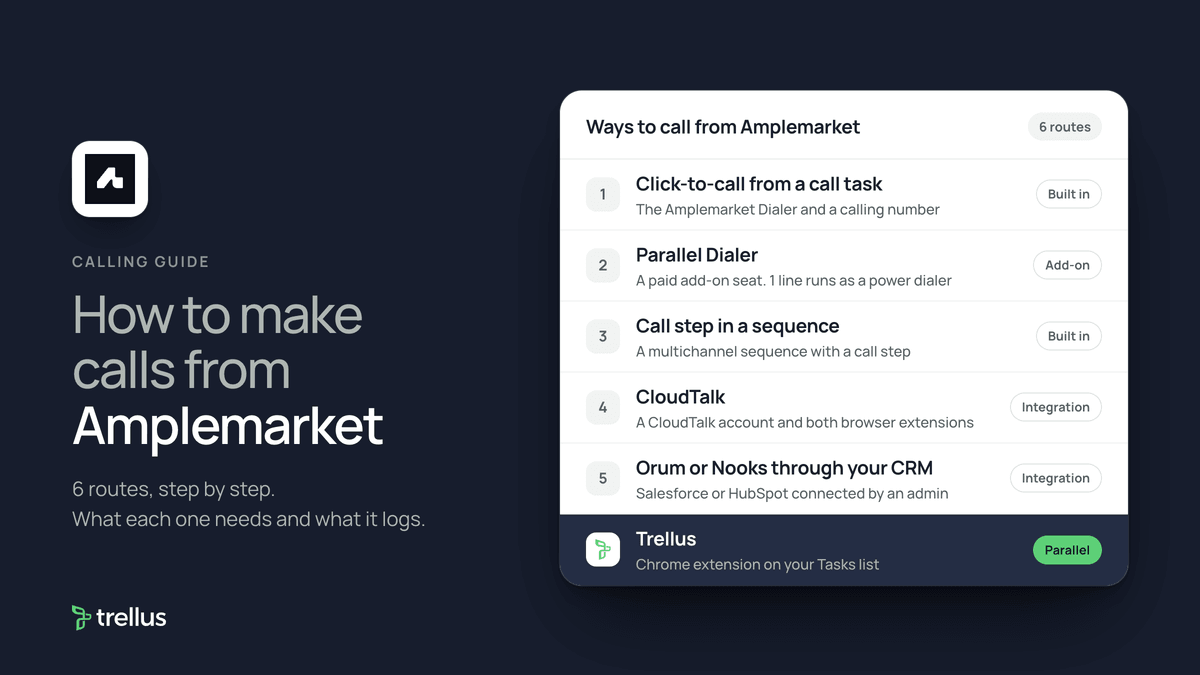
Ways to call from Amplemarket at a glance
| Route | What you need | How the call starts | What lands in Amplemarket |
|---|---|---|---|
| Click-to-call from a call task | The Amplemarket Dialer enabled on your account and a calling number | Open a call task on the Tasks page, pick the phone number and click Call | The call with its disposition and notes. The task completes, reschedules or is skipped |
| Parallel Dialer, or Power with 1 line | A Parallel Dialer seat, a paid add-on per user | Filter call tasks, choose 1 to 5 lines and start the session | The same call workflow, with transcript and summary |
| Call step in a sequence | A multichannel sequence with a call step | The step lands as a call task on the Tasks page | The disposition advances or completes the contact in the sequence |
| CloudTalk | A CloudTalk account, both browser extensions and an admin setup | Call in the task opens the CloudTalk app | The disposition you log in Amplemarket |
| Orum or Nooks through your CRM | Salesforce or HubSpot connected, and an admin to set it up | Due call tasks are pushed to a CRM report or list that the dialer calls from | The dialer's disposition, mapped to an Amplemarket disposition |
| Trellus, a Chrome extension | Chrome and a Trellus plan | From the current Tasks list or a contact, in parallel mode | Task-linked call activity, disposition and note, the task resolved, and a callback task |
What Amplemarket includes for calling
The Amplemarket pricing page on November 17, 2026 listed three plans. Startup was $600 a month on an annual term, with 2 users included. Growth, with 4 users, and Elite, with 10, were custom priced. All plans include a free trial. The comparison table marks Outbound Dialer, “Call verified phone numbers with a single click”, on all three. It lists 600, 5,000 and 9,600 phone number credits per user per year.
Amplemarket's Parallel Dialer Overview says the Parallel Dialer is not included with every subscription:
- It is sold per user seat, and only users with a seat can parallel dial.
- There is no extra per-minute charge. Seats include an allowance for calling phone numbers.
- Terms depend on your agreement. Your Amplemarket Account Manager quotes the price.
The Parallel Dialer page says click-to-call is still there for single calls. For a short list of warm leads, click-to-call may be all you need.
Set up calling and voicemail drops
Amplemarket's public help pages do not give setup steps for turning on its dialer or buying calling numbers. Its voicemail drops article says the Amplemarket Dialer must be enabled on your account. Personal call settings are under Settings, then Calls. To record a voicemail:
- Go to Settings, then Calls. Under Advanced features, find Voicemail and click Record.
- Record a message of up to 2 minutes, or upload an MP3 or WAV file of up to 5 MB.
- Name the voicemail and save it. Your first one becomes the default, and Voicemail Drops turn on.
During a call, click the voicemail button in the call controls, choose the voicemail and click Send and hang up. Amplemarket waits for the beep and plays it.
The Parallel Dialer page names Smart Rotation and Local Presence for calling from the right numbers. An admin can turn on Do Not Call screening under Settings, then Safety. It flags US numbers on the FTC registry but does not block calls.
Add a call step to a sequence
Amplemarket's Parallel Dialer page says calling is a step inside its multichannel sequences, next to email and social steps. Its University lesson on executing manual tasks says a step that needs a call lands on your Tasks page. The call script is the call step's Notes, according to Amplemarket's CRM-connected dialer guide.
That guide lists what a disposition can do to the contact:
- Advance to the next sequence stage.
- Mark the contact as completed in this sequence.
- Mark the contact as completed in all sequences.
Amplemarket includes six default dispositions that cannot be edited, and you can create custom ones.
Call from a call task with click-to-call
Amplemarket's public help pages describe the task screen in its CloudTalk integration article. The task screen and its Complete, Reschedule and Skip actions are Amplemarket's own. The Call button opens whichever dialer your account uses.
- Open the Tasks page and select the call tasks to work. The task executor opens. Click Let's go.
- Check the contact's details: title, company, local time, LinkedIn and CRM links, and past opens and calls.
- Select the phone number and click Call.
- After the call, select a disposition and add notes.
- Click Complete to finish the task, Reschedule Task to keep it for later, or skip it.
On a sequence task, Complete moves the contact to the next stage or completes it, depending on the disposition. A rescheduled task holds the contact at that stage.
Work call tasks with the Parallel Dialer
These steps are from the Parallel Dialer Overview and Amplemarket's guide What is a parallel dialer?.
- Make sure you have a Parallel Dialer seat and calling numbers for the countries you call.
- Set your default number of lines in your Calls settings.
- On the Tasks page, filter call tasks by sequence, local time, account or other criteria.
- In the task execution window, choose 2 to 5 lines to parallel dial, or 1 line to power dial. Amplemarket suggests starting with 2 to 3.
- Pick the voicemail to drop from the Voicemail dropdown. You cannot change it once dialing starts.
- Start the session. When a real person answers, the other calls stop and the contact's page opens.
- Log the disposition and notes, then move into the next round.
Amplemarket's October 2026 updates add a live transcript while a prospect answers, and a Force Connect button to join at once. Each queue card has Skip call, which keeps the task open, and Remove from sequence.
Dialers that connect to Amplemarket
The Amplemarket integrations page lists five dialers: CloudTalk, Trellus, Nooks, Orum and Salesfinity. It describes Salesfinity as a parallel dialer with one-click task import from Amplemarket. Each is a separate subscription.
CloudTalk
From the CloudTalk integration article: an admin creates an API key pair in CloudTalk and shares it with the Amplemarket team. Each rep logs in to both browser extensions. In a call task, Call opens the CloudTalk app with the contact filled in. Log the call in CloudTalk for your CRM, then log the disposition in Amplemarket so the contact moves on.
Orum, Nooks and other dialers through your CRM
Amplemarket's CRM-connected dialer guide says it works with dialers that call from Salesforce reports or HubSpot lists, and it is tested with Orum and Nooks. It needs a connected CRM, admin access, and a CRM user with the same email as each rep.
- Go to Settings, then Integrations. Under Dialer, find Dialer connected via CRM and click Configure.
- Map each disposition your dialer uses to an Amplemarket disposition, with the exact spelling. Set a fallback disposition.
- Select the users. Amplemarket creates a report or list for each, such as john_Contact_AM Calls.
- Review the advanced settings, then click Enable.
- In the dialer, open the Amplemarket report or list and call. The disposition syncs back and the sequence advances.
Only due or overdue tasks are pushed, one per contact, up to 250 per user by default. Salesforce syncs every 10 minutes and HubSpot almost at once. For Orum, Amplemarket also has a direct integration that connects with an Orum API key and pushes due call tasks to a list in Orum.
Parallel dial Amplemarket call tasks with Trellus
Trellus is our product. It is a Chrome extension, installed from the Chrome Web Store, that parallel dials call tasks on the current Amplemarket Tasks list. The steps below are from the Trellus for Amplemarket page.
- Add Trellus to Chrome from the Chrome Web Store.
- Open the Tasks view. Apply the filters and grouping you intend to work. That view is the queue.
- Review the phone choices. Treat a known wrong number or phone-level DNC state as a reason to stop and review.
- Start the parallel block. The Trellus parallel dialer calls up to five lines at once on eligible plans.
- Choose an Amplemarket disposition. It must match a real disposition returned by Amplemarket.
- Save the activity, then resolve the task. Trellus saves the call activity first, then completes the task.
Power is $99.99 per seat per month and dials one number at a time. Power + Parallel is $149.99 and dials up to five lines on eligible plans. Both are bought online with no seat minimum, and there is no free plan or free trial (see Trellus pricing). Watch the recorded Amplemarket walkthrough, or read parallel dialer vs. power dialer.
How calls end up on the record
- Amplemarket Dialer and Parallel Dialer: the call on the contact's activity and on the Calls page, with the disposition and notes. Amplemarket says transcripts and summaries are captured, and a follow-up email can be drafted from the transcript.
- CloudTalk: the disposition and notes you log in Amplemarket, and the call log you save in CloudTalk.
- Dialers through your CRM: the dialer's disposition, which advances or ends the sequence.
- Trellus: a task-linked call activity with the disposition, an available note and optional recording or transcription. The original task is resolved, and a callback becomes a phone-call task titled Trellus Callback Task.
- Your CRM: Amplemarket's HubSpot and Salesforce guides have one setting for calls placed with the Amplemarket Dialer and another for third-party dialers such as Salesfinity and Trellus.
Amplemarket's calls API can also log calls and retrieve recordings.
Recording and consent
Amplemarket's cold calling guide includes “Announce call recording where required by law” in its compliance checklist. It says the guide is not a substitute for legal counsel. The cold calling laws by state hub lists recording consent, calling hours and do-not-call rules for each state, with the statute. This guide is not legal advice.
Troubleshooting
- Several call tasks in the CRM for one call. Amplemarket's CRM dialer FAQ says to turn on Consolidate Salesforce call tasks under Advanced Settings.
- Dispositions are not recognized. The dialer must write to CallDisposition in Salesforce or hs_call_disposition in HubSpot, and the mapping must match exactly, including capitals.
- A user is grayed out. The rep's CRM user must have the same email, matched case-sensitively.
- Call tasks are missing from the dialer. Filter the Tasks page by CRM dialer sync status, then Not synced. The badge tooltip gives the reason.
- DNC flags with an outside dialer. Amplemarket says DNC tags may not transfer to third-party dialers such as Salesfinity or Trellus.
If calls connect but fewer people pick up, read why calls show Spam Likely.
Frequently asked questions
Does Amplemarket have a built-in dialer?
Yes. Amplemarket's pricing page lists an Outbound Dialer on its Startup, Growth and Elite plans, and you call from call tasks with click-to-call. Its Parallel Dialer is a separate paid add-on sold per user seat.
Is Amplemarket's Parallel Dialer included in my plan?
Not automatically. Amplemarket sells the Parallel Dialer per user seat with no per-minute charge, and seats include an allowance for calling numbers. Your Amplemarket Account Manager quotes the price.
Can I power dial in Amplemarket?
Yes, with a Parallel Dialer seat. Set the number of lines to 1 and the Parallel Dialer runs as a power dialer, one call at a time. Set 2 to 5 lines to parallel dial.
Can I use Orum or Nooks with Amplemarket?
Yes. Amplemarket pushes due call tasks to a Salesforce report or HubSpot list that Orum or Nooks calls from, and maps their dispositions back. Orum can also connect directly with an API key.
How do I log a call in Amplemarket?
From the call task, select a disposition, add notes and click Complete. Reschedule Task keeps the task for later. With a dialer that connects through your CRM, the disposition comes back from the dialer instead.
Sources
Every page below was read on November 17, 2026.
- Amplemarket knowledge base: Parallel Dialer Overview, voicemail drops, DNC screening and cold calling guide
- Amplemarket knowledge base: CRM-connected dialer setup, CRM dialer FAQ, direct Orum integration, CloudTalk, HubSpot and Salesforce
- Amplemarket pricing, the Parallel Dialer page and the integrations page
- Amplemarket blog and University: What is a parallel dialer?, October 2026 updates and executing manual tasks
- Amplemarket API docs: calls guide
- Trellus: Trellus for Amplemarket and Trellus pricing