
How to Make Calls From Attio
What Attio does and does not do for phone calls, the steps for each way to call from a record or a list, and what each route writes back to Attio.
Trellus adds power and parallel dialing inside the CRM your team already uses. See pricing Book a demo
On this page
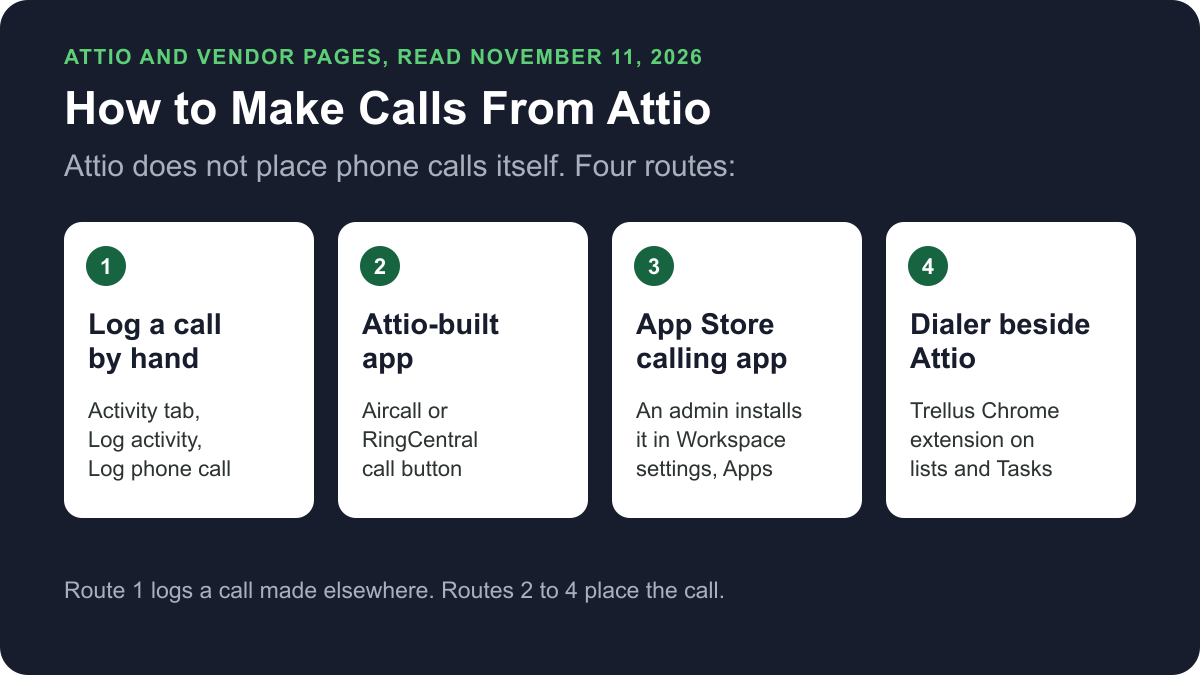
Attio does not place phone calls itself. You call through an app from the Attio App Store, such as Aircall or RingCentral, or through a dialer that works beside Attio, such as Trellus. You can also log a phone call on a record by hand. Here is how each route works and what lands on the record.
Trellus publishes this guide and sells one of the routes below. Details about Attio come from attio.com, and details about each vendor come from that vendor's own website, opened on November 11, 2026. The steps are as those pages give them, and nothing was tested. To compare the products, see the best dialers for Attio.
Ways to call from Attio at a glance
| Route | What you need | How the call starts | What lands in Attio |
|---|---|---|---|
| Log a call by hand | Attio Plus, Pro, Enterprise or Ultra. Activities are in beta | On any phone. Nothing starts in Attio | A Phone call activity that you fill in, on the record's Activity tab |
| Aircall app, built by Attio | Any Attio plan, an admin install, an Aircall account and the Aircall desktop app | The Call button on a record pre-fills the number in Aircall. You click Call now there | A note on the person within a few minutes of a successful call |
| RingCentral app, built by Attio | Any Attio plan, an admin install and a RingCentral account connected by each member | The Call (RingCentral) button. RingCentral rings your app and you press 1 | No logging is described on Attio's pages |
| Other Calling apps in the App Store | An admin install and the vendor's own plan | It varies: a button, a browser extension, your default calling app or the vendor's own app | It varies: a note or a call log, as each listing states |
| Trellus, a Chrome extension | Chrome, a Trellus plan and your Attio phone fields mapped | From an Attio People list or Tasks, in power or parallel mode | Outcome, summary, dispositions and callback tasks on the person record; call activities when the Trellus app is connected |
What Attio does natively today
Attio's help centre documents phone calling through apps. Attio itself offers a meeting recorder and an activity log.
Call Intelligence records video meetings
Attio's call recording setup page says the Attio call recorder works with Zoom, Google Meet and Microsoft Teams, on Pro, Enterprise and Ultra plans. The troubleshooting page lists a call on any other platform as unsupported. So it does not cover calls placed through a phone app or dialer.
Logging a phone call by hand
Attio's activity logging page says Phone call is a standard activity. Activities are in beta, on Plus, Pro, Enterprise and Ultra plans, for all workspace members. To log a call:
- Open a record page.
- Open the Activity tab.
- Click Log activity.
- Under Activities, select Log phone call.
- Fill in the details.
- Click Log phone call to save.
The activity appears on the Activity tab of every linked record. All logged activities are visible to all workspace members. The Attio pricing page lists activity tracking as beta: manual logging on Plus, and custom activities and integrations on Pro and Ultra.
Click-to-call with the Aircall app
Attio builds the Aircall app and offers it on all plans. These steps are from Attio's Aircall help page.
Set up, as a workspace admin:
- Open Workspace settings, then Apps. Find the Aircall app and click Install.
- Click + Connect, log in to Aircall and click Authorize.
- Click + Add numbers, select the number to use and confirm.
Call a record:
- Have Aircall Workspace for Desktop downloaded and open.
- Open the person or company record. The person needs a phone number.
- Click the Call button in the top-right corner. The number is pre-filled in Aircall.
- Choose the line to call from and click Call now in Aircall.
To work through a list, select people in People or any list, click More, then Add to dialer campaign. Start the session from the Power Dialer in the Aircall app.
Click-to-call with the RingCentral app
Attio also builds the RingCentral app, on all plans. These steps are from Attio's RingCentral help page.
- An admin opens Workspace settings, then Apps, finds the RingCentral app and clicks Install.
- Each member opens Account settings, then Apps, opens the RingCentral app and clicks + Connect. They log in and click Authorize.
- Open a person or company record that has a phone number and click Call (RingCentral).
- RingCentral calls your desktop or mobile app. Accept the call and press 1 to connect.
Other calling apps in the Attio App Store
The Attio App Store listed 36 apps under Calling on November 11, 2026. Many are meeting recorders. Attio's app install page says apps are available on all plans and only admins can install them:
- Click the workspace name, select Workspace settings, then Apps.
- Search for the app and click on it.
- Click Install, then connect an account. Some apps need a workspace connection, some need each member to connect, and some need both.
Members who are not admins can click Request to install on any listing. Admins are notified in Attio and by email.
How a call starts depends on the app. Quo's help article describes a Call in Quo button that opens its desktop app. The Ringover listing describes click-to-dial through its browser extension. Allo's Attio page says a clicked number starts the call in Allo once Allo is your default calling app. The CallPal and Reached listings describe calls placed in their own apps and logged back. Our comparison of dialers for Attio has the prices and details.
Power or parallel dial a People list or Tasks with Trellus
Trellus is our product. It is a Chrome extension, installed from the Chrome Web Store and not from the Attio App Store. It adds a calling panel to supported views on app.attio.com. The steps below are from the Trellus for Attio page.
- Add Trellus to Chrome from the Chrome Web Store.
- Open the view. Choose the People list or task view your team is ready to work. Keep the filters and order already set in Attio.
- Map the phone fields. Tell Trellus which attributes hold mobile, work, other and do-not-call data.
- Pick a dialing mode. The Trellus power dialer calls one number at a time. On an eligible plan, the Trellus parallel dialer calls up to five numbers at once.
- Finish the record. Choose the outcome, add the summary, flag a wrong number or schedule a callback before the next person.
To log calls as Attio activities, a Trellus team admin connects the Trellus app to the workspace once, under Integrations in Trellus settings. An Attio workspace admin may need to approve access.
Power is $99.99 per seat per month and Power + Parallel is $149.99. Both are bought online with no seat minimum, and there is no free plan or free trial (see Trellus pricing). Watch the recorded Attio dialing walkthrough, or plan the session with the guide to running an Attio call block. To choose a mode, read parallel dialer vs. power dialer.
How calls end up on the record
- Logged by hand: a Phone call activity on each linked record's Activity tab.
- Aircall app: a note on the person within a few minutes of a successful call, including inbound calls and calls that did not start in Attio. It holds who placed the call, the date and time, the length, whether it was answered and any notes taken in Aircall. The person must already exist in Attio with the correct phone number.
- RingCentral app: Attio's listing and help page describe no logging. You can log the call by hand.
- Other apps: as each listing states. Quo logs calls, recordings, summaries, voicemails and texts to the matching Person. CallPal writes one note per finished call.
- Trellus: the outcome, summary, dispositions and a person-linked callback task. With the right workspace permissions these are structured attributes on the person record. Otherwise call details are saved in an Attio note. When a team admin connects the Trellus app to the workspace from Trellus settings, calls are saved as call activities linked to the person and any identified deal, with the disposition, notes and a transcript link when available.
Recording and consent
Attio's recording guidelines for its meeting recorder say you must follow the data privacy laws that apply to the participants, and that you may need consent from all of them. Phone calls made through an app or dialer are recorded under that tool's settings, not Attio's. The cold calling laws by state hub lists recording consent, calling hours and do-not-call rules for each state, with the statute. This guide is not legal advice. Check with your counsel before you record calls.
Troubleshooting
- Aircall calls work but no notes appear. Attio says to open Aircall, go to Integrations & API, then Attio, then Associated phone numbers, and add the numbers you call from.
- “You need an Aircall user account to make calls.” Attio says the email on your Aircall account must match the email you use to log in to Attio.
- RingCentral is installed but not connected. Attio says each member who wants to call must also connect their own RingCentral account.
- Call in Quo. Quo says the button works from Attio in your browser, not the Attio desktop app on Mac, and the Quo desktop app must be your default calling app.
- Ringover summaries. Ringover's listing says the note created when a call ends must not be edited by hand, or the summary and transcript link cannot be added.
- No Log phone call option. Attio says you can only log activities your workspace admins have set up.
If calls connect but fewer people pick up, read why calls show Spam Likely.
Frequently asked questions
Can you make phone calls directly from Attio?
Not with Attio alone. Attio's help pages describe phone calls through apps. The Attio-built Aircall and RingCentral apps add a call button to person and company records, and other calling apps are in the Attio App Store. A dialer such as Trellus can also call from Attio lists through a Chrome extension.
Does Attio record phone calls?
Attio's call recorder joins video meetings on Zoom, Google Meet and Microsoft Teams, on Pro, Enterprise and Ultra plans. Its troubleshooting page lists any other platform as unsupported. Phone call recordings come from the phone app or dialer you use, and some apps add a recording or a link to the Attio record.
How do I log a phone call in Attio?
Open the record, open the Activity tab and click Log activity. Under Activities, select Log phone call, fill in the details and save. Attio says Activities are in beta and available on Plus, Pro, Enterprise and Ultra plans. The call then appears on the Activity tab of each linked record.
Can I power dial or parallel dial from Attio?
Yes, with a dialer. Attio's Aircall app can add selected people to an Aircall dialer campaign. Trellus, a Chrome extension, power dials an Attio People list or Tasks one number at a time, or parallel dials up to five numbers at once on eligible plans. Other options are in our comparison of dialers for Attio.
Which Attio plan do I need to make calls?
Attio lists its Aircall and RingCentral apps, and app installs in general, as available on all plans. Logging a phone call by hand needs Plus or higher. Call Intelligence, which records video meetings, needs Pro, Enterprise or Ultra. The phone app or dialer you choose has its own plan and price.
Sources
Every page below was read on November 11, 2026.
- Attio help: logging activities on records, call recording setup, recording calls and recording troubleshooting
- Attio help: Aircall app, RingCentral app and installing and connecting apps
- Attio App Store and its Aircall, RingCentral, Quo, Ringover, CallPal and Reached listings
- Attio pricing: Call Intelligence and activity tracking
- Vendor pages: Quo's Attio help article and Allo's Attio page
- Trellus: Trellus for Attio and Trellus pricing