
How to Make Calls From Zoho CRM
What Zoho CRM does for phone calls, the steps for each way to call from a record, a Task or a list, and what each route writes back to Zoho CRM.
Trellus adds power and parallel dialing inside the CRM your team already uses. See pricing Book a demo
On this page
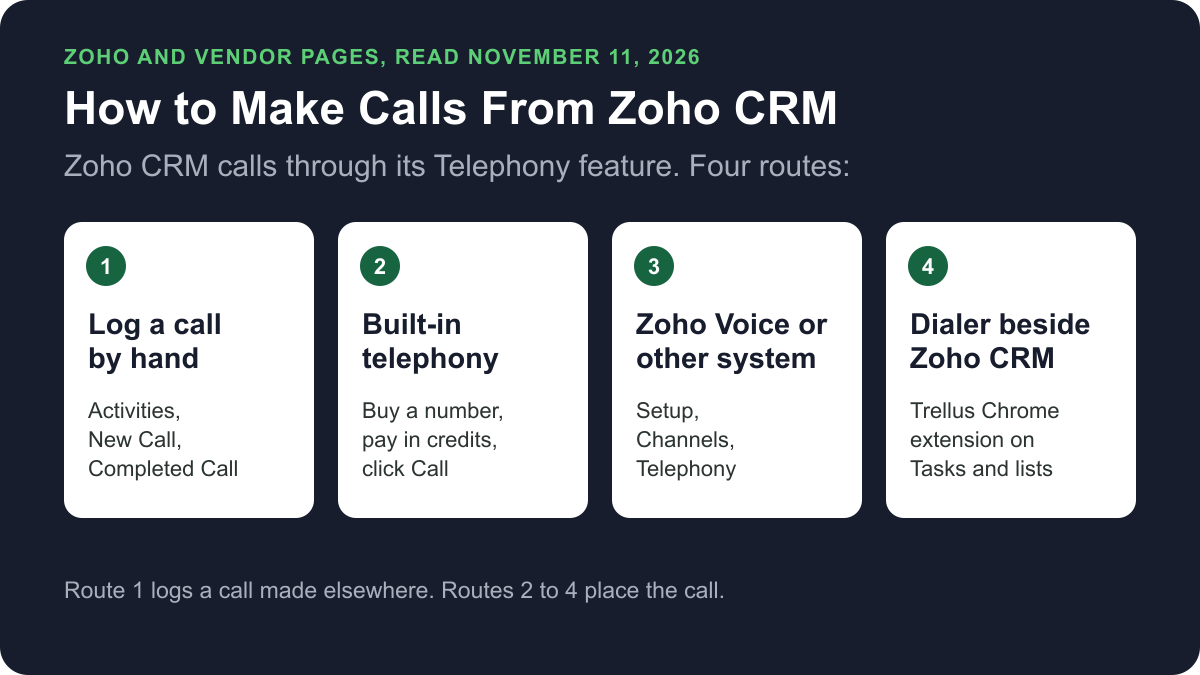
Zoho CRM places calls through its Telephony feature. An admin sets up Zoho's built-in telephony, Zoho Voice or another phone system. Reps then click the phone icon next to a number on a record. You can also log a call by hand in the Calls module, or dial Tasks and lists with a dialer such as Trellus. Here is how each route works and what lands on the record.
Trellus publishes this guide and sells one of the routes below. Details about Zoho CRM and Zoho Voice come from zoho.com and Zoho's help pages, and details about each telephony extension come from that vendor's own Zoho Marketplace listing, all opened on November 11, 2026. The steps are as those pages give them, and nothing was tested.
Ways to call from Zoho CRM at a glance
| Route | What you need | How the call starts | What lands in Zoho CRM |
|---|---|---|---|
| Log a call by hand | Any phone, and permission to create Calls | On that phone. Nothing starts in Zoho CRM | A Calls record that you fill in |
| Built-in telephony | An admin buys a number and credits. 1 credit is US$1 | The Call icon next to a number on a record, or the dial pad | The call in the Calls History tab, and any follow-up you add |
| Zoho Voice | A Zoho Voice plan and a number assigned to each agent | The click-to-call button next to a phone number | A call log in the Calls module, updated automatically |
| Another phone system | A supported provider or a Marketplace extension, enabled by an admin | The phone icon beside the number | Calls logged automatically, as Zoho's guides state |
| Trellus, a Chrome extension | Chrome and a Trellus plan. Works on .zoho.com and .zoho.eu | From Tasks, a module list or a record, in power or parallel mode | A Zoho Calls record. A related Note and Task completion are separate |
What Zoho CRM does natively today
Zoho's telephony introduction says the Telephony feature links a phone system to Zoho CRM. Teams can dial with a single click, see caller details, view missed calls and add call descriptions. Users with the Administrative profile can access the feature.
The Zoho CRM pricing page showed these prices on November 11, 2026. Billed annually, Standard was US$14, Professional US$23 and Enterprise US$40 per user per month. Billed monthly, Standard was US$20 and Professional US$35. The Standard card lists built-in calling. Zoho's feature comparison lists PhoneBridge integrations on Standard and higher, not on Free. It lists calls as an activity on every edition.
Logging a call by hand
These steps for a completed call are from Zoho's Logging Calls article:
- In the Activities module, click New Call. Or click Log a Call in the Open Activities related list on the record.
- Specify the contact or lead. Enter the subject and select the Call Purpose.
- Select the Call Type: Inbound or Outbound.
- In Call Details, click Completed Call and enter the call duration.
- Add the Description and Call Result, then click Save.
Zoho says a call marked as completed cannot be edited.
Set up Zoho CRM's built-in telephony
Zoho's setup guide says built-in telephony runs on Twilio's infrastructure. A user with Administrator permission sets it up:
- Go to Setup, Channels, Telephony. Click Set Up Now, then Buy a number.
- Choose the country and number type, pick a number and confirm.
- On the Telephony Users tab, click Add User. Select the user and tick Allow to make outgoing calls.
- On the Call Flows tab, create a call flow for the number. Incoming calls are rejected for a number with no call flow.
Reps then follow Zoho's user guide:
- Click Phone at the bottom of the CRM, then Preferences. Choose Browser or Custom Phone.
- Open a record and click the Call icon next to the phone or mobile number. Or open the Dial pad, dial and press Call.
- In the Call Ended window, add a follow-up call or task.
Costs are in credits, and 1 credit is US$1. Each number is charged monthly and each call is charged by use. The built-in telephony pricing page shows rates by country and number type.
Click-to-call with Zoho Voice
Zoho Voice is Zoho's own cloud phone system. Its Zoho CRM integration guide says only super admins and admins can configure it.
- In Zoho CRM, go to Setup, Channels, Telephony. Select Zoho Voice and click Install.
- Choose All Users or Specific Users and click Install again.
- In Zoho Voice, go to Settings, Zoho Telephony. Select your Zoho CRM portal and click Integrate Product.
- Select the users to import and click Import.
- On the Call Config page, under Outgoing, assign numbers to the agents who will call. Calls work in Zoho CRM only once numbers are assigned. Reps then use the click-to-call button next to a phone number.
The Zoho Voice pricing page showed these Enterprise Telephony prices on November 11, 2026, billed annually: Basic at US$34 per user per month, Standard at US$49 per month for one admin and 10 telephony agents, and Contact Center at US$74 on the same terms. Call charges are extra. Zoho suggests Standard for existing Zoho CRM users.
The page lists Power Dialer in Contact Center, and as an add-on at 10 credits per user per month on Basic and Standard. Zoho's Power Dialer page says it calls your contacts continuously and automatically. It gives no setup steps, so none are listed here.
Other phone systems: PhoneBridge and Marketplace extensions
Zoho PhoneBridge is the platform phone vendors use to connect a cloud PBX or contact centre to Zoho apps. Zoho keeps a list of supported providers. The Telephony tag in Zoho Marketplace for CRM showed 246 extensions on November 11, 2026.
Zoho's RingCentral guide shows the pattern:
- An administrator goes to Setup, Channels, Telephony.
- Select RingCentral from the Choose a telephony provider list and click Enable.
- Each user logs in to RingCentral from Zoho CRM and chooses a phone number.
- Open a record and click the Phone icon beside the phone number. Press 1 to connect through the RingCentral softphone, which must be installed.
Marketplace listings are in each vendor's words. Kixie's PowerCall and SMS for Zoho, a paid extension, puts a click-to-call button next to numbers in Chrome and logs calls, texts and dispositions. CloudTalk for Zoho CRM logs calls, texts and recordings into Zoho. JustCall Phone Bridge needs a JustCall account and PhoneBridge enabled in Zoho.
Power or parallel dial Tasks and lists with Trellus
Trellus is our product. It is a Chrome extension, installed from the Chrome Web Store. It adds power dialing and parallel dialing to Zoho CRM Tasks, module lists and records. Current browser support is limited to Zoho CRM and CRM Plus on .zoho.com and .zoho.eu. The steps below are from the Trellus for Zoho CRM page.
- Add Trellus to Chrome from the Chrome Web Store.
- Open the worklist. Start from a Zoho Task list, module list or record. Module lists cover Leads, Contacts, Accounts, Deals, Vendors and Products, and available custom modules.
- Review the phone fields. Labels such as Mobile, Phone or Direct line stay next to the value.
- Choose power or parallel. The Trellus power dialer calls one number at a time. On an eligible plan, the Trellus parallel dialer calls up to five numbers at once.
- Select the Zoho result. Choose the Call Purpose and Call Result.
- Inspect the final state. Confirm the Calls record, the related Note and the source Task separately.
Trellus does not create a Zoho callback Task. Power is $99.99 per seat per month and Power + Parallel is $149.99. Both are bought online with no seat minimum, and there is no free plan or free trial (see Trellus pricing). Watch the recorded Zoho dialing walkthrough. To choose a mode, read parallel dialer vs. power dialer.
Which route fits
For a few calls a day, Zoho CRM's own calling is enough. Built-in telephony needs a number and credits, and a call made on any phone can be logged by hand. For a team phone system inside Zoho, look at Zoho Voice. For a long list, use a dialer. Our cold calling report has live answer and conversation rates by hour, weekday and dialing mode.
How calls end up on the record
- Logged by hand: a Calls record, shown in the Closed Activities related list of the lead or contact.
- Built-in telephony: calls are listed in the Calls History tab. A follow-up call or task is linked to the record.
- Zoho Voice: call logs are updated automatically in the Calls module, with your notes.
- Other phone systems: Zoho's telephony guide says incoming and outgoing calls are logged automatically in the Calls module.
- Trellus: a Zoho Calls record with purpose, result, duration, number and description. A related Note and source Task completion are separate steps.
Recording and consent
Zoho's built-in telephony admin guide says you can record incoming and outgoing calls, and asks you to make sure that is legal in your region. The cold calling laws by state hub lists recording consent, calling hours and do-not-call rules for each state, with the statute. This guide is not legal advice.
Troubleshooting
- Zoho Voice click-to-call does nothing. Zoho says calls work only after numbers are assigned to the admin and telephony agents in Zoho Voice.
- Incoming calls are rejected. Zoho says built-in telephony rejects calls to a number that has no call flow.
- New recordings are not saved. Zoho gives each organization 1,000 minutes of free recording storage. Past that, upgrade the storage plan.
If calls connect but fewer people pick up, read why calls show Spam Likely.
Frequently asked questions
Can you make phone calls directly from Zoho CRM?
Yes. Zoho CRM has a Telephony feature. An admin sets up Zoho's built-in telephony, Zoho Voice or another supported phone system under Setup, Channels, Telephony. Reps then click the phone icon next to a number on a record. A dialer such as Trellus can also call Tasks and lists.
Does Zoho CRM have a power dialer?
Zoho's Power Dialer belongs to Zoho Voice, its phone system. The Zoho Voice pricing page lists it in the Contact Center plan, and as an add-on on Basic and Standard. Trellus, a Chrome extension, power dials Zoho CRM Tasks and module lists, or parallel dials up to five numbers at once on eligible plans.
How do I log a call in Zoho CRM?
Calls placed through a telephony integration are logged automatically. By hand, click New Call in the Activities module, or Log a Call on the record. Enter the contact or lead, subject, purpose and call type. Choose Completed Call, enter the duration, description and result, and click Save.
Which Zoho CRM edition do I need to make calls?
On November 11, 2026, the Zoho CRM pricing page listed built-in calling on the Standard edition, at US$14 per user per month billed annually. Zoho's feature comparison lists PhoneBridge integrations on Standard and higher, not on Free. Zoho Voice and other phone systems are priced separately.
What is Zoho PhoneBridge?
PhoneBridge is Zoho's platform for connecting a cloud PBX or contact centre to Zoho apps. Zoho lists click-to-call, call pop-ups, contextual calling and call analytics among its features. Providers such as RingCentral and JustCall connect through it, and Zoho keeps a list of supported telephony providers.
Sources
Every page below was read on November 11, 2026.
- Zoho CRM help: telephony introduction, configuring, using and managing built-in telephony, working with telephony, RingCentral and Logging Calls
- Zoho CRM pricing, feature comparison and built-in telephony pricing
- Zoho Voice: Zoho CRM integration guide, pricing and Power Dialer
- Zoho PhoneBridge, the telephony provider list, and Zoho Marketplace listings for Kixie, CloudTalk and JustCall
- Trellus: Trellus for Zoho CRM and Trellus pricing