
How to Make Calls From GoHighLevel
What HighLevel's own phone system and dialers do, the steps for each way to call a contact or a list, the plans and usage charges involved, and what each route writes back to HighLevel.
Trellus adds power and parallel dialing inside the CRM your team already uses. See pricing Book a demo
On this page
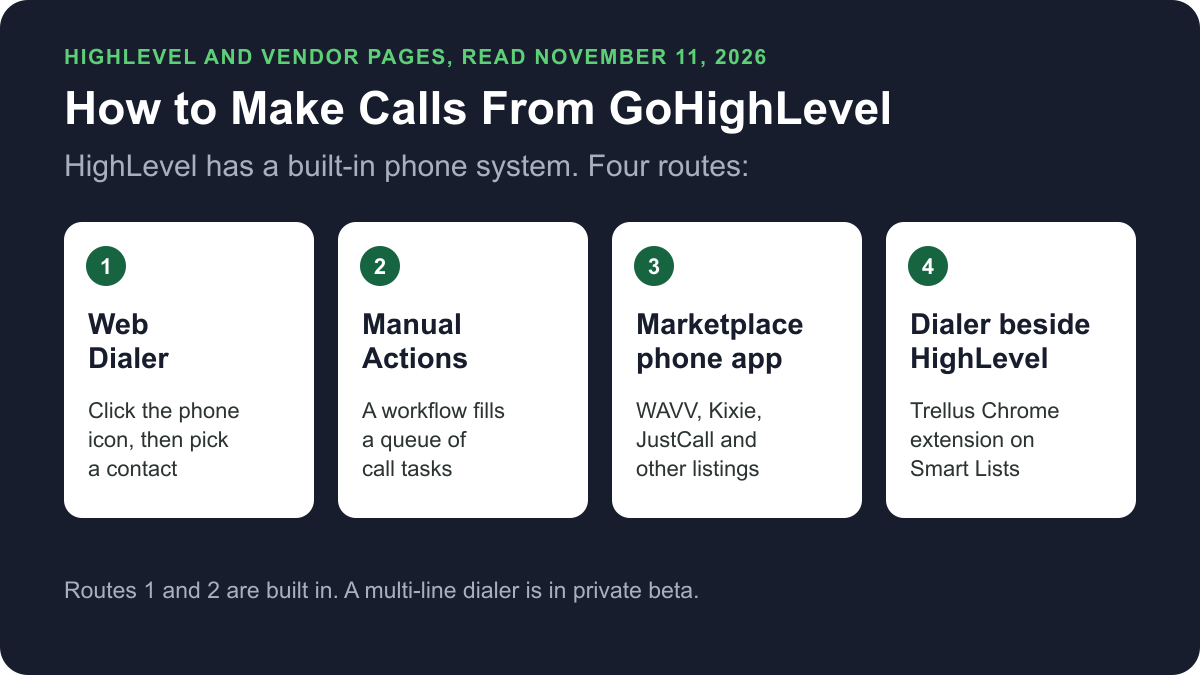
GoHighLevel, which its own pages call HighLevel, has a built-in phone system. You can call a contact from the Web Dialer in your browser, work a queue of call tasks under Manual Actions, or call from the mobile app. A multi-line dialer is in private beta. Marketplace apps, and dialers such as Trellus, add more ways to call a list. Here is how each route works and what lands on the contact.
Trellus publishes this guide and sells one of the routes below. Details about HighLevel come from gohighlevel.com, its help centre and its App Marketplace, and details about each phone app come from that vendor's own Marketplace listing, all opened on November 11, 2026. The steps are as those pages give them, and nothing was tested.
Ways to call from GoHighLevel at a glance
| Route | What you need | How the call starts | What lands in HighLevel |
|---|---|---|---|
| Web Dialer | A HighLevel phone number, on any plan | Click the green phone icon, then pick a contact or enter a number | The call, logged to the contact record automatically |
| Manual Actions queue | A published workflow with a Manual Call action | Open Conversations, then Manual Actions, and click Let's Start | The outcome you log, and a task status |
| Multi-line dialer | Private beta access and an admin switch | From a call list, ringing 1, 2 or 3 contacts at once | A disposition after each call |
| Mobile app | The HighLevel or LeadConnector app | Tap Call on a contact | Notes, tasks and tags from the post-call screen |
| Marketplace phone app | The app installed from the App Marketplace | The vendor's click-to-call or dialer | As each listing states |
| Trellus, a Chrome extension | Chrome, a Trellus plan and the Trellus Dialer Marketplace app | From a Contacts Smart List, in power or parallel mode | A contact note, a selected tag and a callback task |
What HighLevel does natively today
HighLevel's help centre describes LC Phone as its own telephony service, with no Twilio setup. HighLevel's Web Dialer article lists three calling options: the Web Dialer for individual calls, Manual Actions (which it also calls the Power Dialer) for a call queue, and the mobile app.
The HighLevel pricing page showed three plans on November 11, 2026. On its monthly view, Starter was $97 a month, Unlimited $297 and Founder $497, each with unlimited users and a 14-day free trial. It lists inbound and outbound calling as a core feature and says usage-based charges apply. HighLevel's pricing guide says the Phone System is available on all plan levels.
The Phone System pricing guide, last modified October 12, 2026, gives these US and Canada rates:
- A local number is $1.15 a month.
- Outbound calls are $0.0166 a minute in total: $0.0126 for the call and $0.004 in client minutes.
- Calls are billed in full minutes, rounded up.
Call a contact from the Web Dialer
The Web Dialer is HighLevel's browser calling interface. HighLevel says to allow microphone access for the site first. Then:
- From the top navigation, click the green phone icon.
- Review the Calling From number.
- Choose Keypad to enter a number, Contacts to search for a contact, or Recents.
- Click the call button.
- When the call ends, select a disposition, if your account has them set up.
HighLevel's Phone Dialer overview says calls are logged to contact records automatically, with timestamps, duration and call status. Its dispositions article says each call takes one disposition, and a workflow can act on it.
Work a call queue with Manual Actions
Manual Actions is the route HighLevel calls its Power Dialer. A workflow adds contacts as call tasks, and a rep works through them. These steps are from HighLevel's article on adding a Manual Call action:
- Go to Marketing in the left-hand navigation and click + Create Workflow.
- Click + Add Trigger and choose a trigger.
- Click the + icon beneath the trigger and choose the Manual Action To Call action.
- Click Save, then Publish.
- To work the queue, click Conversations, then the Manual Actions tab, then Let's Start.
- Log the call outcome in the side panel, then mark the task as Complete, Skip or Re-queue.
The queue steps are from HighLevel's Manual Actions article. The Manual Call action article says the workflow moves on only when the task is deleted from the Manual Actions tab. Calling the contact from another page does not complete it. Our guide to a pending manual call task covers that case.
Ring up to three contacts with the multi-line dialer
HighLevel's multi-line dialer article, last modified October 27, 2026, says the feature is in private beta. It calls up to three contacts at once and connects you to the first person who picks up.
- An admin opens Settings, then Phone System, then the Voice tab. Under Outbound Calls, the admin turns on Multi-line dialing and sets the callback message.
- In Contacts, select the contacts to call, then select More, then Call.
- Open the dialer and select the Call list tab. Under Ring at once, choose 1, 2 or 3 contacts, then select Start dialing.
- When a call ends, pick a disposition. The dialer moves on to the next contacts.
HighLevel's multi-line pricing article says there is no flat fee. Each round bills your agent connection, each contact who answers and conference usage.
Call from the mobile app
HighLevel's mobile calling article says the app uses the same phone system as the desktop. Open the Contacts tab, select the contact and tap the Call button. When the call ends, a summary screen lets you finish notes, add tasks, apply tags or schedule a callback.
Phone and dialer apps in the App Marketplace
The HighLevel App Marketplace showed 2,881 apps on November 11, 2026, and a search for “dialer” returned 64. Three listings in its calling category:
- WAVV Dialer: an embedded multi-line dialer for the Contacts and Opportunities pages. The listing says WAVV is a flat rate with no charge for minutes.
- Kixie PowerCall & SMS: click-to-call, a power dialer and a multi-line dialer that dials up to 10 numbers in parallel. The listing says every interaction is logged on the contact page.
- JustCall: calls and texts in a click, and a Sales Dialer that auto-dials contact lists. The listing says every call, SMS and voicemail is logged in the CRM.
Each listing shows Free under Pricing. WAVV's pricing tab asks you to log in to view plans, so no plan prices are quoted here. For calls made in an outside phone system, HighLevel's Log External Call workflow action adds the call to the contact's activity.
Power or parallel dial a Smart List with Trellus
Trellus is our product. It is a Chrome extension, installed from the Chrome Web Store. It adds power dialing and parallel dialing to the Contacts Smart Lists a team already uses in HighLevel. The steps below are from the Trellus for GoHighLevel page and its setup guide.
- Install both parts. Add Trellus to Chrome from the Chrome Web Store, and get the Trellus Dialer app from the HighLevel App Marketplace.
- Open the location and Smart List. Trellus keeps the Contacts view's filters and sort order, with no CSV export. It uses a valid primary or additional phone number from the linked contact.
- Choose power or parallel. The Trellus power dialer calls one number at a time. On an eligible plan, the Trellus parallel dialer calls up to five numbers at once.
- Save the result. The selected outcome goes into a HighLevel contact note, with the call purpose, summary and transcript link when available. A selected tag is applied if call tagging is enabled.
- Schedule a callback when needed. Trellus creates a contact-linked Trellus Callback Task with a due date. It is assigned to the rep when their HighLevel identity is available.
The Marketplace listing for Trellus Dialer shows the app as free to install. It says a Trellus account and the Chrome extension are required, and that call activity is saved as a contact note. It also says structured native HighLevel call records need separate setup.
Power is $99.99 per seat per month and Power + Parallel is $149.99. Both are bought online with no seat minimum, and there is no free plan or free trial (see Trellus pricing). To choose a mode, read parallel dialer vs. power dialer.
Which route fits
For one-off calls and callbacks, HighLevel's Web Dialer is enough. It comes with every plan, logs each call to the contact and bills by the minute. For a queue that a workflow fills, use Manual Actions. A Marketplace app or Trellus fits when you want a different dialer on your lists. Trellus saves each call as a contact note, and its listing says native call records need separate setup. Our cold calling report has answer and conversation rates by dialing mode, and best time to cold call has them by hour and weekday.
How calls end up on the contact
- Web Dialer: a logged call with timestamp, duration and call status, plus a disposition if you select one.
- Manual Actions: the outcome you log in the side panel, and a task marked Completed or Skipped.
- Trellus: a contact note with the selected outcome, plus a selected tag and a Trellus Callback Task.
Recording and consent
HighLevel's Web Dialer article says to review the consent rules that apply before you change a number's recording announcement. The cold calling laws by state hub lists recording consent, calling hours and do-not-call rules for each state. This guide is not legal advice.
Troubleshooting
- The other person cannot hear you. HighLevel says to check the browser's microphone permission and the selected microphone.
- The call ends before it rings. HighLevel says to set the Outgoing Call Timeout to at least 20 seconds.
If the recipient sees “Spam Likely”, HighLevel says to review SHAKEN/STIR, CNAM and Voice Integrity in the Trust Center. Our guide explains why calls show Spam Likely.
Frequently asked questions
Can you make phone calls directly from GoHighLevel?
Yes. HighLevel has its own phone system, LC Phone, and a Web Dialer in the browser. Click the green phone icon, pick a contact or enter a number, and click the call button. HighLevel's help centre says calls are logged to contact records automatically.
Does GoHighLevel have a power dialer?
Yes. HighLevel's help centre calls Manual Actions its Power Dialer. A workflow's Manual Call action adds contacts as call tasks under Conversations, then Manual Actions, and a rep clicks Let's Start to work through them. A separate multi-line dialer was in private beta on November 11, 2026.
How much does it cost to make calls in GoHighLevel?
On November 11, 2026, the HighLevel pricing page listed Starter at $97 a month on its monthly view, with usage-based charges for calling. HighLevel's phone pricing guide gives US and Canada outbound calls at $0.0166 a minute in total and a local number at $1.15 a month.
How are calls logged in GoHighLevel?
HighLevel's help centre says Web Dialer calls are logged to the contact record automatically, with timestamps, duration and call status. After a call you can select one disposition. Calls from an outside phone system can be added with the Log External Call workflow action.
Can you parallel dial in GoHighLevel?
HighLevel's own multi-line dialer rings up to three contacts at once, and it was in private beta on November 11, 2026. Marketplace listings for WAVV and Kixie also describe multi-line dialing. Trellus parallel dials a Contacts Smart List, up to five numbers at once on eligible plans.
Sources
Every page below was read on November 11, 2026.
- HighLevel help: LC Phone, Web Dialer, Phone Dialer overview, dispositions, mobile calling and Log External Call
- HighLevel help: adding a Manual Call action, Manual Call workflow action, Manual Actions, multi-line dialer and its pricing
- HighLevel pricing page, pricing guide and Phone System pricing guide
- HighLevel App Marketplace and the WAVV Dialer, Kixie, JustCall and Trellus Dialer listings
- Trellus: Trellus for GoHighLevel, the setup guide and Trellus pricing